
可观测性与链路追踪
跨 Quickstart 组件观测与追踪请求。
可观测性与链路追踪
可观测性与链路追踪
假定你已阅读 quickstart 入门与演示文档;若未读,强烈建议先建立可观测性基础认知。
可观测性概览
CN quickstart 部署含完整可观测性套件,预配置用于开发/生产环境监控与排障,提供三类监控数据:
- 合并结构化日志(应用与系统事件)
- 分布式追踪(端到端交易流);以及
- 指标(关键性能指标)。
套件支持数据互相关联以做根因分析;Canton 账本亦提供多种关联/追踪 ID,跨组织与环境追踪交易来源。
LocalNet 配置
Quickstart 运行时配置在 .env.local,可启用本地 Observability Stack;可用 $ make setup(包装 configureProfiles)创建,或手动设置 LOCALNET_ENABLED、OBSERVABILITY_ENABLED。
LocalNet 由 quickstart/ 根目录 .env 驱动的 compose.yaml 中 docker-compose 管理;适用常规 Docker 命令。
可能已熟悉的常用命令:
$ docker ps列出运行中容器。$ docker logs [-f] <container>获取/跟踪容器日志。- 若系统异常且不信任可观测性栈,
docker logs backend-service是查错的起点。
- 若系统异常且不信任可观测性栈,
$ docker restart <container>用于容器卡住时。
可观测性组件概览
Quickstart 提供生产级 Daml 应用基础与完整可观测性配置;技术栈有既定选择,但平台本身中立,组件可按需替换。
当前排障与调试服务包括:
- 经 Daml Shell 本地检查账本
- 经 OpenTelemetry 采集与管理数据源
- 使用 OTEL Collector(文档)
- 指标由 Prometheus 聚合(https://prometheus.io/)
- 日志用 lnav 检查(见 lnav 文档)
- 追踪由 Tempo 聚合(https://grafana.com/oss/tempo/)
- Grafana 可查看聚合观测并超链接跳转(https://grafana.com/oss/grafana/)。
Daml Shell
Daml Shell 在 PQS 之上交互检查本地账本;Quickstart 在 Docker 中启动并连接应用提供方 PQS。构建启动后:
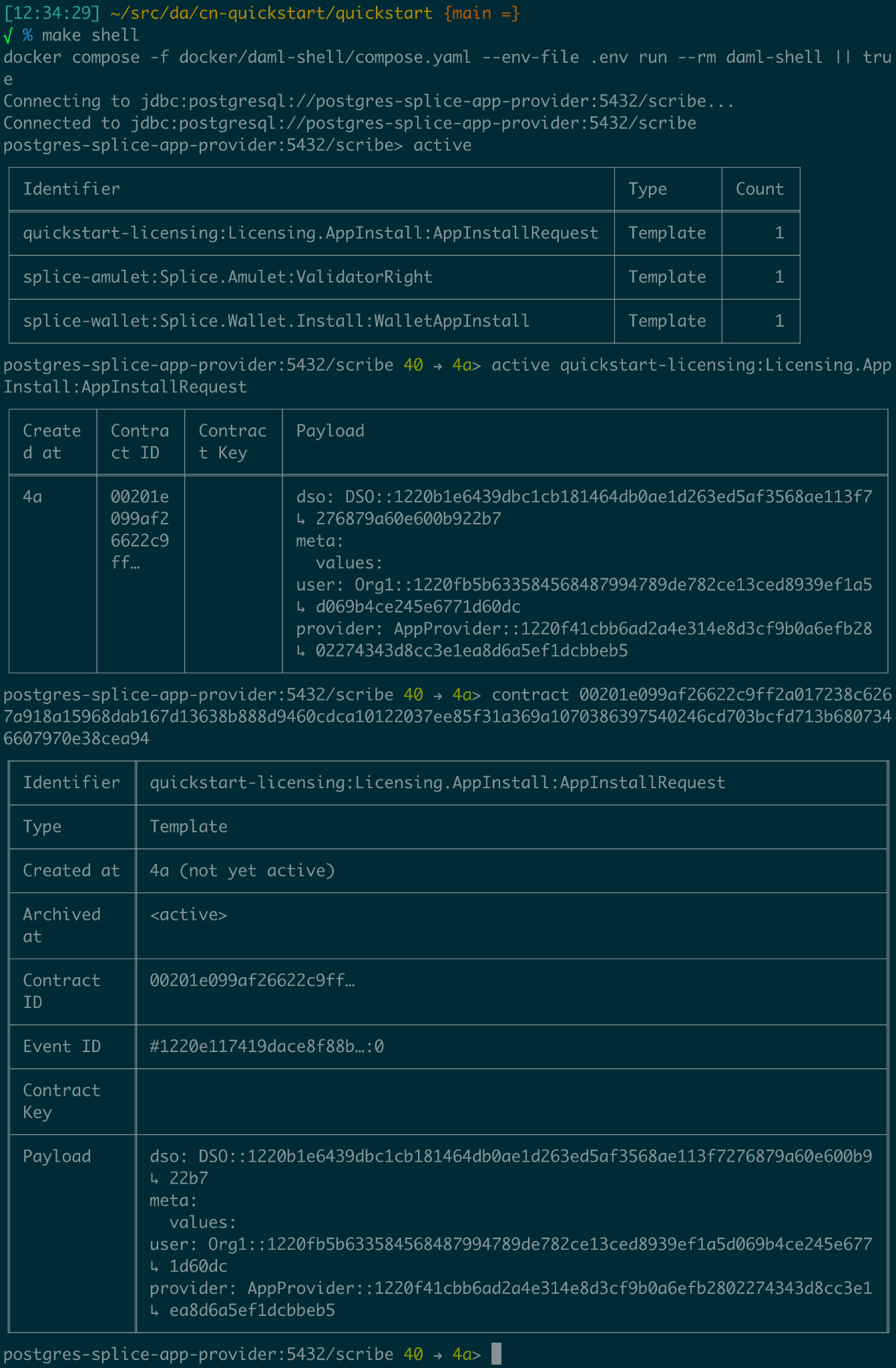
运行 $ make create-app-install-request 向账本提交 create AppInstallRequest1 以启动用户入驻2,然后:
> active 查看已创建合约摘要;
> active quickstart-licensing:Licensing.AppInstall:AppInstallRequest 查看合约详情;
> contract [合约 ID]3 查看 AppInstallRequest 完整详情。
> help [command] 提供命令帮助4。
Grafana
Grafana Web UI 映射到 http://localhost:3030/,可用 make open-observe 打开。
调试应优先用 Grafana 追踪/日志与 Daml Shell 账本检查;开发期日志/追踪充足则生产排障更可靠。
Quickstart 在 LocalNet 上配置了额外调试访问;开发与生产应使用相同诊断工具;保留 trace/debug 日志有助于运维就绪。
直接访问 Postgres
示例应用持久状态存于 Postgres;可用 .env 配置直连。
$ docker exec -it <postgres container> psql -v --username <.env username> --dbname <.env dbname> --password
例如连接 postgres-splice-app-provider(默认用户 cnadmin、库 scribe、密码 supersafe)可用 SQL 检查应用提供方 participant 本地账本。
交互式调试器
查看 compose.yaml 中 backend-service 配置可见:
   backend-service:
     environment:
       ...
       JAVA_TOOL_OPTIONS: "-javaagent:/otel-agent.jar
       -agentlib:jdwp=transport=dt_socket,server=y,suspend=n,address=*:5005"

    ports:

      - "${BACKEND_PORT}:8080"
      - "5055:5005"
这可远程调试 Java 后端;必要时 IDE 附加调试。仍建议优先 Grafana 与 lnav,以保持生产可调试性。
可观测性与追踪
分布式系统故障难诊断;Quickstart 从项目伊始即提供通常到后期才完善的可观测性与诊断能力。
概览中的链接为各工具官方文档;下文 Quickstart 能力导览可作为实验起点。
关联标识符
检查 Canton 从关联标识符开始;Canton 可接受/生成多种 ID,用于跨时间、节点与账本状态关联。
关键标识符包括:
| 标识符 | 指定方 | 范围 | |
| ------------------ | ----------------------------- | ------------------------------------------------------------------------------------------------------------------------------------------------------------------------------------------------------------------------------------------------------------ |
| ApplicationId | Ledger 客户端 | 命令提交与处理时标识客户端 | |
| WorkflowId | Ledger 客户端 | 标识业务流程,持久化到账本 | |
| CommandId | Ledger 客户端 | 标识业务“动作”,仅提交方可见,重试共用 | |
| SubmissionId | Ledger 客户端 | 标识单次提交 | |
| TransactionId | Daml 账本 | 已提交交易的全局 ID5 | |
| LedgerEventId | Daml 账本 | 账本事件在交易树中的全局 ID | |
| Trace/SpanId6 | 客户端或上游 | gRPC/HTTP 接口接受并在全网传递6 | |
| LedgerOffset | Participant | 本地账本线性化中的高度7 | |
| ContractId | Daml 账本 | 曾成功创建的合约全局 ID | |
| TemplateId | Daml 应用 | 与 PackageId 组合为全局模板 ID | |
| PartyId | Participant | Canton 账本上的 Party 标识8 | |
常用关联标识符
可观测性配置旨在便于在系统中导航任意状态/事件的来源;这些 ID 可关联日志、指标与状态;application-id、workflow-id、command-id 宜映射业务域标识。
导航依赖各组件结构化日志9;建议自定义组件亦输出结构化日志供 OpenTelemetry 消费。
用关联 ID 直接检查账本
从 $ make stop clean-all && make build start 开始,发起 app-user 入驻示例:
$ make create-app-install-request | cat -n
   docker compose -f docker/app-user-shell/compose.yaml --env-file .env run --rm create-app-install-request || true
   get_token ledger-api-user AppProvider
   get_user_party AppProvider participant-app-provider
   http://participant-app-provider:7575/v2/users/AppProvider
   get_token ledger-api-user Org1
   get_user_party Org1 participant-app-user
   http://participant-app-user:7575/v2/users/Org1
   get_token administrator Org1
   http://validator-app-user:5003/api/validator/v0/scan-proxy/dso-party-id
   http://participant-app-user:7575/v2/commands/submit-and-wait
   --data-raw {
     "commands" : [
        {
           "CreateCommand" : {
             "template_id":
             "#quickstart-licensing:Licensing.AppInstall:AppInstallRequest",
             "create_arguments": {
                "dso":
                "DSO::1220015e721c8ec5c1a5868b418442f064530e367c2587a9b43bd66f58c7bfddfec4",
                "provider":
                "AppProvider::12202fe7b2bf950dca3858b880d9ee0dd58249af8821ff2330ea1b80420852e816ff",
                "user":
                "Org1::122072b20a515d939910f9412f915cff8c1a7a427ddde76c6d0b7646d0022d4d4551",
                "meta": {"values": []}
             }
           }
        }
     ],
     "workflow_id" : "create-app-install-request",
     "application_id": "ledger-api-user",
     "command_id": "create-app-install-request",
     "deduplication_period": { "Empty": {} },
     "act_as":
     ["Org1::122072b20a515d939910f9412f915cff8c1a7a427ddde76c6d0b7646d0022d4d4551"],
     "read_as":
     ["Org1::122072b20a515d939910f9412f915cff8c1a7a427ddde76c6d0b7646d0022d4d4551"],
     "submission_id": "create-app-install-request",
     "disclosed_contracts": [],
     "domain_id": "",
     "package_id_selection_preference": []
   }
   {"update_id":
   "1220e48d6d59af99a1b61eca414fe25766c342bb4e7d8d485e049a11a7f2267ed5c0",
    "completion_offset":73}
脚本向 app-user participant 提交 create 命令的输出已含多种关联 ID:
| 14 | TemplateId | #quickstar t-licensing:Licensing.AppInstall:AppInstallRequest |
| 16 -18 | Party Ids | DSO::1220015e721c8ec5c1a5868b…ddfec4 AppProvider::12202fe7b2bf950d…e816ff Org1::122072b20a515d939910f94…4d4551 |
| 25 | Workflow Id | create-app-install-request |
| 26 | Application Id | ledger-api-user |
| 27 | Command Id | create-app-install-request |
| 31 | Submission Id | create-app-install-request |
| 36 | Transaction Id | 1220e48d6d59af99a1b61eca414fe…7ed5c0 |
可立即在 Daml Shell 用 transaction id 查看账本交易:
   $ make shell
    docker compose -f docker/daml-shell/compose.yaml --env-file .env run --rm daml-shell || true
    Connecting to jdbc:postgresql://postgres-splice-app-provider:5432/scribe...
    Connected to jdbc:postgresql://postgres-splice-app-provider:5432/scribe
    postgres-splice-app-provider:5432/scribe> transaction 1220e48d6d59af99a1b61eca414fe25766c342bb4e7d8d485e049a11a7f2267ed5c0
    transactionId: 1220e48d6d59af99a1b61eca414fe25766c342bb4e7d8d485e049a11a7f2267ed5c0, offset: 48, workflowId: create-app-install-request - Feb 17, 2025, 5:26:09 AM
    + #1220e48d6d59af99a1b61eca414fe25766c342bb4e7d8d485e049a11a7f2267ed5c0:0
    quickstart-licensing:Licensing.AppInstall:AppInstallRequest (005c17f89b7fd1d5fde9c548740c32924edeeddacc6320256892636b4e3b7d66aaca1)
    {"dso": "DSO::1220015e721c8ec5c1a5868b418442f064530e367c2587a9b43bd66f58c7bfddfec4", "meta": {"values": []}, "user": "Org1::122072b20a515d939910f9412f915cff8c1a7a427ddde76c6d0b7646d0022d4d4551", "provider": "AppProvider::12202fe7b2bf950dca3858b880d9ee0dd58249af8821ff2330ea1b80420852e816ff"}
    postgres-splice-app-provider:5432/scribe 3f → 48>
由此可获得更多标识符:
| Ledger Offset | 48 |
| Ledger Event Id | #122026e55e3f82e27542…:0 |
| Contract Id | 00cb53139ff0eb7ec57b… |
Workflow Id、Template Id、Party Id 亦可见;Ledger offset 便于查 PQS/Ledger API;Contract Id 可在 Daml Shell 显示合约。
   postgres-splice-app-provider:5432/scribe 3f → 48> contract 005c17f89b7fd1d5fde9c548740c32924edeeddacc6320256892636b4e3b7d66aaca101220777c5420863adb012c4f38847049346014c44eba7cd54bf58950dd6a18679053
   ╓───────────────────────────────────────────────────────────────────────────╖
   | identifier: quickstart-licensing:Licensing.AppInstall:AppInstallRequest   |
   | Type: Template                                                            |
   | Created at: 48 (not yet active)                                           |
   | Archived at: <active>                                                     |
   | Contract ID: 005c17f89b7fd1d5fde9c548740c32924edeeddacc6320256892636b...  |
   | Event ID: #1220e48d6d59af99a1b61eca414fe25766c342bb4e7d8d485e049a11a7...  |
   | Contract Key:                                                             |
   | Payload: dso:1220015e721c8ec5c1a5868b418442f064530e367c2587a9b43bd66f5... |
   | meta:                                                                     |
   |    values: []                                                             |
   | user: Org1:122072b20a515d939910f9412f915cff8c1a7a427ddde76c6d0b7646d00... |
   | provider: AppProvider:12202fe7b2bf950dca3858b880d9ee0dd58249af8821ff23... |
   ╙───────────────────────────────────────────────────────────────────────────╜
   postgres-splice-app-provider:5432/scribe 3f → 48>
智能合约缺陷可在 Daml Shell/IDE 中重放交易定位;多数问题根因在链下,故将这些 ID 与 OpenTelemetry 合并日志关联很有价值。
用关联 ID 关联日志与追踪
继续示例:以 AppProvider 登录并接受 AppInstallRequest:

浏览器开发者工具可提取关联 ID:
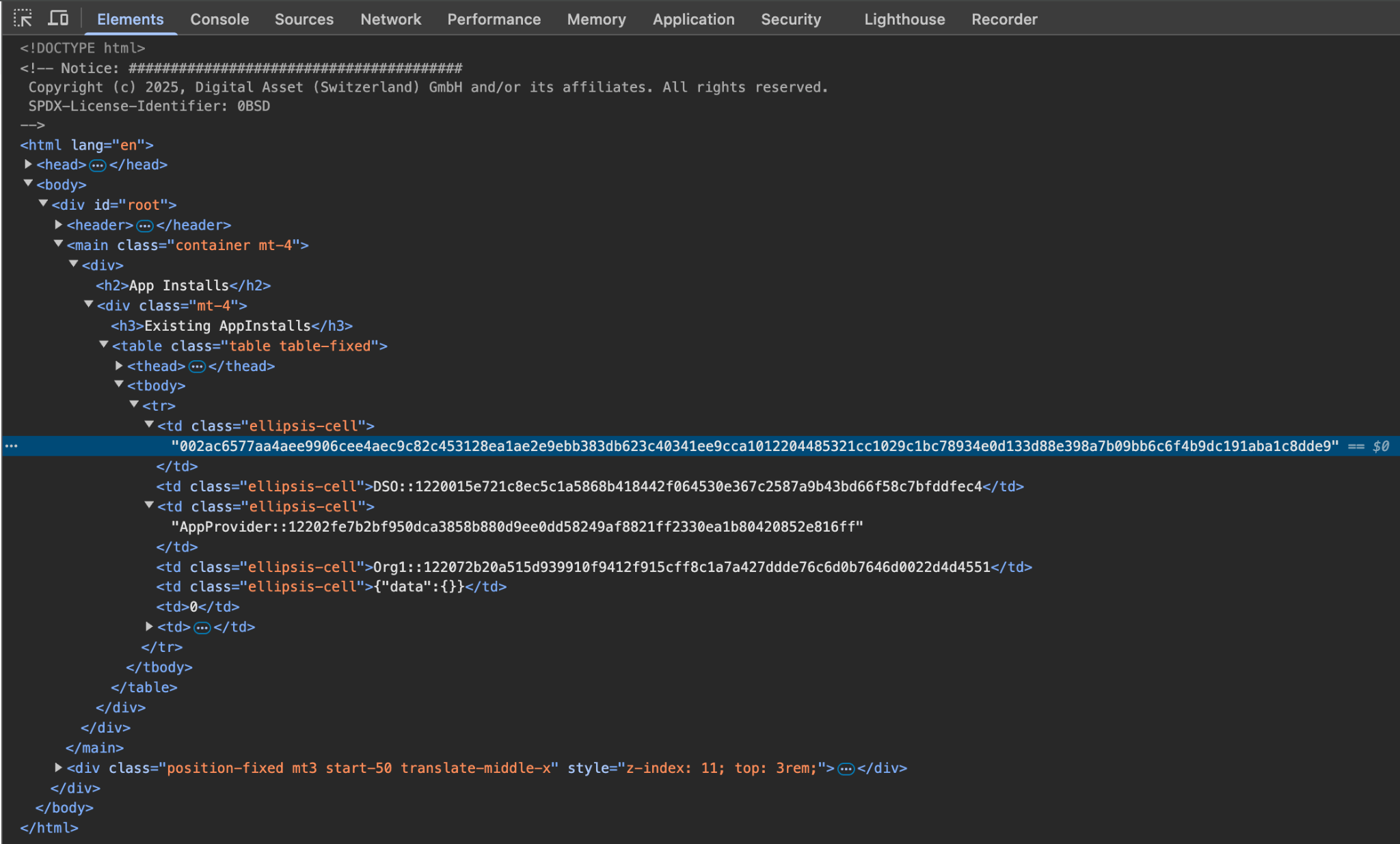
签发新许可时可见对 Backend-Service 的 HTTP 调用,响应亦含更多 ID。
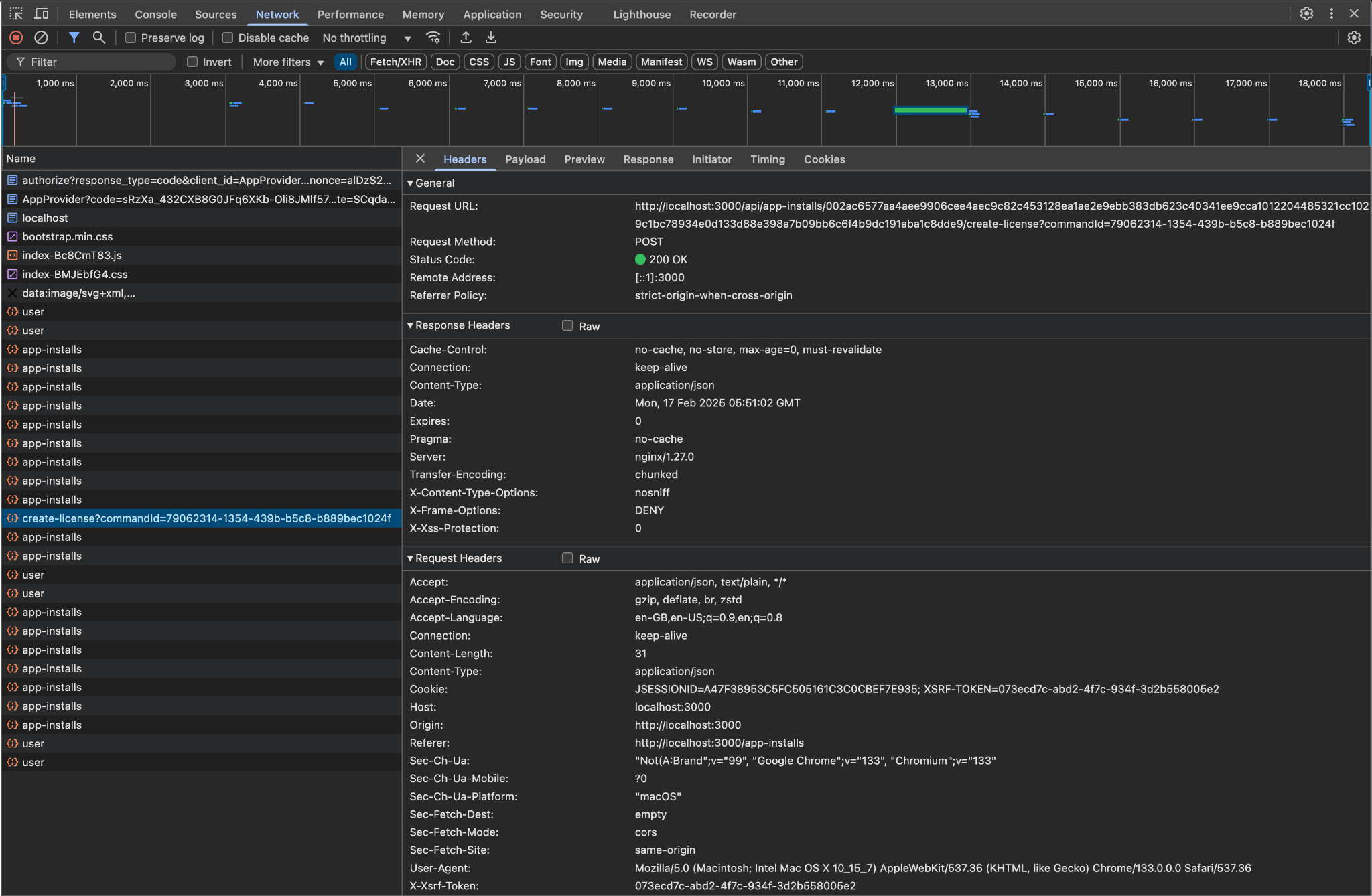


Id Type | Description | ID |
|---|---|---|
Command Id | 79062314-1354-439b-b5c8-b889bec1024f | |
Contract Id | AppInstall | 002ac6577aa4aee9906cee4aec9c82c45312... |
Contract Id | License | 79062314-1354-439b-b5c8-b889bec1024f |
合约 ID 可在 Daml Shell 检查;Backend OpenAPI 将 Command Id 作为 POST 查询参数,可用于 Grafana 查询合并日志:
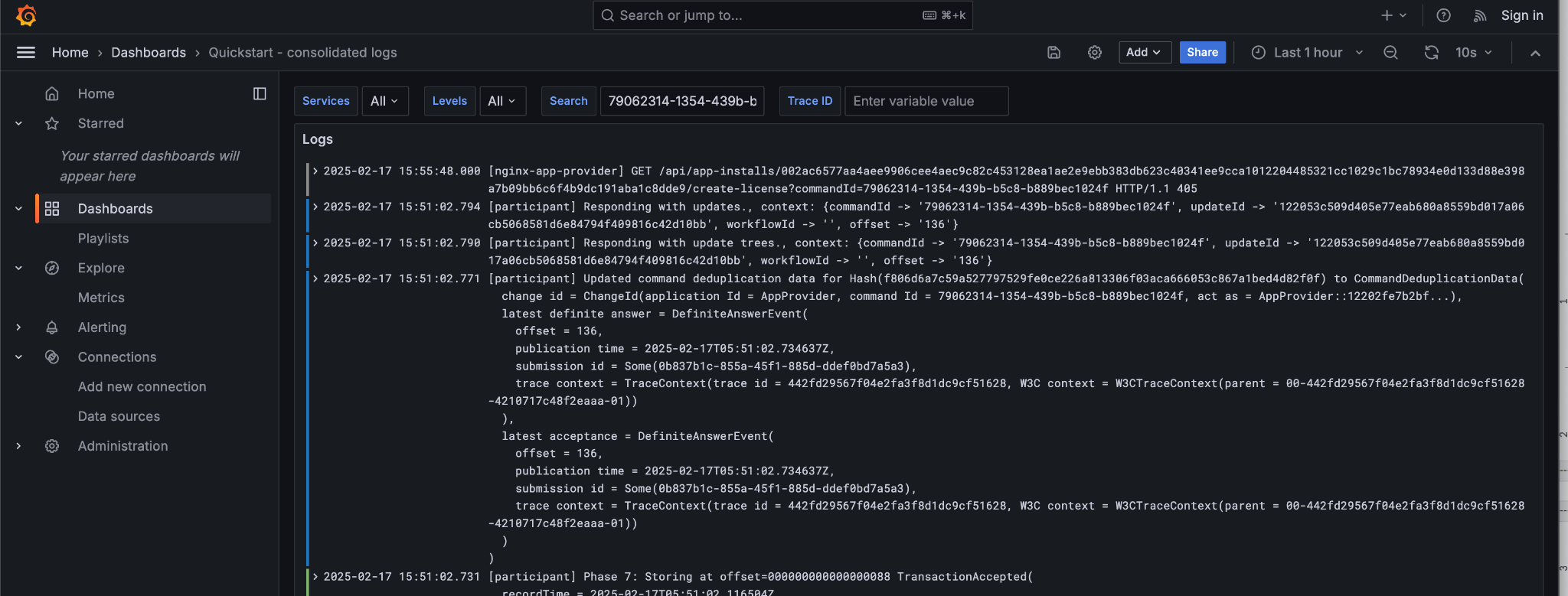
command-id 关联到应用提供方 Nginx 与 Participant 日志;可核对 Nginx 与浏览器请求一致。
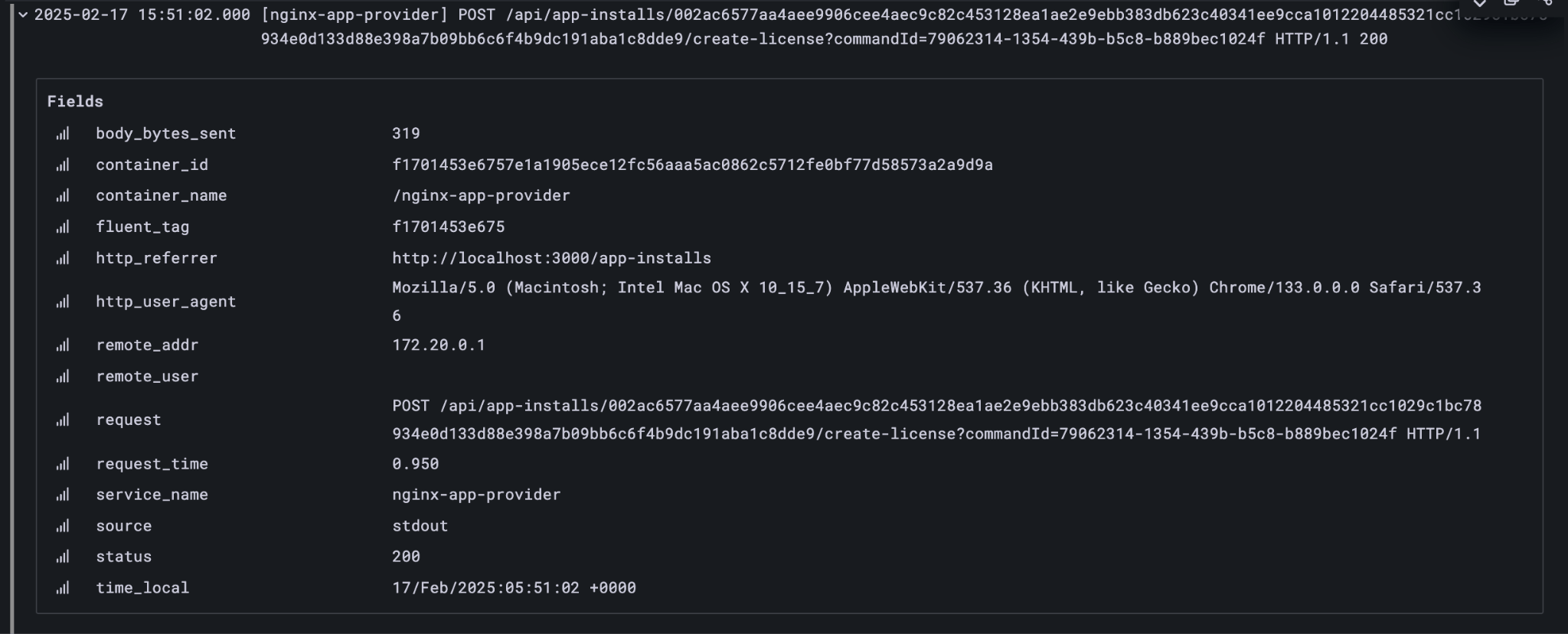
同一聚合日志中可见 Participant 向 Canton 同步域提交交易。
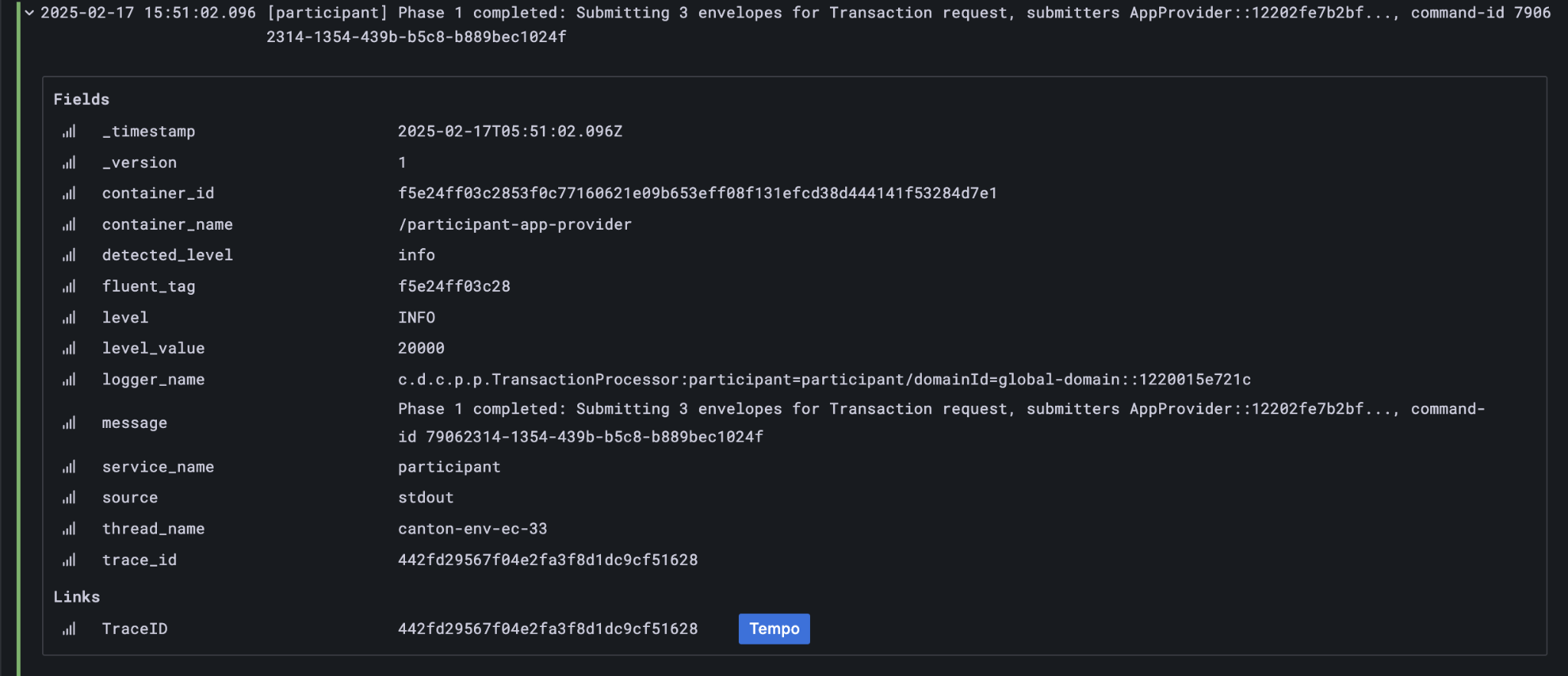
并通知交易已成功提交到 Canton 账本:
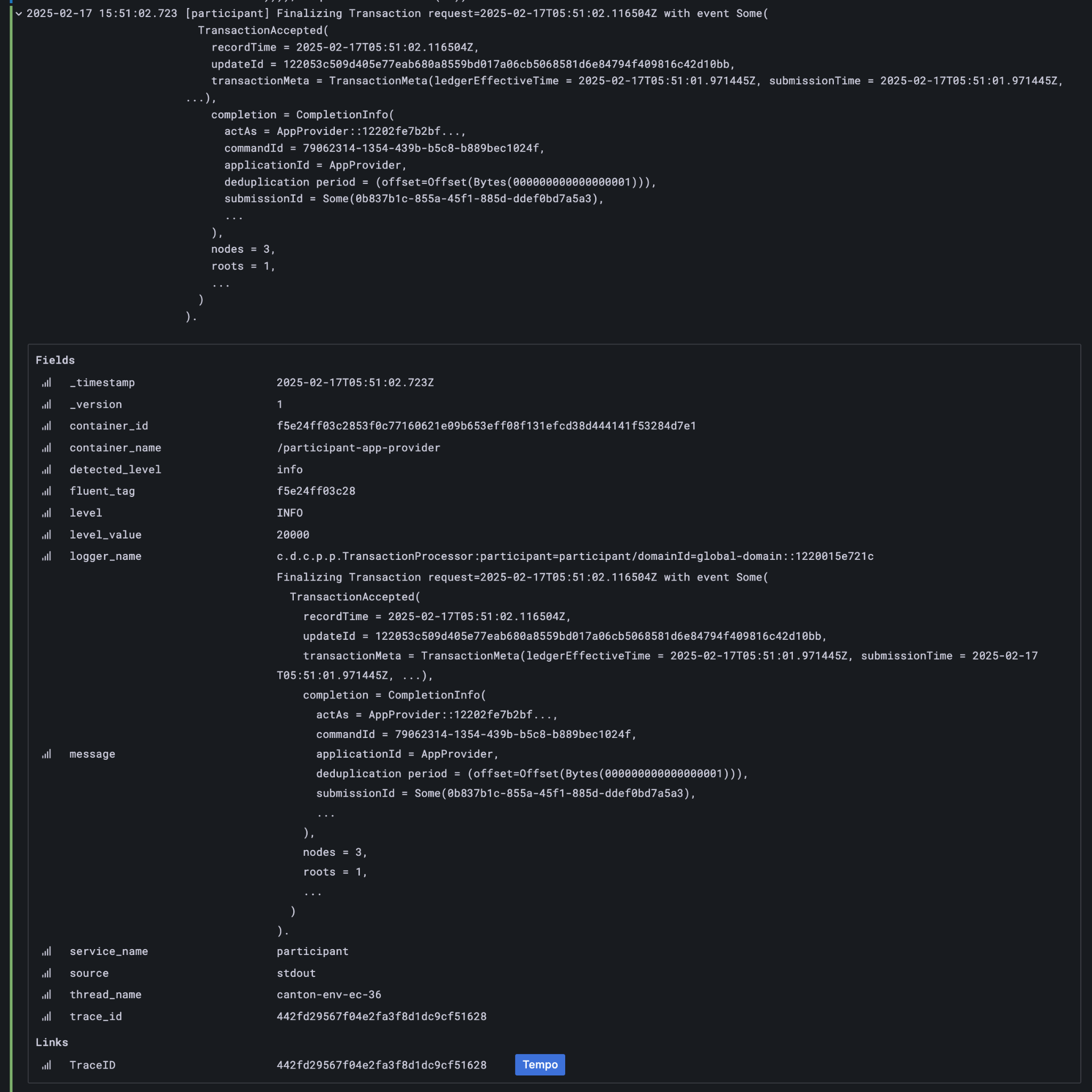
最终写入应用提供方本地账本10:
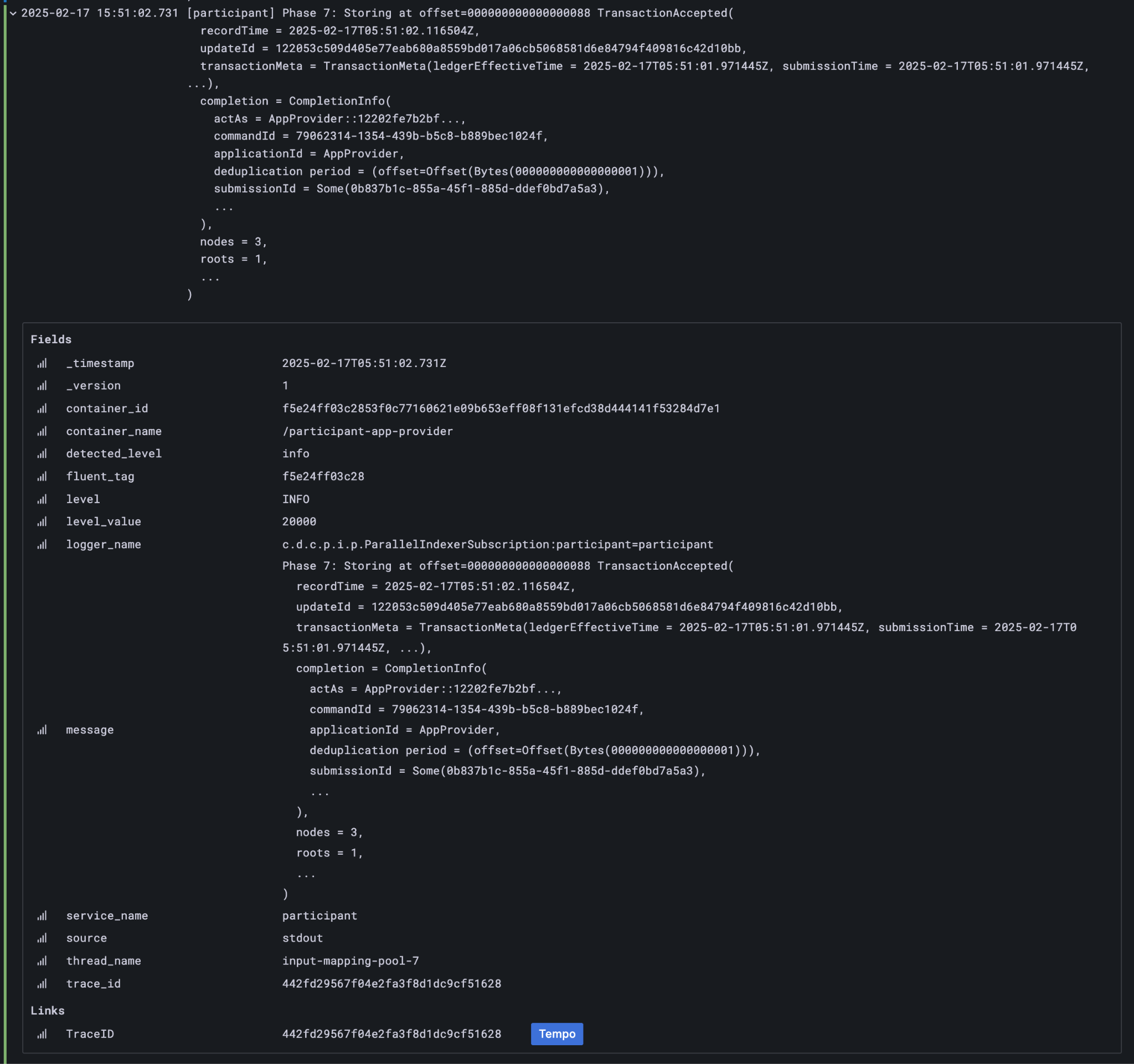
由此还可获得其他关联 ID,任一条均可定位这些日志:
| Ledger Offset | | 000000000000000088 | | | --------------- | - | ------------------------------------ | | Transaction Id | | … | | | Submission Id | | 0b837b1c-855a-45f1-885d-ddef0bd7a5a3 | | Trace Id | | 442fd29567f04e2fa3f8d1dc9cf51628 |
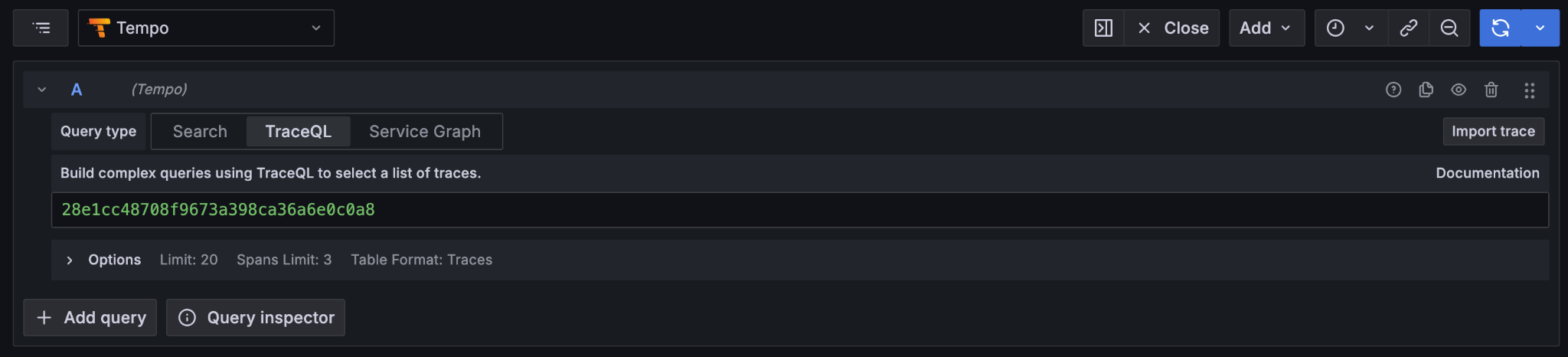
Trace Id 尤其重要,可直达 Tempo 查看分布式 span:
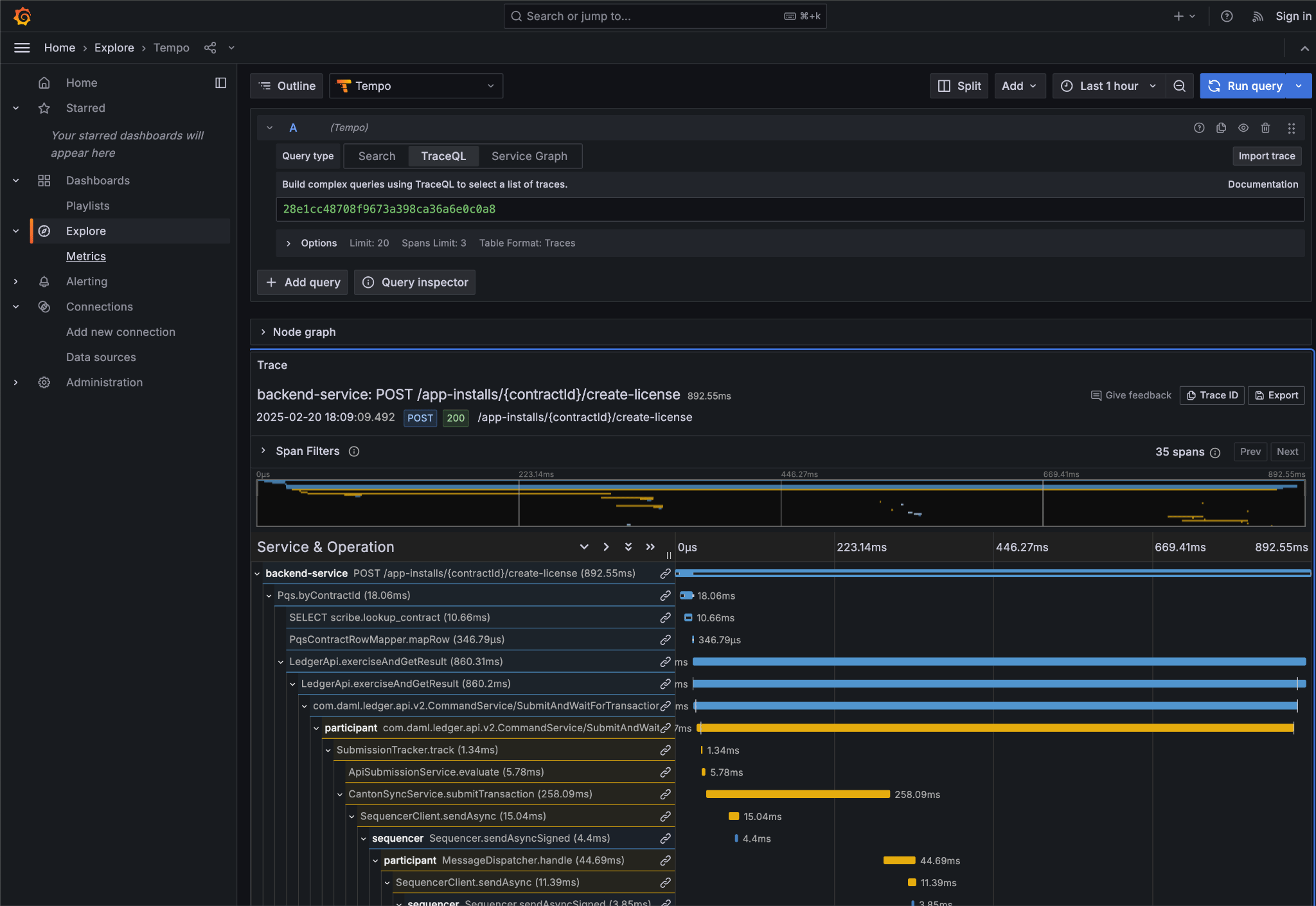
可见后端反向代理后 create license 操作流:
- Backend Service 初始 POST 处理
- 后端查询 PQS 获取 AppInstall
- 后端调用应用提供方 Ledger API
- Participant 准备交易并提交 Canton Network
Grafana 套件强大之处在于整合日志、追踪:合并日志可链到 Tempo,展开 span 可查看「Logs for this span」。
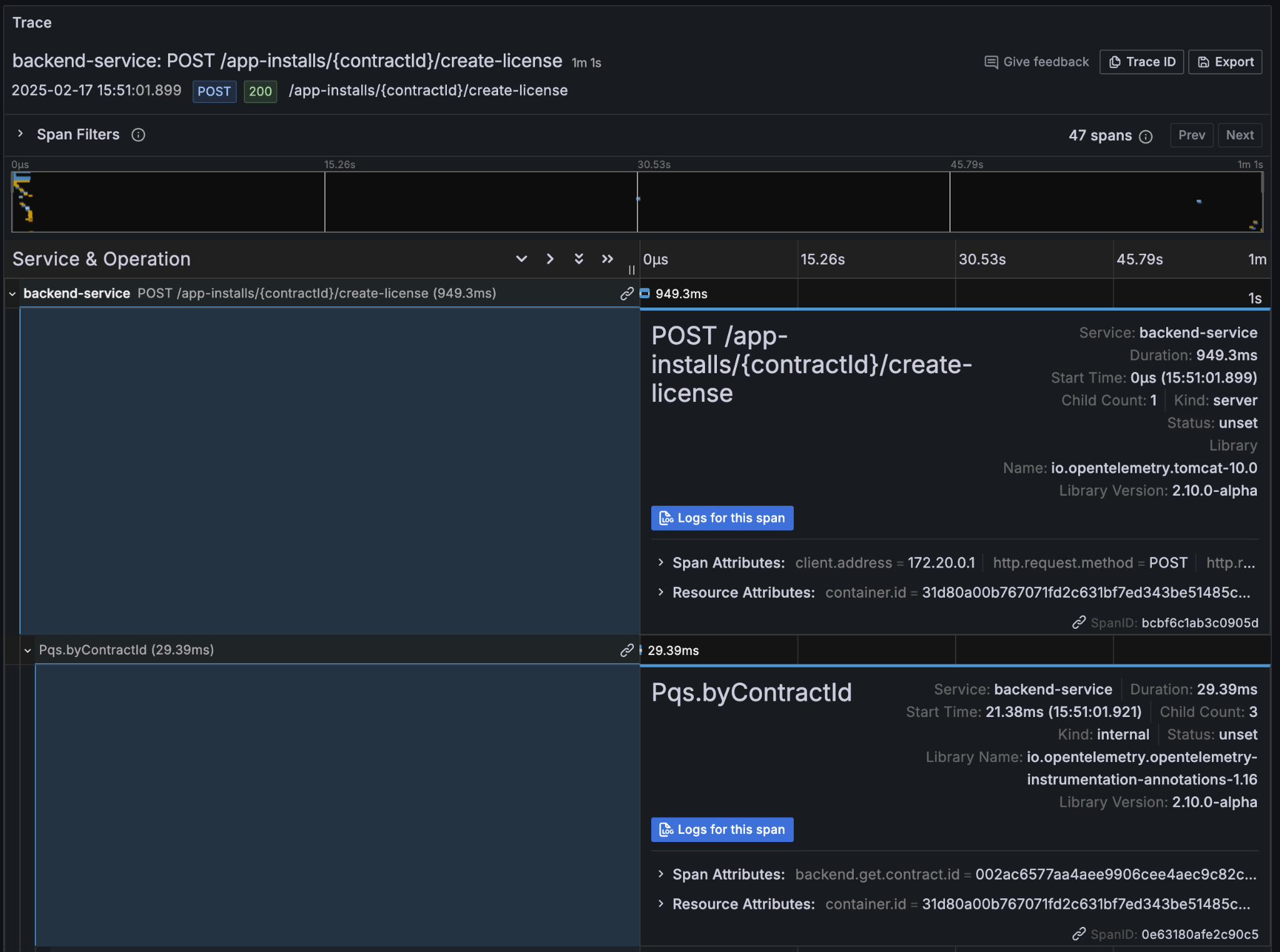
链接到与该 span 关联的各组件日志。
不同关联 ID 可导航分布式应用历史;PQS 索引交易时亦记录相关 ID。
transactionId 与 traceId 可扩展对 create-license 及后续操作的理解。
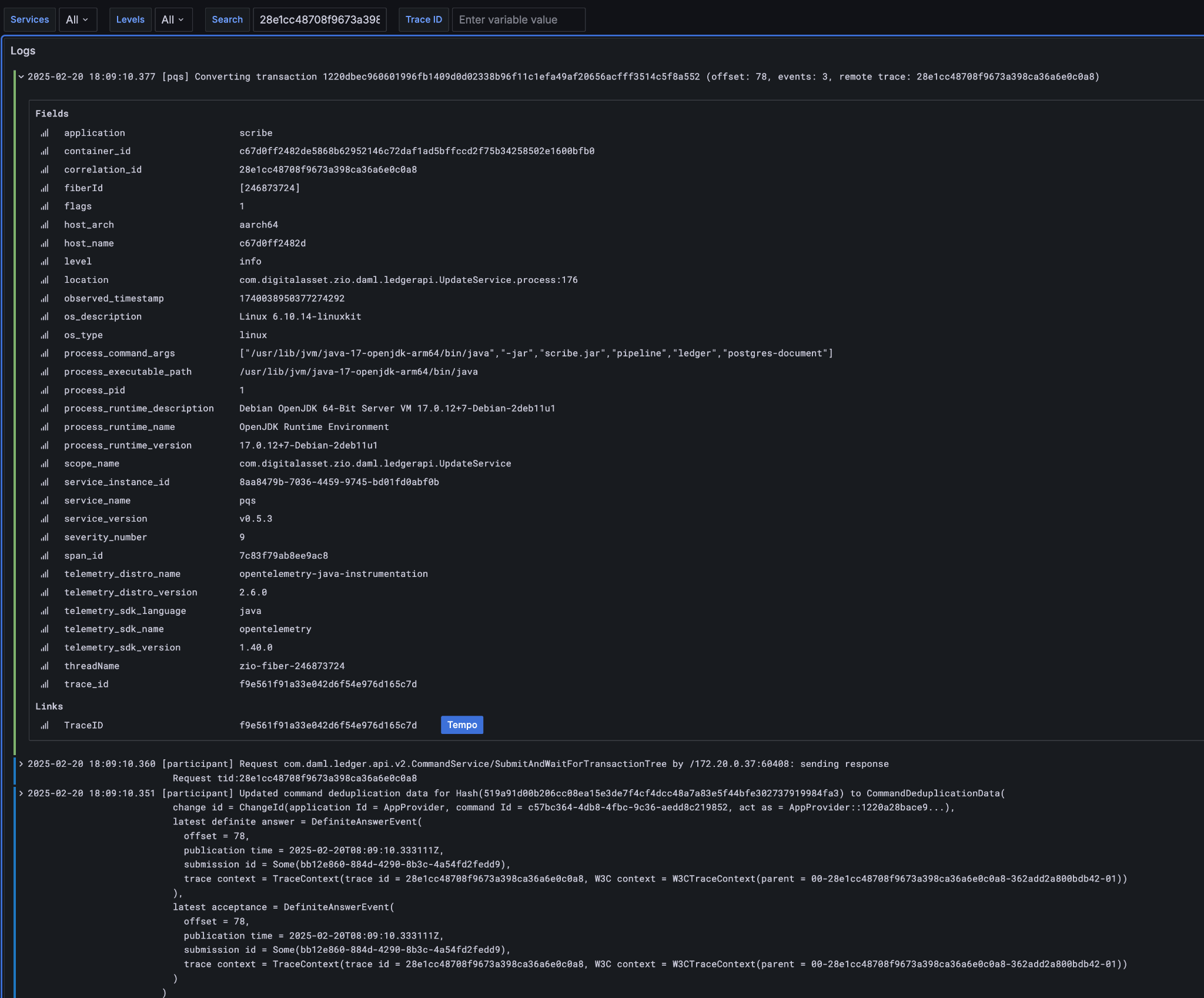
PQS 摄取为后台独立操作,traceId 不同但仍链回账本数据的 trace/transaction。
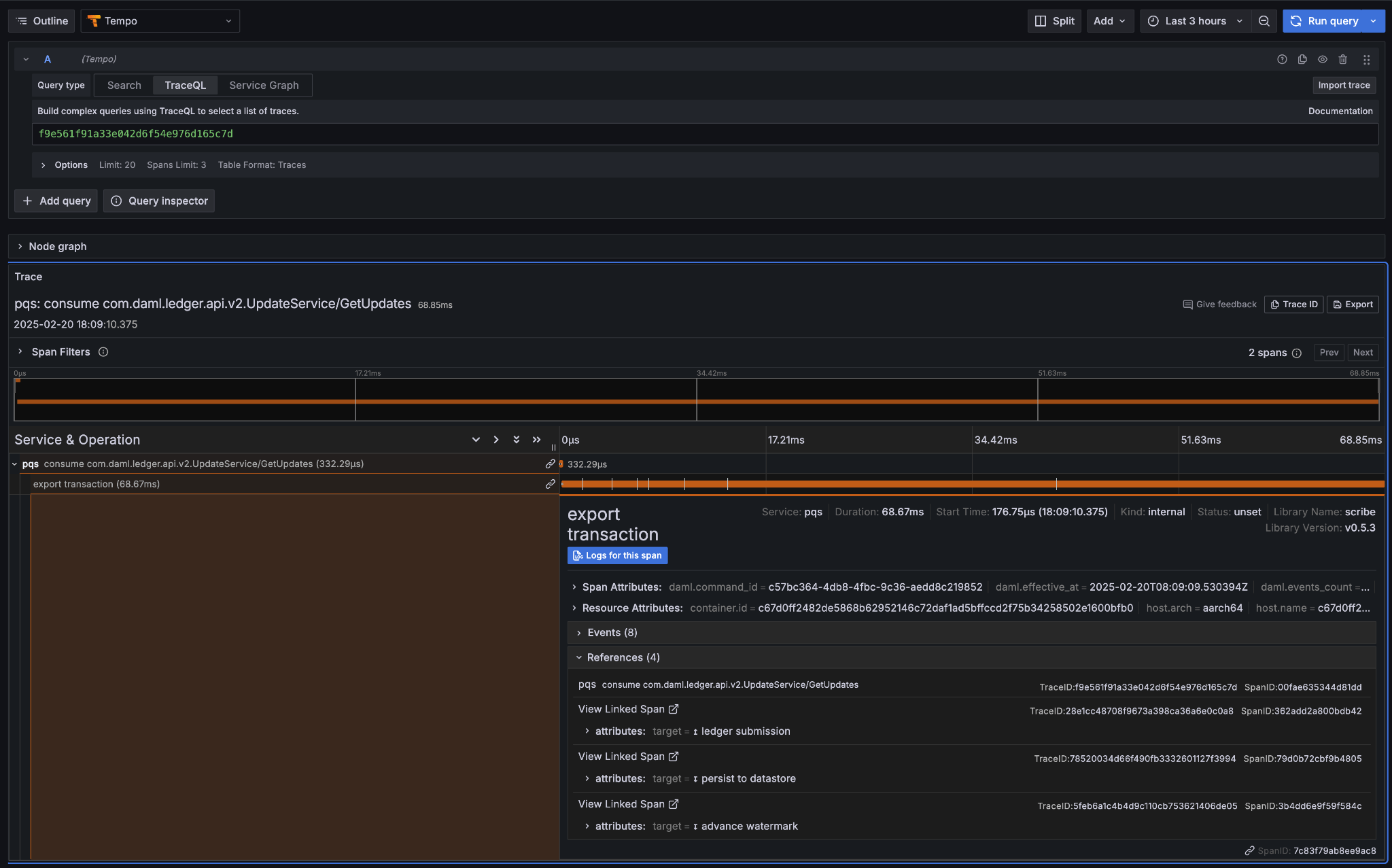
export transaction span 的 references 含相关 PQS 追踪及导致该交易的命令提交追踪。
关联查询日志/追踪/span 更易理解 CN 应用多组件;仅能导航已发出且附带 ID 的观测,建议持续丰富应用日志。
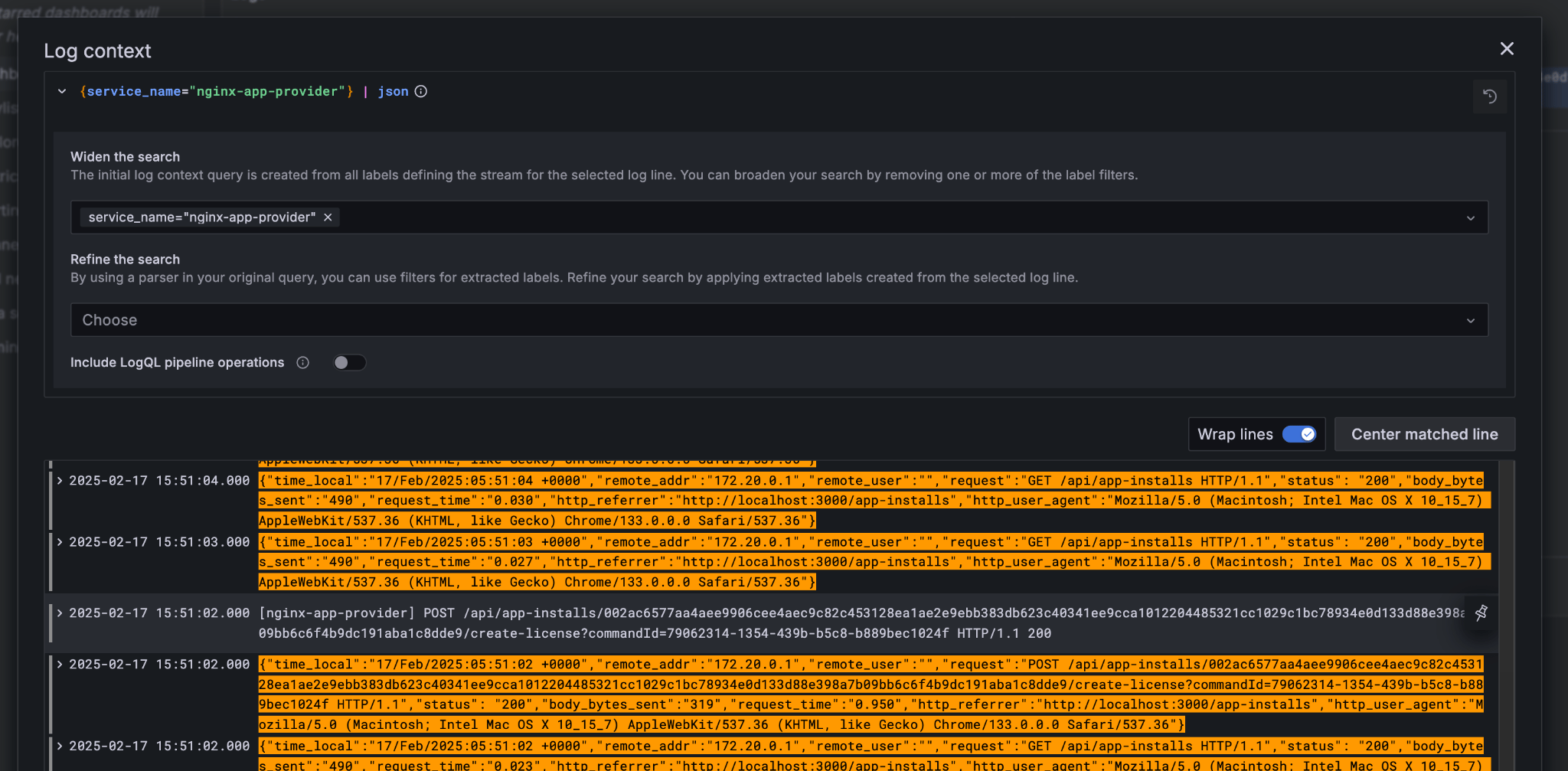
悬停日志行可查看该行上下文:
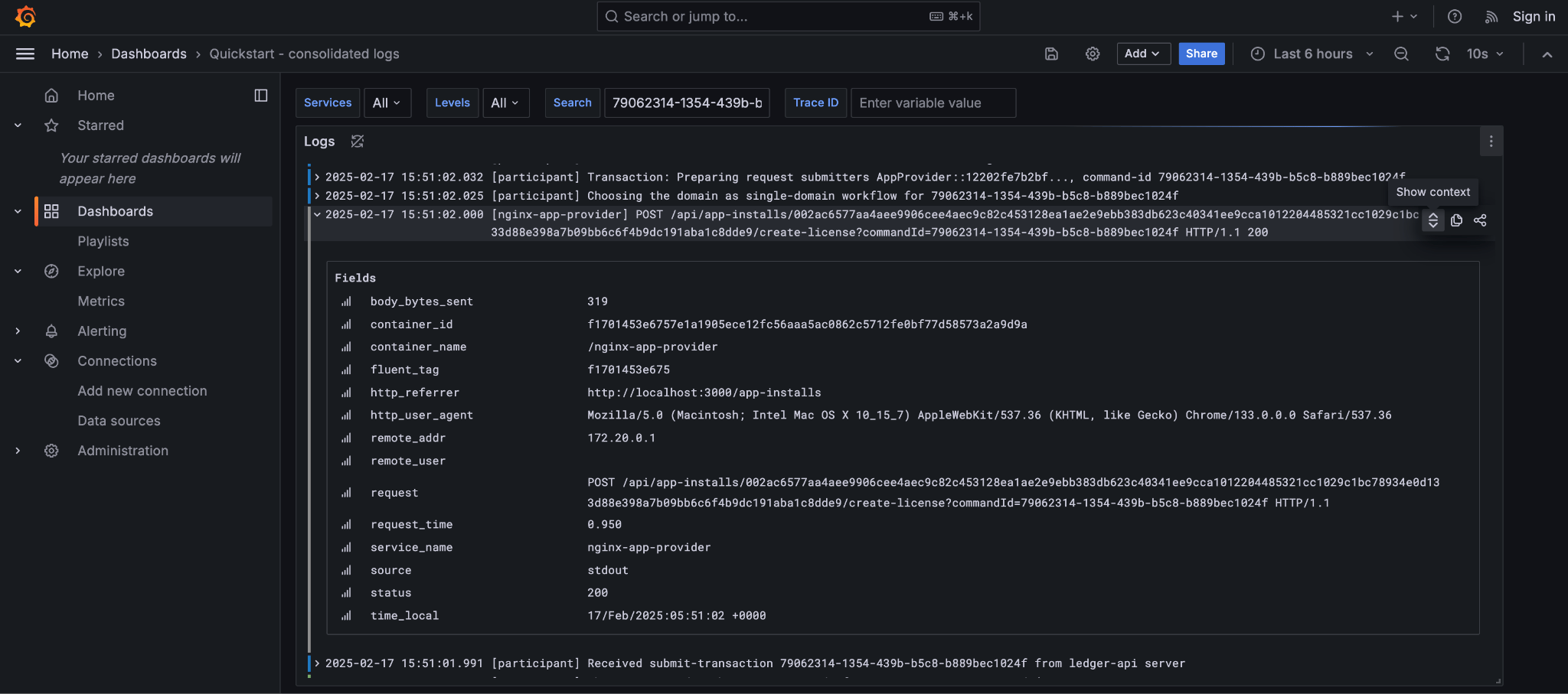
弹出该时刻组件未过滤日志并高亮相关行;例如可一次查看 Nginx 同时段其他流量。
Grafana 亦暴露 Tempo/Prometheus 原始查询,值得实验;日志检查用 lnav:
相关文档起点:
本文由 CC Privacy Club 根据 Canton Network 官方文档(CC-BY-4.0)整理翻译,仅供学习;实现细节以官方最新版本为准。
Footnotes
-
Specifically this sends a
CreateCommandto thesubmit-and-waitservice on the Application User’s participant node. ↩ -
See the Canton Network Quickstart Guide “Project Structure” for more details on this ↩
-
Daml shell has tab completion on most command arguments, including the Template Id argument to
activeand the Contract Id argument to contract. ↩ -
Further documentation is available in the Daml Shell reference.
 ↩
↩
-
A key differentiator of Canton from all other level one blockchains is that it offers privacy. It does this by enforcing right-to-know. rather than via secrecy-via-obscurity and/or via pseudo-anonymity. Canton provides two privacy guarantees: Even in encrypted form (sub-)transactions are only transmitted to participant nodes with a right to be informed of them; and, participant nodes will be informed of every (sub-)transaction they have a right to be informed of. For details on how Canton defines “right” and other aspects of this see the Daml ledger privacy model. ↩
-
Distributed tracing is essential to efficient debugging and diagnosis of any distributed application. While technically distinct identifiers Trace and Span Ids are closely linked. If unfamiliar with their use OpenTelemetry has a good primer (https://opentelemetry.io/docs/concepts/signals/traces/), Grafana has a reasonable demo (https://grafana.com/docs/tempo/latest/introduction/), and we demonstrate their use later in this guide. ↩ ↩2
-
Equivalent to “blockheight” in other public blockchains that do not support privacy. As privacy dictates that each participant node sees a different projection of the global blockchain, the offset is not comparable across different Participant Nodes. It is commonly the preferred id when dealing with a single participant node due to being a simple, monotonic, total-order on ledger events witnessed by a Participant Node. ↩
-
By virtue of their role in the ledger model, all parties are (and the associated entity must be) capable of authorizing a (sub-)transaction or ledger event. See the Daml ledger authorization model for details. ↩
-
Where loggers cannot be configured to emit structured logs directly, log parsers are used to convert raw log files in the usual manner. This is primarily done in the OTEL Collector configuration. ↩
-
This is an example of an important feature of the Canton Network. The participant node is only aware of the existence of this transaction because it is authorized to be informed of the transaction by the relevant Daml Smart Contracts and the privacy semantics of the Daml Ledger Model. Privacy is guaranteed, not because the contract data is obscured as cyphertext; but, because the ledger model ensures participants without a verified right to know do not receive the transaction in any form. ↩