
交易所集成指南
将交易所接入 Canton Network:架构、工作流、交易摄取、容错、节点运维、备份、测试与扩展。
交易所集成指南
以下页面说明如何将交易所接入 Canton,以交易符合 Canton Network Token Standard(如 Canton Coin)的代币。
此类集成的核心是自动化代币的充值与提现。本指南也可供除交易所外、希望支持 Canton Network 代币充提的服务参考。
{/* COPIED_START source=“splice-wallet-kernel:docs/wallet-integration-guide/src/exchange-integration/overview.rst” hash=“d02c931e” */}
概览
本指南帮助你将交易所接入 Canton,以交易 Canton Coin(CC)及 Canton Network(CN)代币。
应按什么顺序开发?
This material is comprehensive guidance for integrating with the Canton Network. You may need to review it several times to become familiar with Canton’s UTXO-based chain, smart 合约 language, and its privacy model.
The guide is intentionally structured such that you can use a learning-by-doing approach that delivers your 集成 in a series of incremental milestones:
- Canton Coin(CC) (CC) with 1-step withdrawal only.
- Support for all CN Tokens, not just CC.
- Earning additional 应用 奖励 for all CN tokens.
以下 dependency diagrams 展示 the work items for each milestone.
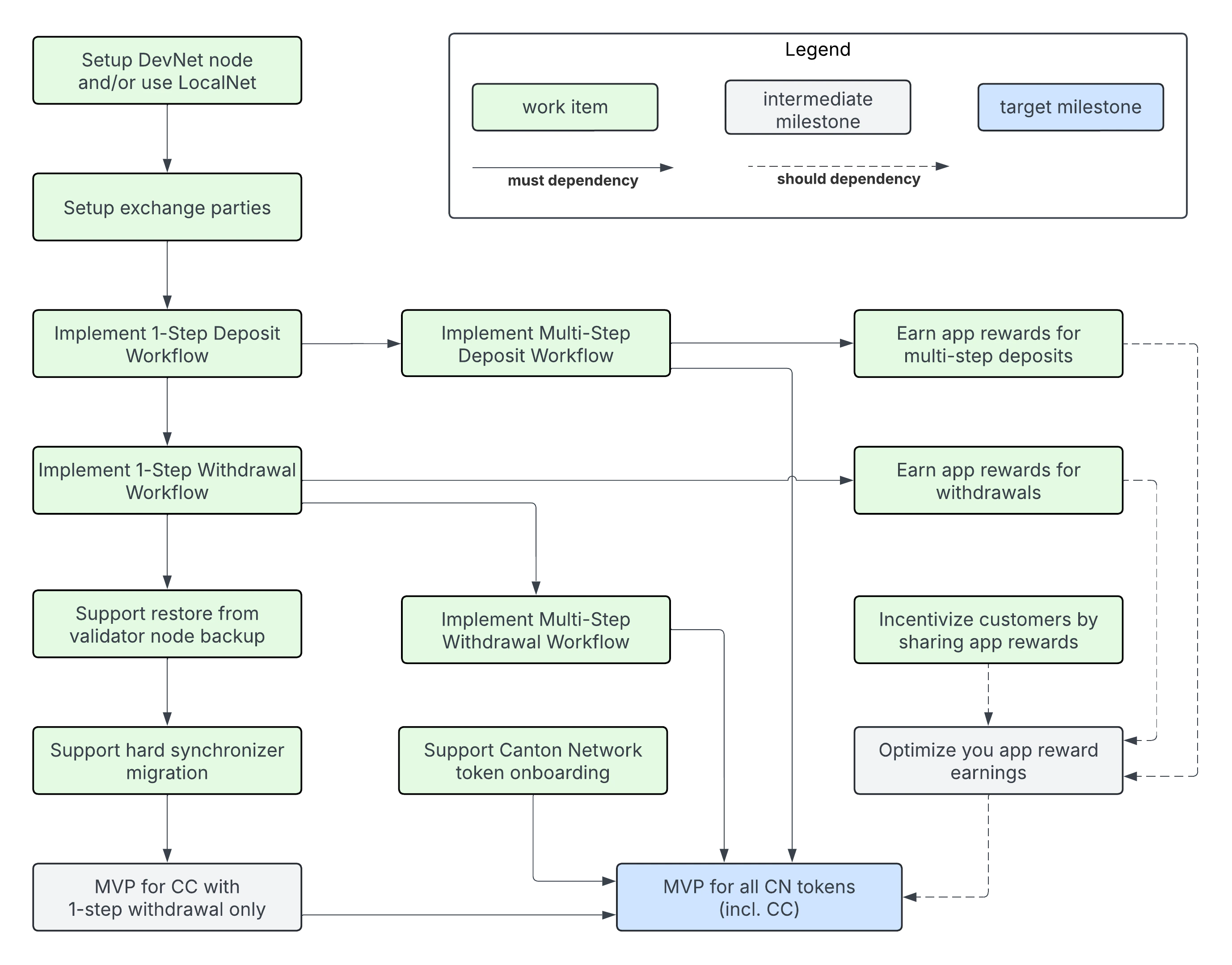
CC with 1-step withdrawal only: this milestone allows you to support deposits and withdrawals of CC. It includes earning app 奖励 for all CC deposits. The 工作流 基于 the Canton Network Token Standard which is the foundation for supporting all CN tokens in the next milestone. We consider it an intermediate milestone, as it does not support:
- all CN tokens
- CC 用户 that prefer to control the receipt of transfers, and 因此 do not want to setup preapprovals
- earning app 奖励 for all deposits and withdrawals
参见 following sections for details on the work items it depends on.
- Setup DevNet node and/or use LocalNet
exchange-Party-setupone-step-deposit-工作流one-step-withdrawal-工作流- Support 恢复 from 验证者节点 备份
- Support hard 同步器 migration
MVP for all CN Tokens: this milestone allows you to support deposits and withdrawals of all CN tokens. It comes with the limitation that 应用 奖励 are only earned on deposits of CC, but not on deposits of other CN tokens. It depends on the MVP for CC and the following additional work items:
multi-step-deposit-工作流multi-step-withdrawal-工作流, which resolves the limitation that 用户 must setup a CC 转账预批准(TransferPreapproval) to receive withdrawals.token-onboarding
Earn app 奖励 for all CN tokens: is a milestone that improves the profitability of the 集成 by implementing changes so the exchange earns 应用 奖励 on both withdrawals and deposits of all CN tokens. Sharing 应用 奖励 is an optional steps.
withdrawal-app-奖励deposit-app-奖励share-奖励-with-customers
集成支持代码
Use the following support code to simplify your 集成 开发 for:
- JavaScript/TypeScript: use the functions from the 钱包 SDK to simplify building your 集成.
- Java/JVM: use the sample code from the https://github.com/digital-asset/ex-java-json-api-bindings repository as a starting point.
- Other languages: use the code from the 钱包 SDK or the Java sample code as a blueprint.
{/* COPIED_START source=“splice-wallet-kernel:docs/wallet-integration-guide/src/exchange-integration/architecture.rst” hash=“56b6899e” */}
集成架构
高层概览
若你 have integrated your exchange with other BTC and other UTXO-based chains, the architecture presented here will be familiar and you will be able to reuse existing 组件 and patterns. Before jumping into the discussion, it is important to map your preexisting concepts using the following mapping:
- 交易 are identified in Canton using their globally unique update-id.
- Each 交易 is committed at specific 记录时间 that is assigned by the 同步器 used to commit the 交易.
- Blockheight in BTC can be mapped to the 记录时间 of the 全局同步器 in Canton Network.
- BTC UTXOs map to what are usually called active 合约 in Canton. Every Canton 合约 carries data of a specific Daml template type. For ease of understanding, we often refer to active 合约 as “UTXOs” in this guide.
- BTC addresses map to Party in Canton.
- 验证者 nodes host Party and store their private data. 验证者 nodes also expose the Ledger API (LAPI), which can be used by an owner of a party to read their party’s state and 交易.
- Canton is designed as a 网络-of-networks where each 网络 is a separate 同步器 that is distinct and separate from other synchronizers. 例如, the 全局同步器 is a 同步器 that connects validators in its 网络.
- 验证者 nodes can be connected to multiple synchronizers. 验证者 nodes merge the data streams from all connected synchronizers into a single logical stream, which is why they assign a local Ledger API 偏移 to every 交易. These 偏移 are not comparable across 验证者节点, but update-ids and record times are.
- 交易 in Canton have a hierarchical structure that reflects the nested execution and visibility of Daml choices. This hierarchical structure guarantees privacy between Party in the same 交易. Different 验证者节点 may see different sub-trees of the same 交易 depending on which Party they host.
- Memos are stored in the transfer metadata using the
splice.lfdecentralizedtrust.org/reasonkey. The Canton Network Token Standard defines this key and a way to parse these memo tags and other transfer information from 交易.
本指南 provides a sample architecture and 工作流 for integrating an exchange with Canton. The expectation is that the 集成 组件 are reasonably thin wrappers over the functionality provided by the 钱包 SDK. The guide expects you to provide these 组件 since they are mostly concerned integrating with your exchange’s internal systems and its requirements.
组件概览
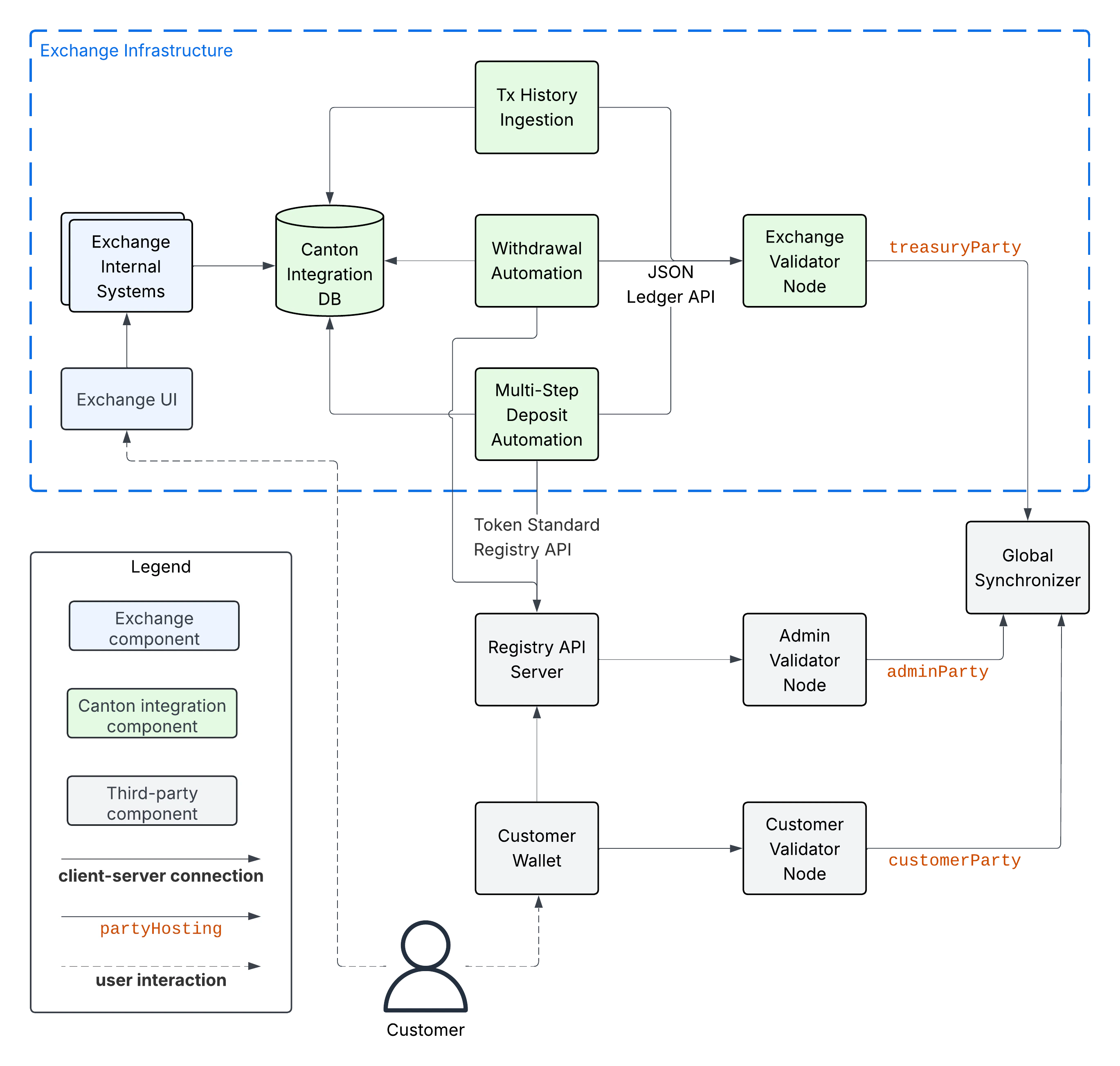
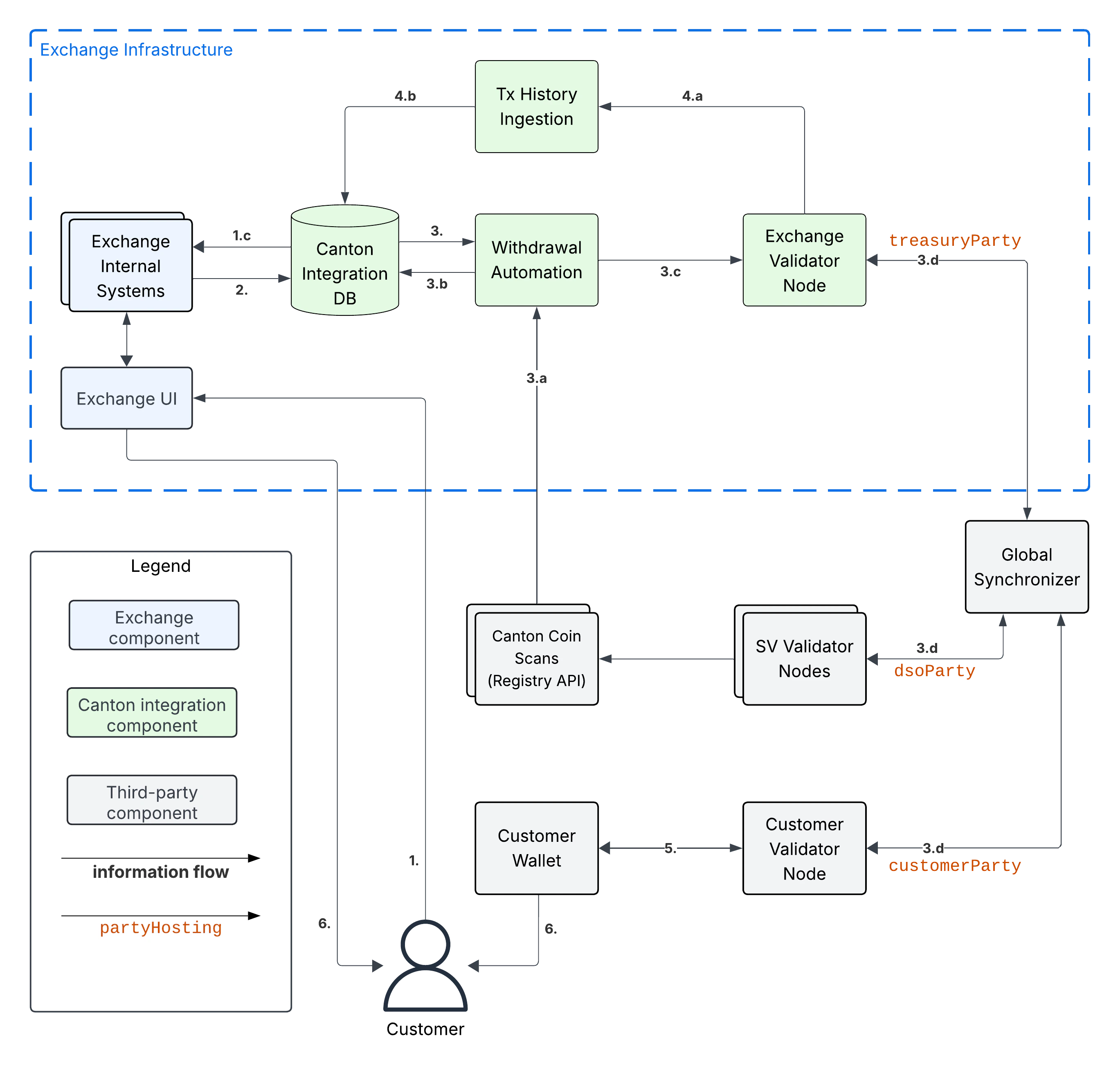
以下 diagram 展示 the 组件 to integrate an exchange’s internal systems with Canton Network. We explain the 组件 in the subsections below.
交易所组件
本指南 assumes that there are Exchange Internal Systems that manage, among other things, the exchange’s internal ledger of Customer balances. These systems serve data to the Exchange UI, which is used by exchange customers to trade, observe their deposits, and 请求 withdrawals of funds to their wallets.
The guide’s assumptions might not perfectly match your exchange’s actual architecture. We encourage you to consider them in spirit and map the diagram as best as possible.
Canton 集成组件
There are five Canton 集成 组件:
- The Exchange 验证者 Node is a Splice 验证者节点 that hosts your
treasuryParty(金库 Party), which is the party you setup to control funds, receive deposits, and execute transfers for withdrawals. Seeexchange-Party-setupfor details on how to setup thetreasuryParty(金库 Party). 你可以 deploy and operate a validator yourself or use a node-as-a-服务 提供方 to operate it for you. - The Canton 集成 DB is used to keep track of the state of withdrawals and the customer-attribution of the funds held by the
treasuryParty(金库 Party). It is shown as a separate 组件 in the diagram, but it could be part of an existing databases. - The Tx History Ingestion 服务 uses the JSON Ledger API exposed by the Exchange 验证者 Node to read Daml 交易 affecting the
treasuryParty(金库 Party). It parses these 交易 and updates the Canton 集成 DB with the effect of these 交易 (e.g. a successful deposit to a customer 账户). - The 提现 Automation 服务 is responsible for executing withdrawals requested by the Exchange Internal Systems via the Canton 集成 DB.
- The Multi-Step 充值 Automation 服务 is responsible for accepting or rejecting transfers from customers to their exchange 账户 for CN tokens that do not support direct transfers. It is not necessary for an 集成 with Canton Coin(CC), which does support direct, 1-step transfers.
你需要 expected to provide the three 服务 and DBs listed above in a way that is accessible for querying by the Exchange Internal Systems. As explained in the architecture-high-level-overview, you should be able to build these 服务 as thin wrappers over the functionality provided by the 钱包 SDK and reuse the DB schemas from your existing UTXO-based 集成. We explain the expected functionality of the 服务 and the state they store in the Canton 集成 DB in the 集成-工作流 section.
第三方组件
The purpose of the third-party 组件 in the diagram above (in gray) is:
- The 全局同步器 serves the 验证者节点 to commit Daml 交易 in a decentralized and fault-tolerant manner.
- The Customer 验证者 Node is the 验证者节点 that hosts the
customerParty(客户 Party)which is used by the Customer to hold and transfer their funds. - The Customer 钱包 is the 钱包 used by the customer to manage their funds and make 交易.
- The Admin 验证者 Node is the 验证者节点 used by the token administrator to track the ownership records of the token and validate changes to them. We use the
adminPartyto refer to the party that represents them on ledger. 请注意 theadminPartyfor a decentralized token is hosted on multiple 验证者节点. 例如 theadminPartyfor Canton Coin(CC) is hosted on every SV node. - The Registry API Server provides access to extra context to execute token transfers. This context is often only known to the token administrator, which is why access is provided to it off-ledger. The OpenAPI specification of the Registry API is maintained as part the Canton Network Token Standard definitions in the Splice repository.
信息流
以下 diagram 展示 the information flows between the 组件. The main information flows of the Canton 集成 are highlighted using bold arrows. We explain them below.
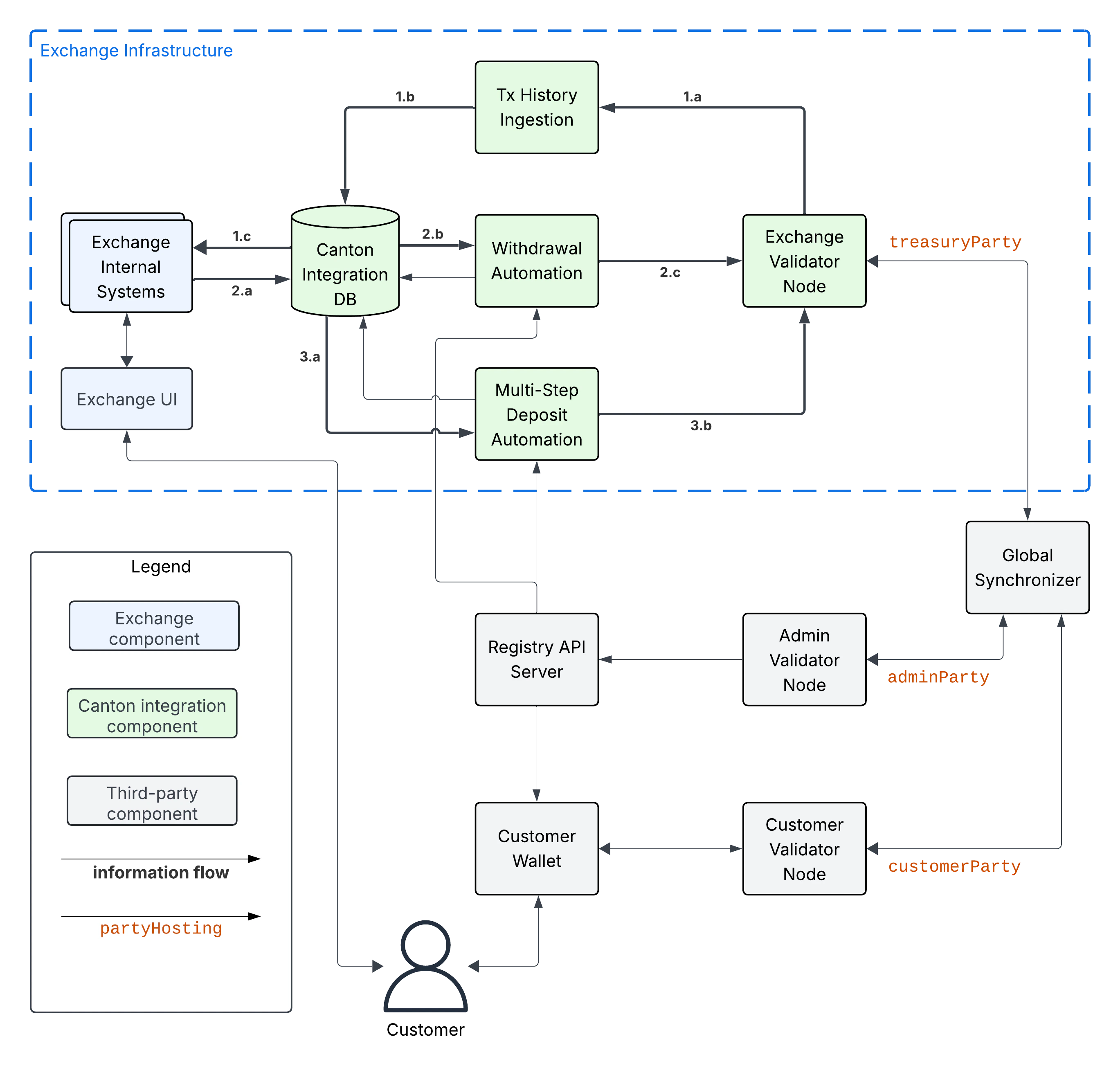
There are three main information flows:
-
Tx History Ingestion: ingests the 交易 (tx) affecting the
treasuryParty(金库 Party)from the Exchange 验证者 Node into the Canton 集成 DB. Arrow 1.a represents the 交易 data being read using the/v2/updates/flatsLedger API 端点 using either plain HTTP or websockets. It is parsed by the Tx History Ingestion 服务 to update the status of funds, deposits, and withdrawals in the Canton 集成 DB (Arrow 1.b).This data is queried by Exchange Internal Systems (Arrow 1.c), for example to serve the Exchange UI. For brevity, the diagram 展示 direct access to the Canton 集成 DB by the Exchange Internal Systems. However using a micro-服务 architecture, the Exchange Internal Systems would typically access the Canton 集成 DB through a dedicated API layer. Choose whatever architecture best fits your exchange’s needs.
-
提现 Automation: starts with the Exchange Internal Systems writing a withdrawal 请求 to the Canton 集成 DB (Arrow 2.a). The 提现 Automation 服务 reads the 请求 from the DB (Arrow 2.b), and prepares, signs, and executes a Canton Network Token standard transfer corresponding to the withdrawal 请求 using the Ledger API (Arrow 2.c).
请注意 the status of transfers becomes visible in the 交易 history ingested by the Tx History Ingestion 服务; and is communicated to both the Exchange Internal Systems and the 提现 Automation 服务 via the Canton 集成 DB. This routing of information through the Canton 集成 DB is intentional to simplify disaster recovery.
另请注意 that the 提现 Automation may write back to the Canton 集成 DB to mark a withdrawal as failed.
-
Multi-Step 充值 Automation: is required to support offer-and-accept style transfers for tokens that do not support direct transfers. It relies on the Tx Ingestion 服务 to ingest transfer offers as part of Arrow 1.c.
The 工作流 starts with the Multi-Step 充值 Automation 服务 querying the Canton 集成 DB to see whether there are pending transfers for deposits from customers (Arrow 3.a). The 服务 then checks whether the deposit address specified in the transfer is known. 若是, it prepares, signs, and executes an accept 交易 using the Ledger API (Arrow 3.b). 若否, then it takes no action, and lets the transfer offer expire or be withdrawn by the sender.
请注意 there is an arrow from Multi-Step 充值 Automation back to the Canton 集成 DB, as the Multi-Step 充值 Automation may write back to the Canton 集成 DB to store that the 交易 to accept the deposit could not be committed even after retrying multiple times.
The other information flows interact with the main flows as part of a deposit or withdrawal. We explain them in the 集成-工作流 section.
{/* COPIED_START source=“splice-wallet-kernel:docs/wallet-integration-guide/src/exchange-integration/工作流.rst” hash=“60badcf7” */}
集成工作流
概览
The 工作流 below are grouped into two milestones.
mvp-for-cccontains the minimum viable product (MVP) 工作流 for integrating Canton Coin(CC) (CC) into the exchange. It comes with the limitation that both the exchange and the customers need to set up aTransferPreapproval合约 to enable 1-step transfers of CC.mvp-for-cn-tokenscontains the additional 工作流 required to support all CN tokens. They are the 工作流 to onboard a new token and to support multi-step transfers for both deposits and withdrawals. Multi-step transfers gives the receiver a choice to: reject an incoming transfer as well as enable additional asynchronous checks on transfers by the token admin (e.g. KYC/AML checks).
Further extensions of these two MVPs to address Day-2 requirements are explored in 集成-extensions.
add these functions. potentially using sphinx-tabs to allow switching between SDK function view and higher-level description
Canton Coin(CC) MVP
- The role of the
adminPartyis assumed by thedsoParty, which is the token admin party for CC. ThedsoPartyis a decentralized party that is hosted on the 验证者节点 run by 超级验证者 (SV) operators. A confirmation threshold of 2/3 is used to achieve Byzantine fault-tolerance for its 交易 validation. - The role of the Registry API Server is taken over by the Canton Coin(CC) Scan 服务 that every SV operator runs. They serve the Registry API for CC. See
reading-from-canton-coin-scanfor more information about how to reliably read from multiple Canton Coin(CC) Scan instances.
1-Step 充值 工作流
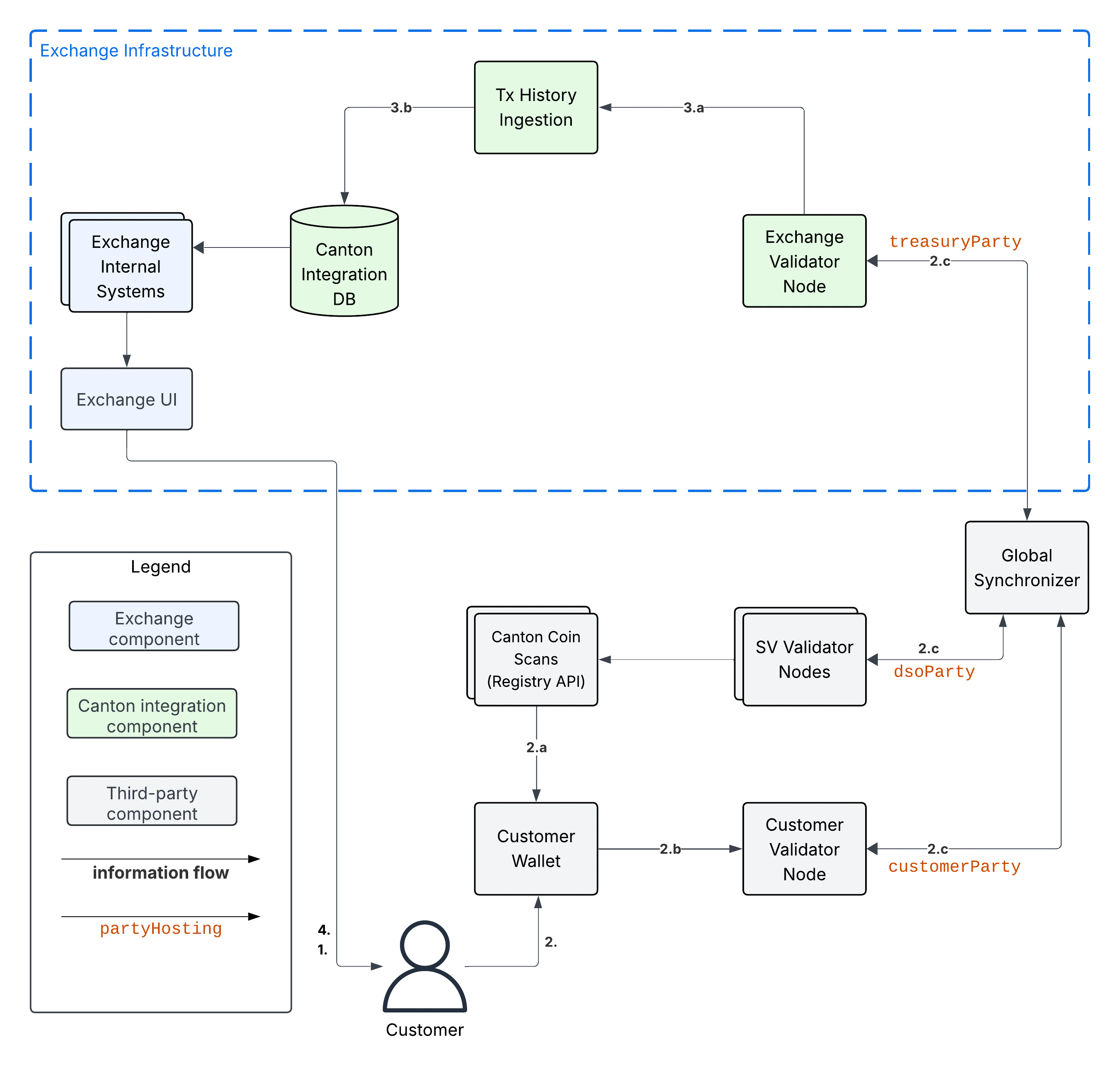
Assumptions:
- The Exchange has set up a CC
TransferPreapprovalfor theirtreasuryParty(金库 Party)as explained intreasury-party-setup. - The Exchange has associated deposit 账户 “abc123” with the Customer in the Canton 集成 DB.
示例 flow:
- Customer uses Exchange UI to retrieve
treasuryParty(金库 Party)and the deposit 账户-id (“abc123”) to use for the deposit - Customer uses Customer 钱包 to initiate a token standard transfer of 100 CC to
treasuryParty(金库 Party)with metadata keysplice.lfdecentralizedtrust.org/reasonset to “abc123”.-
Customer 钱包 selects CC
HoldingUTXOs to fund the transfer and queries Canton Coin(CC) Scan to retrieve registry-specificTransferFactoryand extra transfer context. The returned data includes theTransferPreapprovalfor thetreasuryParty(金库 Party). -
Customer 钱包 submits the 命令 to exercise the
TransferFactory_Transferchoice together with the extra transfer context. The resulting 交易:- archives the funding CC
HoldingUTXOs - creates a CC
HoldingUTXO with 合约-idcoid234owned by thetreasuryParty(金库 Party) - creates another CC
HoldingUTXO for the change owned by the Customer.
- archives the funding CC
-
The resulting 交易 gets committed across the Customer, Exchange, and SV 验证者节点. It is assigned an update-id
upd567and a 记录时间t1by the 全局同步器. It is assigned 偏移off1by the Exchange 验证者 Node. (The other 验证者节点 will have a different偏移value.)
-
- Tx History Ingestion observes
upd567at 记录时间t1with 偏移off1and updates the Canton 集成 DB as follows.- Tx History Ingestion parses
upd567using the token standard tx history parser from the 钱包 SDK to determine:- The deposit amount of 100 CC.
- The deposit 账户 “abc123” from the
splice.lfdecentralizedtrust.org/reasonmetadata value. - The new
HoldingUTXOcoid234owned by thetreasuryParty(金库 Party)
- Tx History ingestion writes the following in a single, atomic 交易 to the Canton 集成 DB
- The latest ingested update-id
upd567, its 记录时间t1, its 偏移off1, and thesynchronizerIdof the 全局同步器. - The new CC
HoldingUTXOcoid234for the 100 CC that was received. - The credit of 100 CC on the Customer’s 账户 at the exchange.
- The latest ingested update-id
- Tx History Ingestion parses
- Customer observes the successful deposit in their Exchange UI, whose data is retrieved from the Canton 集成 DB via the Exchange Internal Systems.
1-Step 提现 工作流
Assumptions:
- Customer set up a CC
TransferPreapprovalfor theircustomerParty(客户 Party).
示例 flow:
- Customer requests withdrawal of 100 CC to
customerParty(客户 Party)using the Exchange UI. - Exchange Internal Systems process that 请求 and update the Canton 集成 DB to store:
- The deduction of 100 CC from the Customer’s trading 账户.
- The pending withdrawal with id
wid123of 100 CC tocustomerParty(客户 Party). - The CC
HoldingUTXOscoidsto use to fund the transfer tocustomerParty(客户 Party)forwid123. Seeutxo-managementfor more information. - The target 记录时间
trecTgton the 全局同步器 until which the 交易 for the CC transfer must be committed. Thecoidsare considered to be reserved for funding the transfer for withdrawalwid123untiltrecTgthas passed.
- 提现 Automation queries the Canton 集成 DB in a polling fashion, observes the pending withdrawal
wid123, and commits the corresponding CC transfer as follows.-
提现 Automation queries Canton Coin(CC) Scan to retrieve the
TransferFactoryfor CC and extra transfer context. -
提现 automation checks that transfer is indeed a 1-step transfer by checking that
transfer_kind="direct"in the 响应 from Canton Coin(CC) Scan. If that is not the case, then it marks the withdrawal as failed in the Canton 集成 DB with reason “lack of CC transfer-preapproval forcustomerParty(客户 Party)” and stops processing. -
提现 Automation prepares, signs, and submits the 命令 to exercise the
TransferFactory_Transferchoice with the exclusive upper-bound for the 记录时间 of the commit set totrecTgt. It also sets the value for keysplice.lfdecentralizedtrust.org/reasonin the转账metadata towid123. -
The resulting 交易:
- archives the CC
HoldingUTXOscoidsused to fund the transfer - creates a CC
HoldingUTXO with 合约-idcoid345owned by thecustomerParty(客户 Party) - creates a CC
HoldingUTXO with 合约-idcoid789owned bytreasuryParty(金库 Party)representing the change returned to the Exchange.
The 交易 is committed across the Customer, Exchange, and SV 验证者节点. It is assigned an update-id
upd567and a 记录时间t1<trecTgtby the 全局同步器. It is assignedoff1by the Exchange 验证者 Node. It is assignedoff2by the Customer 验证者 Node. - archives the CC
-
- Tx History Ingestion observes
upd567att1with 偏移off1and updates the Canton 集成 DB as follows.- Tx History Ingestion parses
upd567using the token standard tx history parser from the 钱包 SDK to determine:- The withdrawal-id
wid123from thesplice.lfdecentralizedtrust.org/reasonmetadata value. - The new
HoldingUTXOcoid789owned by thetreasuryParty(金库 Party)
- The withdrawal-id
- Tx History ingestion writes the following in a single, atomic 交易 to the Canton 集成 DB
- The latest ingested update-id
upd567, its 记录时间t1and 偏移off1. - The successful completion of withdrawal
wid123by the 交易 with update-idupd567at 记录时间t1. - The deduction of 100 CC from the Customer’s trading 账户.
- The archival of the CC
HoldingUTXOscoids. - The new CC
HoldingUTXOcoid789for the change returned after funding the CC transfer.
- The latest ingested update-id
- Tx History Ingestion parses
- Customer 钱包 observes
upd567att1with 偏移off2on the Customer 验证者 Node, parses it using the token standard tx history parser and updates its UI as follows:- Its tx history 展示 the receipt of 100 CC from
exchangeParty(交易所 Party)with “Reason”wid123that was committed as updateupd567att1. - Its holding listing 展示 the new CC
Holdingwith 合约 idcoid345.
- Its tx history 展示 the receipt of 100 CC from
- Customer observes the completion of the withdrawal at
t1in the Exchange UI and the receipt of the expected funds in their Customer 钱包.
UTXO Selection and Management
Executing a withdrawal requires selecting Holding UTXOs to fund the withdrawal, as described for example in one-step-withdrawal-工作流. You likely already have a UTXO management strategy in place for your existing UTXO-chain 集成. Here some considerations to take into 账户 when adapting your strategy to work with Canton:
- Canton Coin(CC) charges a small holding fee of about $1 per year for each
HoldingUTXO to allow archiving dust coins once their holding fee surpasses their value. - Canton Coin(CC) limits the number of UTXOs for a single transfer to 100
HoldingUTXOs to avoid large 交易 that are expensive to process. - Canton Coin(CC) 交易 also merge all input
HoldingUTXOs and return the change to the sender as a singleHoldingUTXO to allow batching the merging ofHoldingUTXOs with transfers. - Other tokens are likely to follow similar strategies for the same rationale.
- At the time of writing (2025-08-29), the Canton Network Token Standard recommends to use self-transfers (i.e.,
sender=receiver) to be used to mergeHoldingUTXOs into twoHoldingUTXOs: one for the transferredamountand another one for the change. It does not (yet) support requesting multipleHoldingUTXOs to be created for the change.
We therefore recommend the following approach:
- Limit the number of input UTXOs to less than 100 UTXOs per transfer. Thus staying with the Canton Coin(CC) limits and keeping 交易 size small, which also helps you to reduce your 流量 spend when having to retry 交易 execution.
- Consider using a UTXO selection strategy for withdrawals that favors smaller UTXOs so that they get merged automatically as part of executing transfers.
- Consider keeping a pool of
klarge amount UTXOs to be able to execute up tokwithdrawals at the same time. 运行 a periodic background job to manage this pool using self-transfers.- From an implementation perspective, these self-transfers are a special kind of withdrawal. We 因此 recommend to implement them using the same code path as withdrawals: start with writing the self-transfer 请求 into the Canton 集成 DB and have the 提现 Automation execute it.
全部 CN 代币 MVP
The MVP for supporting all Canton Network tokens builds on the Canton Coin(CC) MVP. The key changes required are:
- Change Tx History Ingestion to also ingest the
TransferInstructionUTXOs, which are used by the Canton Network Token Standard to represent in-progress transfers (see docs, code). - Adjust the Exchange UI to show the status of in-progress transfers.
- Adjust the 用户 funds tracking done as part of Tx History Ingestion to credit funds back to the 用户 if they reject a withdrawal transfer. Consider deducting a fee for the failed withdrawal.
- Implement the Multi-Step 充值 Automation 服务 to auto-accept incoming transfers that are pending receiver acceptance. 确保 that the deposit address is known before accepting the transfer.
- 添加 support for configuring the URL of a token admin’s Registry API Server and to deploy their .dar files as described in
token-onboarding.
The sections below provide worked examples for the resulting multi-step deposit and withdrawal 工作流. All examples assume that:
- There is a token admin called Acme who issues a token called AcmeToken on the Canton Network and operates their own Admin 验证者 Node and their own Registry API Server.
- The Exchange and Customer have onboarded AcmeToken as per
token-onboarding.
Multi-Step 充值 工作流
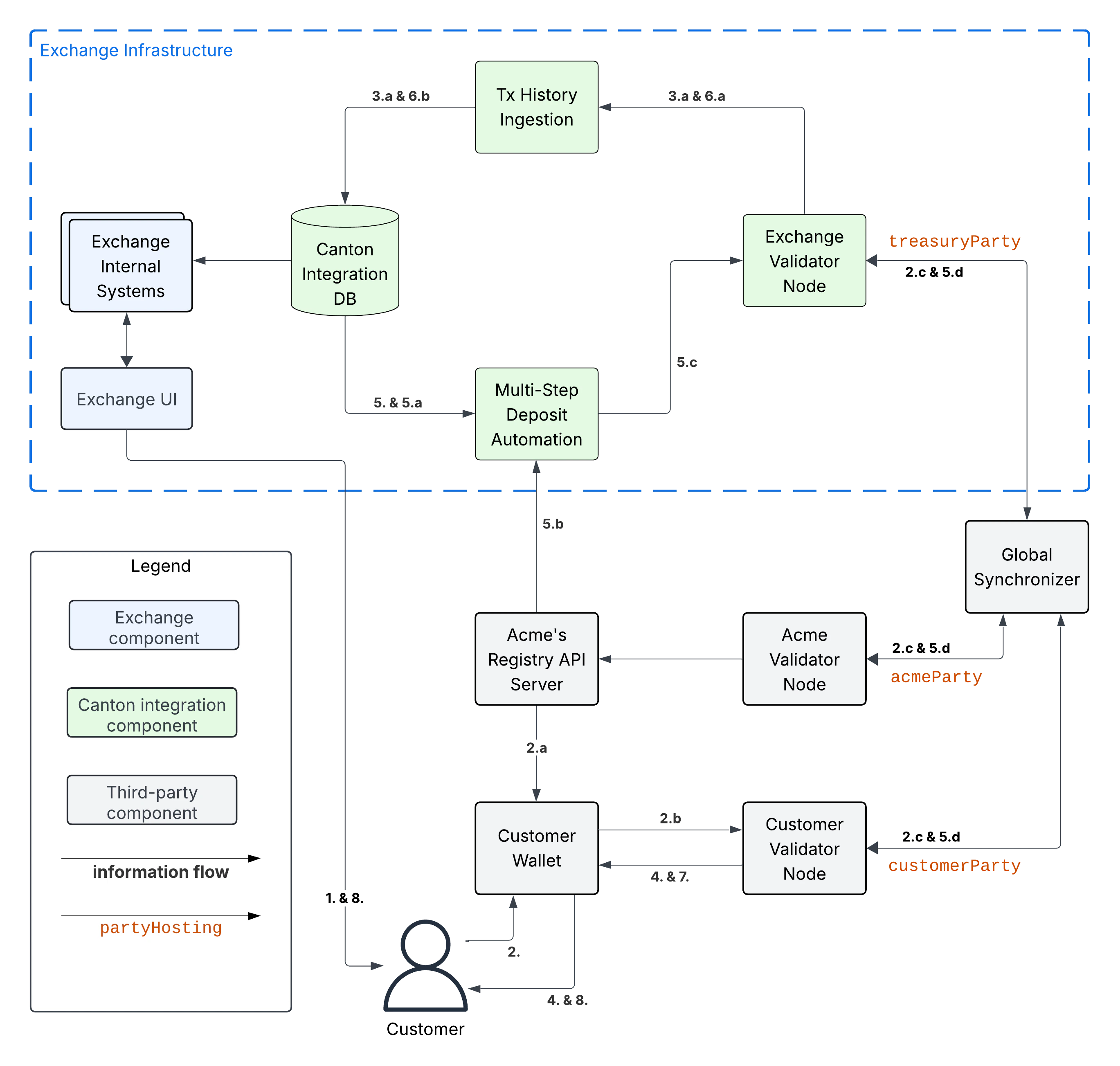
示例 flow: deposit offer and acceptance
The flow uses essentially the same initial four steps as the one-step-deposit-工作流 above. We list them in full for completeness.
- Customer uses Exchange UI to retrieve
treasuryParty(金库 Party)and deposit 账户-id “abc123” to use for the deposit. - Customer uses Customer 钱包 to initiate a token standard transfer of 100 AcmeToken to
treasuryParty(金库 Party)with metadata keysplice.lfdecentralizedtrust.org/reasonset to “abc123”.-
Customer 钱包 selects AcmeToken
HoldingUTXOs to fund the transfer and queries Acme’s Registry API Server to retrieve registry-specificTransferFactoryand extra transfer context. The URL for this server was configured in the Customer 钱包 as part oftoken-onboarding. -
Customer 钱包 submits the 命令 to exercise the
TransferFactory_Transferchoice together with the extra transfer context. The resulting 交易:- archives the funding AcmeToken
HoldingUTXOs - creates a locked 100 AcmeToken
HoldingUTXO with 合约-idcoid234owned by thecustomerParty(客户 Party) - creates another AcmeToken
HoldingUTXO for the change owned by the Customer.
The 交易 also creates a
TransferInstructionUTXO with 合约-idcoid567, which represents the transfer offer to the Exchange. - archives the funding AcmeToken
-
The resulting 交易 gets committed across the Customer, Exchange, and Acme 验证者节点. It is assigned an update-id
upd567and a 记录时间t1by the 全局同步器. It is assigned 偏移off1by the Exchange 验证者 Node.
-
- Tx History Ingestion observes
upd567att1with 偏移off1and updates the Canton 集成 DB as follows.- Tx History Ingestion parses
upd567using the token standard tx history parser from the 钱包 SDK to determine:- The deposit amount of 100 AcmeToken.
- The deposit 账户 “abc123” from the
splice.lfdecentralizedtrust.org/reasonmetadata value. - The
TransferInstructionUTXOcoid567representing the transfer offer for the deposit.
- Tx History ingestion writes the following in a single, atomic 交易 to the Canton 集成 DB
- The latest ingested update-id
upd567its 记录时间t1and 偏移off1. - The
TransferInstructionUTXOcoid567representing the transfer offer fromcustomerParty(客户 Party)for a deposit of 100 AcmeToken in 账户 “abc123”.
- The latest ingested update-id
- Tx History Ingestion parses
- Customer 钱包 ingests update
upd567and Customer observes the pending transfer offer for the deposit in the Customer 钱包. Customer also sees the 100 AcmeTokenHoldingUTXOcoid234locked to the deposit.
This is where the main difference to the one-step-deposit-工作流 starts. The Multi-Step 充值 Automation 服务 will now auto-accept the transfer offer.
-
The Multi-Step 充值 Automation regularly queries the Canton 集成 DB for pending transfer offers for known deposit 账户. It 因此 observes the pending transfer offer
coid567and accepts it as follows.- Multi-Step 充值 Automation retrieves the URL for Acme’s Registry API Server from the Canton 集成 DB.
- Multi-Step 充值 Automation queries Acme’s Registry API Server to retrieve the extra context to exercise the
TransferInstruction_Acceptchoice oncoid567. - Multi-Step 充值 Automation prepares, signs, and submits the 命令 to exercise the
TransferInstruction_Acceptchoice oncoid567. - The resulting 交易 gets committed across the Customer, Exchange, and Acme 验证者节点. It is assigned an update-id
upd789and a 记录时间t2the 全局同步器. It is assignedoff3by the Exchange 验证者 Node. The resulting 交易 has the following effects:- It archives the
TransferInstructionUTXOcoid567. - It archives the locked 100 AcmeToken
HoldingUTXOcoid234owned by thecustomerParty(客户 Party). - It creates a 100 AcmeToken
HoldingUTXOcoid999owned by thetreasuryParty(金库 Party).
- It archives the
At this point the 工作流 again proceeds the same way as the one-step-deposit-工作流.
- Tx History Ingestion observes
upd789att2with 偏移off3and updates the Canton 集成 DB as follows.- Tx History Ingestion parses
upd789using the token standard tx history parser from the 钱包 SDK to determine:- The deposit amount of 100 AcmeToken.
- The deposit 账户 “abc123” from the
splice.lfdecentralizedtrust.org/reasonmetadata value.
- Tx History ingestion writes the following in a single, atomic 交易 to the Canton 集成 DB
- The latest ingested update-id
upd789, its 记录时间t2and 偏移off3. - The new AcmeToken
HoldingUTXOcoid999for the 100 AcmeToken that was received. - The credit of 100 AcmeToken on the Customer’s 账户 at the exchange.
- The latest ingested update-id
- Tx History Ingestion parses
- Customer 钱包 observes
upd789att2on the Customer 验证者 Node, parses it using the token standard tx history parser and updates its UI as follows:- Its tx history 展示 the successful transfer of 100 AcmeToken to
exchangeParty(交易所 Party)with “Reason”wid123that was committed as updateupd789att2.
- Its tx history 展示 the successful transfer of 100 AcmeToken to
- Customer observes the successful deposit in their Exchange UI, whose data is retrieved from the Canton 集成 DB via the Exchange Internal Systems.
示例: handling deposits with unknown deposit 账户
To minimize 流量 cost, we recommend not acting on deposits with unknown deposit 账户. The sender can use their 钱包 to withdraw the offer.
Ingesting deposit offers with unknown deposit 账户 is still valuable to allow the exchange’s support team to handle customer inquiries about these transfers.
Multi-Step 提现 工作流
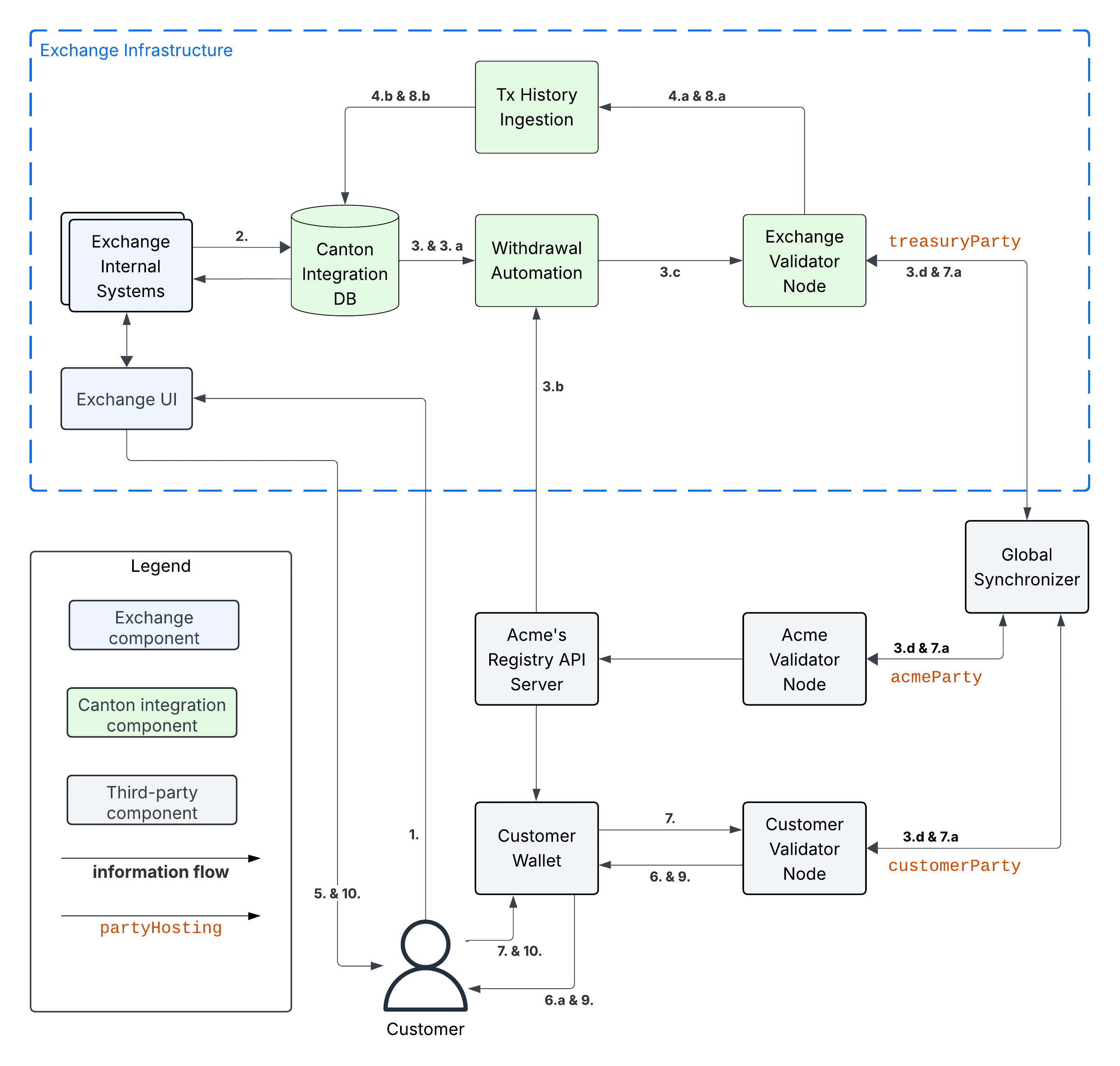
示例 flow: withdrawal offer and acceptance
The flow uses essentially the same initial six steps as the one-step-withdrawal-工作流 above. We list them in full for completeness.
- Customer requests withdrawal of 100 AcmeToken to
customerParty(客户 Party)using the Exchange UI. - Exchange Internal Systems process that 请求 and update the Canton 集成 DB to store:
- The deduction of 100 AcmeToken from the Customer’s trading 账户.
- The pending withdrawal with id
wid123of 100 AcmeToken tocustomerParty(客户 Party). - The AcmeToken
HoldingUTXOscoidsto use to fund the transfer tocustomerParty(客户 Party)forwid123. Seeutxo-managementfor more information. - The target 记录时间
trecTgton the 全局同步器 until which the 交易 for the AcmeToken transfer must be committed using thecoidsUTXOs for fundingwid123. Thecoidsare considered to be reserved to funding this transfer untiltrecTgthas passed.
- 提现 Automation queries the Canton 集成 DB in a polling fashion, observes the pending withdrawal
wid123, and commits the corresponding AcmeToken transfer as follows.- 提现 Automation retrieves the URL for Acme’s Registry API Server from the Canton 集成 DB.
- 提现 Automation queries Acme’s Registry API Server to retrieve the
TransferFactoryfor AcmeToken and extra transfer context. - 提现 Automation prepares, signs, and submits the 命令 to exercise the
TransferFactory_Transferchoice with the exclusive upper-bound for the 记录时间 of the commit set totrecTgt. It also sets the value for keysplice.lfdecentralizedtrust.org/reasonin the转账metadata towid123; and it sets the upper bound for the customer to accept the transfer far enough in the future, so that the customer has sufficient time to act (e.g. 1 year). - The resulting 交易 gets committed across the Customer, Exchange, and Acme 验证者节点. It is assigned an update-id
upd567and a 记录时间t1<trecTgtby the 全局同步器. It is assignedoff1by the Exchange 验证者 Node. It is assignedoff2by the Customer 验证者 Node. The resulting 交易 has the following effects:- It archives the AcmeToken
HoldingUTXOscoidsused to fund the transfer. - It creates an AcmeToken
HoldingUTXO with 合约-idcoid789owned bytreasuryParty(金库 Party)representing the change returned to the Exchange. - It creates one locked AcmeToken
HoldingUTXO with amount 100 and 合约-idcoid345owned by thetreasuryParty(金库 Party). - It creates a
TransferInstructionUTXO with 合约-idcoid567representing the transfer offer. ThisTransferInstructionincludes a copy of the转账specification and its metadata.
- It archives the AcmeToken
- Tx History Ingestion observes
upd567att1with 偏移off1and updates the Canton 集成 DB as follows.- Tx History Ingestion parses
upd567using the token standard tx history parser from the 钱包 SDK to determine:- The withdrawal-id
wid123from thesplice.lfdecentralizedtrust.org/reasonmetadata value. - The new locked AcmeToken
HoldingUTXOcoid345owned by thetreasuryParty(金库 Party)and locked to the withdrawalwid123of 100 AcmeToken tocustomerParty(客户 Party). - The new AcmeToken
HoldingUTXOcoid789owned by thetreasuryParty(金库 Party) - The
TransferInstructionUTXOcoid567representing the transfer offer for the withdrawal.
- The withdrawal-id
- Tx History ingestion writes the following in a single, atomic 交易 to the Canton 集成 DB:
- The latest ingested update-id
upd567, its 记录时间t1and 偏移off1. - The successful transfer offer for withdrawal
wid123by the 交易 with update-idupd567at 记录时间t1. - The
HoldingUTXOcoid345locked to the withdrawal. - The
TransferInstructionUTXOcoid567representing the transfer offer. - The archival of the AcmeToken
HoldingUTXOscoids. - The new AcmeToken
HoldingUTXOcoid789for the change returned after funding the AcmeToken transfer.
- The latest ingested update-id
- Tx History Ingestion parses
- Exchange UI displays that withdrawal
wid123is pending transfer offer acceptance by the Customer. - Customer 钱包 observes update with update-id
upd567att1with 偏移off2on the Customer 验证者 Node.- It parses the 交易 using the token standard 交易 history parser and updates its UI so that its 交易 history 展示 the offer for a transfer of 100 AcmeToken from
exchangeParty(交易所 Party)with “Reason”wid123that was committed as updateupd567att1.
- It parses the 交易 using the token standard 交易 history parser and updates its UI so that its 交易 history 展示 the offer for a transfer of 100 AcmeToken from
This is where the main difference to the one-step-withdrawal-工作流 starts. The customer has a choice whether to accept or reject the transfer offer. Here they choose to accept it.
- Customer uses their Customer 钱包 to accept the offer using the
TransferInstruction_Acceptchoice.- The resulting 交易 is committed across Exchange, Acme, and Customer 验证者节点 and assigned update-id
upd789and 记录时间t2. The 交易 has the following effects:- It archives the locked
HoldingUTXOcoid345. - It archives the
TransferInstructionUTXOcoid567. - It creates a 100 AcmeToken
HoldingUTXOcoid999owned by thecustomerParty(客户 Party).
- It archives the locked
- The resulting 交易 is committed across Exchange, Acme, and Customer 验证者节点 and assigned update-id
- Tx History Ingestion observes update
upd789att2and 偏移off3assigned by the Exchange 验证者 Node.- It parses the update using the token standard parser to extract the withdrawal-id
wid123from thesplice.lfdecentralizedtrust.org/reasonmetadata value. - Tx History Ingestion writes the following in a single, atomic 交易 to the Canton 集成 DB
- The latest ingested update-id
upd789, its 记录时间t2and 偏移off3. - The successful completion of the withdrawal
wid123by the 交易 with update-idupd789at 记录时间t2. - The archival of the locked AcmeToken
HoldingUTXOcoid345.
- The latest ingested update-id
- It parses the update using the token standard parser to extract the withdrawal-id
- Customer 钱包 observes
upd789att2and updates its display to reflect its effects. - Customer observes the completion of the withdrawal at
t2in Exchange UI and confirms the receipt of funds in their Customer 钱包.
示例 flow: customer rejects transfer offer
The Customer might decide to reject the offer in Step 7 in the example above. The corresponding 交易 will
- archive the locked
HoldingUTXOcoid345,- archive the
TransferInstructionUTXOcoid567, and- create a new 100 AcmeToken
HoldingUTXOcoid999owned by thetreasuryParty(金库 Party).
Steps 8 - 10 are largely the same as for the successful acceptance with the difference that Tx History Ingestion will see this 交易 and update the Canton 集成 DB to such that
- withdrawal
wid123is marked as failed because the customer rejected the offer, and- the customer 账户 is credited back the 100 AcmeToken, potentially minus a fee for the failed withdrawal.
And the 用户 will ultimately see in both the Exchange UI and the Customer 钱包 that the transfer was offered, but rejected by them.
Canton Network Token Onboarding
You likely have requirements and considerations for onboarding a token. In the following, we document the additional considerations that are specific to Canton.
At a high-level, the Canton-specific steps to onboarding a token are:
- Upload the token admin’s .dar files to your 验证者节点.
- Store the mapping from the token admin’s
adminPartyid to the admin’s Registry API Server URL in your Canton 集成 DB (or another suitable place). - In case the token is permissioned, follow the token admin’s instructions to have your exchange’s
treasuryParty(金库 Party)added to the token’s allowlist.
Make sure that you only upload .dar files from trusted token admins to avoid unwanted changes to the behavior of your existing 合约 on-ledger.
Many token admin’s run a test instance of their token on TestNet. Consider using these test instances as part of your 测试 strategy.
例如, Canton Coin(CC) also exist on TestNet and DevNet with different dsoParty ids. 你可以 retrieve the dsoParty id for each 网络 using the CC Scan API served from the SV nodes of that 网络:
- Use /v0/dso to query the
dsoPartyfor the 网络 you are connected to. - Use /v0/splice-instance-names to query the 网络 name (DevNet, TestNet, or MainNet).
{/* COPIED_START source=“splice-wallet-kernel:docs/wallet-integration-guide/src/exchange-integration/txingestion.rst” hash=“72f69ac3” */}
交易历史摄取 Details
偏移检查点
When consuming 交易 through the update 服务 at /v2/updates you will not just receive 交易 but you will also receive 偏移 checkpoints. Each 偏移 checkpoint contains an 偏移 and the most recent observed 记录时间 for each 同步器. Your Tx History Ingestion should use that to update the last processed 偏移 and 记录时间 (in addition to updating those after each 交易) so that it will resume processing 交易 from that point on after a crash or restart.
偏移 checkpoints are in particular required around Major Splice Upgrades where there is no Daml 交易 for an extended period of time, but you want to ensure that your Tx History Ingestion advances beyond a particular 记录时间.
交易解析
As part of the 集成-工作流, Tx History Ingestion is expected to extract a number of fields for both deposits and withdrawals. Below we provide details on the 交易 structure of the 集成-工作流 and how to parse it.
- JavaScript/TypeScript: use the token standard history parser provided in the 钱包 SDK.
- Java/JVM: use the the Java TransactionParser from the https://github.com/digital-asset/ex-java-json-api-bindings repository as a blueprint.
- Other languages: use the Java TransactionParser referenced above as a blueprint.
1-Step Transfers
To understand the structure of a 1-step transfer, let’s look at an example deposit as seen through the JSON Ledger API.
In this case, we query a single 交易. The format is identical to the 交易 you will get when streaming 交易 through /v2/updates/flats and you can also use the same filter. 请注意 you need to adjust the auth-token, update-id and treasury-party placeholders to match your setup.
curl -sSL --fail-with-body http://json-api-url/v2/updates/update-by-id \
-H 'Authorization: Bearer <authtoken>' \
-d '{
"updateId": "<update-id>",
"updateFormat": {
"includeTransactions": {
"transactionShape": "TRANSACTION_SHAPE_LEDGER_EFFECTS",
"eventFormat": {
"filtersByParty": {
"<treasury-party>": {
"cumulative": [
{"identifierFilter": {"WildcardFilter": {"value": {"includeCreatedEventBlob": false}}}},
{"identifierFilter": {"InterfaceFilter": {"value": {"interfaceId": "#splice-api-token-transfer-instruction-v1:Splice.Api.Token.TransferInstructionV1:TransferFactory", "includeInterfaceView": true, "includeCreatedEventBlob": false}}}},
{"identifierFilter": {"InterfaceFilter": {"value": {"interfaceId": "#splice-api-token-holding-v1:Splice.Api.Token.HoldingV1:Holding", "includeInterfaceView": true, "includeCreatedEventBlob": false}}}},
{"identifierFilter": {"InterfaceFilter": {"value": {"interfaceId": "#splice-api-token-transfer-instruction-v1:Splice.Api.Token.TransferInstructionV1:TransferInstruction", "includeInterfaceView": true, "includeCreatedEventBlob": false}}}}
]
}
},
"verbose": true
}
}
}
}'{
"update": {
"Transaction": {
"value": {
"updateId": "122008a4699e61ce682917c9515ecb3b4426adf276441e41edede8b3862efa2de80e",
"commandId": "582f81e4-86e4-48fa-ad95-607e9ebe8c9b",
"workflowId": "",
"effectiveAt": "1970-01-01T00:01:00Z",
"events": [
{
"ExercisedEvent": {
"offset": 107,
"nodeId": 4,
"contractId": "0003113864953b90e689737a131569e8758df3cf82e3db12c89f010ac330276f3cca1112204bc3e9f7d695217e06aec436ac87a441c8e1a0f0d3ae2668c38e408fa2d5ebda",
"templateId": "6e9fc50fb94e56751b49f09ba2dc84da53a9d7cff08115ebb4f6b7a12d0c990c:Splice.AmuletRules:TransferPreapproval",
"interfaceId": null,
"choice": "TransferPreapproval_Send",
"choiceArgument": {
"context": {
"amuletRules": "002402fc37d1f6fcb5c9247342c66659f95eb03efebba3da8c244ae7c10925aae2ca1112201ac4dd28e75b1ba2be4df65e674b0c66fa2ec934abc15824584d8566af4916e9",
"context": {
"openMiningRound": "009d18bf51238bb679b45ac760d418d31d95fead0538971a26eff6d2b2d582005dca1112204d969f7a6e0d271b3a85b27297879812e8c0fdaaaf8d72d64441a06556bb5955",
"issuingMiningRounds": [],
"validatorRights": [],
"featuredAppRight": null
}
},
"inputs": [
{
"tag": "InputAmulet",
"value": "009b939ae451ef1a0cb81d1606391406690e055b5be301fd2f51efb6be5675577eca1112200f58604ac538224f73bdc57117d73830ed1e3167f956d66f9e3ecdacbf2359a7"
}
],
"amount": "200.0000000000",
"sender": "sender::1220278a4a0eb2c244b425dff62853ef1cd04ca1095bffcea465c0de766faf9ab8cd",
"description": "token-standard-transfer-description"
},
"actingParties": [
"sender::1220278a4a0eb2c244b425dff62853ef1cd04ca1095bffcea465c0de766faf9ab8cd"
],
"consuming": false,
"witnessParties": [
"treasury-party::1220278a4a0eb2c244b425dff62853ef1cd04ca1095bffcea465c0de766faf9ab8cd"
],
"lastDescendantNodeId": 12,
"exerciseResult": {
"result": {
"round": {
"number": "1"
},
"summary": {
"inputAppRewardAmount": "0.0000000000",
"inputValidatorRewardAmount": "0.0000000000",
"inputSvRewardAmount": "0.0000000000",
"inputAmuletAmount": "199877.3600000000",
"balanceChanges": [
[
"sender::1220278a4a0eb2c244b425dff62853ef1cd04ca1095bffcea465c0de766faf9ab8cd",
{
"changeToInitialAmountAsOfRoundZero": "-214.0000000000",
"changeToHoldingFeesRate": "0.0000000000"
}
],
[
"treasury-party::1220278a4a0eb2c244b425dff62853ef1cd04ca1095bffcea465c0de766faf9ab8cd",
{
"changeToInitialAmountAsOfRoundZero": "200.0038051800",
"changeToHoldingFeesRate": "0.0038051800"
}
]
],
"holdingFees": "0.0000000000",
"outputFees": ["8.0000000000"],
"senderChangeFee": "6.0000000000",
"senderChangeAmount": "199663.3600000000",
"amuletPrice": "0.0050000000",
"inputValidatorFaucetAmount": "0.0000000000",
"inputUnclaimedActivityRecordAmount": "0.0000000000"
},
"createdAmulets": [
{
"tag": "TransferResultAmulet",
"value": "008f783cd288ce926f8bc973df7ddb719e0b8c941dd84cd9a6ca0240fb7ecff390ca111220f5d7073ad68f0746851954e570f348d099a323b796f71807caf71871fce6d956"
}
],
"senderChangeAmulet": "00431eabcbb8f4293ccc0e17764bca260ff64aede386245c033b2d0ebddc2cbb21ca111220e755e3b05c909e84ffbc47fa4be1e1b786af37e76479efd348a0ae2722149904",
"meta": null
},
"meta": {
"values": {
"splice.lfdecentralizedtrust.org/burned": "14.0",
"splice.lfdecentralizedtrust.org/reason": "deposit-account-id",
"splice.lfdecentralizedtrust.org/sender": "sender::1220278a4a0eb2c244b425dff62853ef1cd04ca1095bffcea465c0de766faf9ab8cd",
"splice.lfdecentralizedtrust.org/tx-kind": "transfer"
}
}
},
"packageName": "splice-amulet",
"implementedInterfaces": []
}
},
{
"ExercisedEvent": {
"offset": 107,
"nodeId": 5,
"contractId": "002402fc37d1f6fcb5c9247342c66659f95eb03efebba3da8c244ae7c10925aae2ca1112201ac4dd28e75b1ba2be4df65e674b0c66fa2ec934abc15824584d8566af4916e9",
"templateId": "6e9fc50fb94e56751b49f09ba2dc84da53a9d7cff08115ebb4f6b7a12d0c990c:Splice.AmuletRules:AmuletRules",
"interfaceId": null,
"choice": "AmuletRules_Transfer",
"choiceArgument": {
"transfer": {
"sender": "sender::1220278a4a0eb2c244b425dff62853ef1cd04ca1095bffcea465c0de766faf9ab8cd",
"provider": "sender::1220278a4a0eb2c244b425dff62853ef1cd04ca1095bffcea465c0de766faf9ab8cd",
"inputs": [
{
"tag": "InputAmulet",
"value": "009b939ae451ef1a0cb81d1606391406690e055b5be301fd2f51efb6be5675577eca1112200f58604ac538224f73bdc57117d73830ed1e3167f956d66f9e3ecdacbf2359a7"
}
],
"outputs": [
{
"receiver": "treasury-party::1220278a4a0eb2c244b425dff62853ef1cd04ca1095bffcea465c0de766faf9ab8cd",
"receiverFeeRatio": "0.0000000000",
"amount": "200.0000000000",
"lock": null
}
],
"beneficiaries": null
},
"context": {
"openMiningRound": "009d18bf51238bb679b45ac760d418d31d95fead0538971a26eff6d2b2d582005dca1112204d969f7a6e0d271b3a85b27297879812e8c0fdaaaf8d72d64441a06556bb5955",
"issuingMiningRounds": [],
"validatorRights": [],
"featuredAppRight": null
},
"expectedDso": "DSO::12204b8b621ec1dedd51ee2510085f8164cad194953496494d32f541f3f2c170e962"
},
"actingParties": [
"sender::1220278a4a0eb2c244b425dff62853ef1cd04ca1095bffcea465c0de766faf9ab8cd",
"treasury-party::1220278a4a0eb2c244b425dff62853ef1cd04ca1095bffcea465c0de766faf9ab8cd"
],
"consuming": false,
"witnessParties": [
"treasury-party::1220278a4a0eb2c244b425dff62853ef1cd04ca1095bffcea465c0de766faf9ab8cd"
],
"lastDescendantNodeId": 12,
"exerciseResult": {
"round": {
"number": "1"
},
"summary": {
"inputAppRewardAmount": "0.0000000000",
"inputValidatorRewardAmount": "0.0000000000",
"inputSvRewardAmount": "0.0000000000",
"inputAmuletAmount": "199877.3600000000",
"balanceChanges": [
[
"sender::1220278a4a0eb2c244b425dff62853ef1cd04ca1095bffcea465c0de766faf9ab8cd",
{
"changeToInitialAmountAsOfRoundZero": "-214.0000000000",
"changeToHoldingFeesRate": "0.0000000000"
}
],
[
"treasury-party::1220278a4a0eb2c244b425dff62853ef1cd04ca1095bffcea465c0de766faf9ab8cd",
{
"changeToInitialAmountAsOfRoundZero": "200.0038051800",
"changeToHoldingFeesRate": "0.0038051800"
}
]
],
"holdingFees": "0.0000000000",
"outputFees": ["8.0000000000"],
"senderChangeFee": "6.0000000000",
"senderChangeAmount": "199663.3600000000",
"amuletPrice": "0.0050000000",
"inputValidatorFaucetAmount": "0.0000000000",
"inputUnclaimedActivityRecordAmount": "0.0000000000"
},
"createdAmulets": [
{
"tag": "TransferResultAmulet",
"value": "008f783cd288ce926f8bc973df7ddb719e0b8c941dd84cd9a6ca0240fb7ecff390ca111220f5d7073ad68f0746851954e570f348d099a323b796f71807caf71871fce6d956"
}
],
"senderChangeAmulet": "00431eabcbb8f4293ccc0e17764bca260ff64aede386245c033b2d0ebddc2cbb21ca111220e755e3b05c909e84ffbc47fa4be1e1b786af37e76479efd348a0ae2722149904",
"meta": {
"values": {
"splice.lfdecentralizedtrust.org/burned": "14.0",
"splice.lfdecentralizedtrust.org/sender": "sender::1220278a4a0eb2c244b425dff62853ef1cd04ca1095bffcea465c0de766faf9ab8cd",
"splice.lfdecentralizedtrust.org/tx-kind": "transfer"
}
}
},
"packageName": "splice-amulet",
"implementedInterfaces": []
}
},
{
"ExercisedEvent": {
"offset": 107,
"nodeId": 8,
"contractId": "009b939ae451ef1a0cb81d1606391406690e055b5be301fd2f51efb6be5675577eca1112200f58604ac538224f73bdc57117d73830ed1e3167f956d66f9e3ecdacbf2359a7",
"templateId": "6e9fc50fb94e56751b49f09ba2dc84da53a9d7cff08115ebb4f6b7a12d0c990c:Splice.Amulet:Amulet",
"interfaceId": null,
"choice": "Archive",
"choiceArgument": {},
"actingParties": [
"DSO::12204b8b621ec1dedd51ee2510085f8164cad194953496494d32f541f3f2c170e962",
"sender::1220278a4a0eb2c244b425dff62853ef1cd04ca1095bffcea465c0de766faf9ab8cd"
],
"consuming": true,
"witnessParties": [
"treasury-party::1220278a4a0eb2c244b425dff62853ef1cd04ca1095bffcea465c0de766faf9ab8cd"
],
"lastDescendantNodeId": 8,
"exerciseResult": {},
"packageName": "splice-amulet",
"implementedInterfaces": [
"718a0f77e505a8de22f188bd4c87fe74101274e9d4cb1bfac7d09aec7158d35b:Splice.Api.Token.HoldingV1:Holding"
]
}
},
{
"CreatedEvent": {
"offset": 107,
"nodeId": 9,
"contractId": "004d3b89582b1d286a067ea783675350f61fe1d700319deeaa5fc35a81f9357172ca111220c529ebbcad9fcce4d6a6fbc3eda16ce0155f93896df5ba212d1e959b289814b3",
"templateId": "6e9fc50fb94e56751b49f09ba2dc84da53a9d7cff08115ebb4f6b7a12d0c990c:Splice.Amulet:ValidatorRewardCoupon",
"contractKey": null,
"createArgument": {
"dso": "DSO::12204b8b621ec1dedd51ee2510085f8164cad194953496494d32f541f3f2c170e962",
"user": "sender::1220278a4a0eb2c244b425dff62853ef1cd04ca1095bffcea465c0de766faf9ab8cd",
"amount": "8.0000000000",
"round": {
"number": "1"
}
},
"createdEventBlob": "",
"interfaceViews": [],
"witnessParties": [
"treasury-party::1220278a4a0eb2c244b425dff62853ef1cd04ca1095bffcea465c0de766faf9ab8cd"
],
"signatories": [
"DSO::12204b8b621ec1dedd51ee2510085f8164cad194953496494d32f541f3f2c170e962"
],
"observers": [
"sender::1220278a4a0eb2c244b425dff62853ef1cd04ca1095bffcea465c0de766faf9ab8cd"
],
"createdAt": "1970-01-01T00:01:00Z",
"packageName": "splice-amulet"
}
},
{
"CreatedEvent": {
"offset": 107,
"nodeId": 10,
"contractId": "002a7815f107134bfd776bbc50bb7ead071a050cd651e3d7d15f6ac1f970403558ca111220554d2712f9bf057953688d5fc2aaab8d890e37fe9023f4522a4a53a40d4cf538",
"templateId": "6e9fc50fb94e56751b49f09ba2dc84da53a9d7cff08115ebb4f6b7a12d0c990c:Splice.Amulet:AppRewardCoupon",
"contractKey": null,
"createArgument": {
"dso": "DSO::12204b8b621ec1dedd51ee2510085f8164cad194953496494d32f541f3f2c170e962",
"provider": "sender::1220278a4a0eb2c244b425dff62853ef1cd04ca1095bffcea465c0de766faf9ab8cd",
"featured": false,
"amount": "8.0000000000",
"round": {
"number": "1"
},
"beneficiary": "sender::1220278a4a0eb2c244b425dff62853ef1cd04ca1095bffcea465c0de766faf9ab8cd"
},
"createdEventBlob": "",
"interfaceViews": [],
"witnessParties": [
"treasury-party::1220278a4a0eb2c244b425dff62853ef1cd04ca1095bffcea465c0de766faf9ab8cd"
],
"signatories": [
"DSO::12204b8b621ec1dedd51ee2510085f8164cad194953496494d32f541f3f2c170e962"
],
"observers": [
"sender::1220278a4a0eb2c244b425dff62853ef1cd04ca1095bffcea465c0de766faf9ab8cd"
],
"createdAt": "1970-01-01T00:01:00Z",
"packageName": "splice-amulet"
}
},
{
"CreatedEvent": {
"offset": 107,
"nodeId": 11,
"contractId": "008f783cd288ce926f8bc973df7ddb719e0b8c941dd84cd9a6ca0240fb7ecff390ca111220f5d7073ad68f0746851954e570f348d099a323b796f71807caf71871fce6d956",
"templateId": "6e9fc50fb94e56751b49f09ba2dc84da53a9d7cff08115ebb4f6b7a12d0c990c:Splice.Amulet:Amulet",
"contractKey": null,
"createArgument": {
"dso": "DSO::12204b8b621ec1dedd51ee2510085f8164cad194953496494d32f541f3f2c170e962",
"owner": "treasury-party::1220278a4a0eb2c244b425dff62853ef1cd04ca1095bffcea465c0de766faf9ab8cd",
"amount": {
"initialAmount": "200.0000000000",
"createdAt": {
"number": "1"
},
"ratePerRound": {
"rate": "0.0038051800"
}
}
},
"createdEventBlob": "",
"interfaceViews": [
{
"interfaceId": "718a0f77e505a8de22f188bd4c87fe74101274e9d4cb1bfac7d09aec7158d35b:Splice.Api.Token.HoldingV1:Holding",
"viewStatus": {
"code": 0,
"message": "",
"details": []
},
"viewValue": {
"owner": "treasury-party::1220278a4a0eb2c244b425dff62853ef1cd04ca1095bffcea465c0de766faf9ab8cd",
"instrumentId": {
"admin": "DSO::12204b8b621ec1dedd51ee2510085f8164cad194953496494d32f541f3f2c170e962",
"id": "Amulet"
},
"amount": "200.0000000000",
"lock": null,
"meta": {
"values": {
"amulet.splice.lfdecentralizedtrust.org/created-in-round": "1",
"amulet.splice.lfdecentralizedtrust.org/rate-per-round": "0.00380518"
}
}
}
}
],
"witnessParties": [
"treasury-party::1220278a4a0eb2c244b425dff62853ef1cd04ca1095bffcea465c0de766faf9ab8cd"
],
"signatories": [
"DSO::12204b8b621ec1dedd51ee2510085f8164cad194953496494d32f541f3f2c170e962",
"treasury-party::1220278a4a0eb2c244b425dff62853ef1cd04ca1095bffcea465c0de766faf9ab8cd"
],
"observers": [],
"createdAt": "1970-01-01T00:01:00Z",
"packageName": "splice-amulet"
}
},
{
"CreatedEvent": {
"offset": 107,
"nodeId": 12,
"contractId": "00431eabcbb8f4293ccc0e17764bca260ff64aede386245c033b2d0ebddc2cbb21ca111220e755e3b05c909e84ffbc47fa4be1e1b786af37e76479efd348a0ae2722149904",
"templateId": "6e9fc50fb94e56751b49f09ba2dc84da53a9d7cff08115ebb4f6b7a12d0c990c:Splice.Amulet:Amulet",
"contractKey": null,
"createArgument": {
"dso": "DSO::12204b8b621ec1dedd51ee2510085f8164cad194953496494d32f541f3f2c170e962",
"owner": "sender::1220278a4a0eb2c244b425dff62853ef1cd04ca1095bffcea465c0de766faf9ab8cd",
"amount": {
"initialAmount": "199663.3600000000",
"createdAt": {
"number": "1"
},
"ratePerRound": {
"rate": "0.0038051800"
}
}
},
"createdEventBlob": "",
"interfaceViews": [
{
"interfaceId": "718a0f77e505a8de22f188bd4c87fe74101274e9d4cb1bfac7d09aec7158d35b:Splice.Api.Token.HoldingV1:Holding",
"viewStatus": {
"code": 0,
"message": "",
"details": []
},
"viewValue": {
"owner": "sender::1220278a4a0eb2c244b425dff62853ef1cd04ca1095bffcea465c0de766faf9ab8cd",
"instrumentId": {
"admin": "DSO::12204b8b621ec1dedd51ee2510085f8164cad194953496494d32f541f3f2c170e962",
"id": "Amulet"
},
"amount": "199663.3600000000",
"lock": null,
"meta": {
"values": {
"amulet.splice.lfdecentralizedtrust.org/created-in-round": "1",
"amulet.splice.lfdecentralizedtrust.org/rate-per-round": "0.00380518"
}
}
}
}
],
"witnessParties": [
"treasury-party::1220278a4a0eb2c244b425dff62853ef1cd04ca1095bffcea465c0de766faf9ab8cd"
],
"signatories": [
"DSO::12204b8b621ec1dedd51ee2510085f8164cad194953496494d32f541f3f2c170e962",
"sender::1220278a4a0eb2c244b425dff62853ef1cd04ca1095bffcea465c0de766faf9ab8cd"
],
"observers": [],
"createdAt": "1970-01-01T00:01:00Z",
"packageName": "splice-amulet"
}
}
],
"offset": 107,
"synchronizerId": "global-domain::12204b8b621ec1dedd51ee2510085f8164cad194953496494d32f541f3f2c170e962",
"traceContext": {
"traceparent": "00-a02f704bef12ca819b369d2c2c037c55-4bc4bdde1e4377b5-01",
"tracestate": null
},
"recordTime": "1970-01-01T00:01:00.000114Z"
}
}
}
}你可以 parse such 交易 using the token standard history parser provided in the 钱包 SDK to extract the deposit amount, 账户 and holding 合约 ids. 请注意 one-step deposits are more complex to parse than two-step transfers as the token standard does not provide an interface choice visible to the receiver. 若你 prefer implementing your own implementation, you can parse this as follows:
-
Go over the list of 事件 ordered by
nodeIdthat you see in the 交易. -
For each exercised 事件, check the exercise result. If it has a field called
`metawith a"splice.lfdecentralizedtrust.org/tx-kind": "transfer"field you found a transfer. In the example here, this is the 事件 withnodeId4 which exercises theTransferPreapproval_Sendchoice. 请注意 this choice is specific to Canton Coin(CC) so rely on the existence of themetafield which is standardized instead of the specific choice name. -
Extract the
"splice.lfdecentralizedtrust.org/reason"to get the deposit 账户. In this example it isdeposit-账户-id. -
Go over all 事件 whose
nodeIdis larger than thenodeIdof the transfer (4 in the example here) and smaller than thelastDescendantNodeIdof the transfer (12 in the example here). -
Find all
CreatedEventsin that range that create aHoldingwith"owner": "<treasury-party>"and sum up the amounts for eachinstrumentId. In this example, we have two 事件 that create 持仓,nodeId11 and 12. However, only 12 has"owner": "<treasury-party>". Therefore, we extract that the transfer created200.0000000000for the token with instrument id{"admin": "DSO::12204b8b621ec1dedd51ee2510085f8164cad194953496494d32f541f3f2c170e962", "id": "Amulet"}. -
Find all
ExercisedEventswithimplementedInterfacescontaining theHoldinginterface andconsuming: true. In the example here, this is the 事件 withnodeId:: 8. For each of them get thecontractIdand lookup the 合约 payload through the 事件 query 服务 as shown below. 若你 get a 404, it’s a holding for a different party so you can ignore it. 若你 get back an 事件, check if"owner": "<treasury-party>". If so, sum up all 事件 for which this is the case. In the example here, we get a 404 as it is a holding of the sender not treasury-party.curl -sSL --fail-with-body http://json-api-url/v2/events/events-by-contract-id \ -H 'Authorization: Bearer 721580fa5edea5c12b887af1dba4ed2381c507d1a94c96aa63685198c958bf3ddd951d3cb004ead720c61734d4035c442afc102896cdb75e1c0883f61828eaed' \ -d '{ "contractId": "009b939ae451ef1a0cb81d1606391406690e055b5be301fd2f51efb6be5675577eca1112200f58604ac538224f73bdc57117d73830ed1e3167f956d66f9e3ecdacbf2359a7", "eventFormat": { "filtersByParty": { "<treasury-party>": { "cumulative": [ {"identifierFilter": {"InterfaceFilter": {"value": {"interfaceId": "#splice-api-token-holding-v1:Splice.Api.Token.HoldingV1:Holding", "includeInterfaceView": true, "includeCreatedEventBlob": false}}}} ] } }, "verbose": true } }' -
Subtract the sum of archived 持仓 for the treasury-party from the sum of created 持仓. This gives you the deposit amount for each instrument id. You now extracted the deposit amount from the created and exercised 事件, the UTXOs from the created 事件 and the deposit acount from the
splice.lfdecentralizedtrust.org/reasonfield. -
Continue with the 事件 starting at node id
lastDescendantNodeId + 1. 请注意 in this example this skips over the 事件 withnodeId: 5which exercisesAmuletRules_Transfer. This is important as you already accounted for this 事件 through the parent 事件 at node id 4. 请注意 one 交易 can contain multiple deposits including mixing 1 and 2-step deposits in the same 交易.
Differences between 1-Step 充值 and 提现
The example we discussed above, 展示 a deposit. A withdrawal is essentially the same 交易 but sender and receiver are swapped. For a withdrawal, the sender, i.e. the treasury party for an exchange, will also see the TransferFactory_Transfer choice as a parent and you can extract the amount and reason from that instead of looking for the meta field in exercise results.
Note however, that for Canton Coin(CC) the amount in the TransferFactory_Transfer argument will be higher than the difference of 持仓 archived and created for the treasury party due to Canton Coin(CC) usage fees. Once the CIP for CC fee removal is implemented, this distinction goes away. Currently Canton Coin(CC) is the only token on Canton Network charging such fees.
Multi-Step Transfers
To understand the 交易 structure of a multi-step transfer, let’s look at an example 交易 of a Multi-Step 充值 as seen through the JSON Ledger API.
In this case, we query a single 交易. The format is identical to the 交易 you will get when streaming 交易 through /v2/updates/flats and you can also use the same filter. 请注意 you need to adjust the auth-token, update-id and treasury-party placeholders to match your setup.
curl -sSL --fail-with-body http://json-api-url/v2/updates/update-by-id \
-H 'Authorization: Bearer <authtoken>' \
-d '{
"updateId": "<update-id>",
"updateFormat": {
"includeTransactions": {
"transactionShape": "TRANSACTION_SHAPE_LEDGER_EFFECTS",
"eventFormat": {
"filtersByParty": {
"<treasury-party>": {
"cumulative": [
{"identifierFilter": {"WildcardFilter": {"value": {"includeCreatedEventBlob": false}}}},
{"identifierFilter": {"InterfaceFilter": {"value": {"interfaceId": "#splice-api-token-transfer-instruction-v1:Splice.Api.Token.TransferInstructionV1:TransferFactory", "includeInterfaceView": true, "includeCreatedEventBlob": false}}}},
{"identifierFilter": {"InterfaceFilter": {"value": {"interfaceId": "#splice-api-token-holding-v1:Splice.Api.Token.HoldingV1:Holding", "includeInterfaceView": true, "includeCreatedEventBlob": false}}}},
{"identifierFilter": {"InterfaceFilter": {"value": {"interfaceId": "#splice-api-token-transfer-instruction-v1:Splice.Api.Token.TransferInstructionV1:TransferInstruction", "includeInterfaceView": true, "includeCreatedEventBlob": false}}}}
]
}
},
"verbose": true
}
}
}
}'{
"update": {
"Transaction": {
"value": {
"updateId": "12208359521a283dbd0749c2a38c858ad71612fd5177aa95fb736e77fd181b8060c7",
"commandId": "",
"workflowId": "",
"effectiveAt": "1970-01-01T00:01:00Z",
"events": [
{
"CreatedEvent": {
"offset": 96,
"nodeId": 0,
"contractId": "00fc774936c91f423c117744102a5996e4dc117f2b6496ef337967a7d2c5d02e4aca1112203c35266c980ae19508cc690cb501f8c767c02bfdbe838f1f89105de6fe59439f",
"templateId": "6e9fc50fb94e56751b49f09ba2dc84da53a9d7cff08115ebb4f6b7a12d0c990c:Splice.AmuletTransferInstruction:AmuletTransferInstruction",
"contractKey": null,
"createArgument": {
"lockedAmulet": "004ef3ae401af384aa37391f3a975647b1ca3d9ca3dc97f7b1e19c47d013ed4956ca11122015cac2e81f6d2e2735ed64c16326230234cc374c85ed42657b7801bf62233ddc",
"transfer": {
"sender": "sender::1220f37942af4f4d062006155d504f1adfa1565260cd499e62325b011c06db635d8c",
"receiver": "treasury-party::12207bd11907b9b3c11ade702d30b556bfe635314d3d0f708f9677e09a4ff096ef87",
"amount": "1000.0000000000",
"instrumentId": {
"admin": "DSO::1220d26d73867a428814de451fdd8e716acf45fe59c6569d76ad77d42270629f3ce9",
"id": "Amulet"
},
"requestedAt": "1970-01-01T00:01:00Z",
"executeBefore": "1970-01-01T00:02:00Z",
"inputHoldingCids": [
"004ef3ae401af384aa37391f3a975647b1ca3d9ca3dc97f7b1e19c47d013ed4956ca11122015cac2e81f6d2e2735ed64c16326230234cc374c85ed42657b7801bf62233ddc"
],
"meta": {
"values": {
"splice.lfdecentralizedtrust.org/reason": "deposit-account-id"
}
}
}
},
"createdEventBlob": "",
"interfaceViews": [
{
"interfaceId": "55ba4deb0ad4662c4168b39859738a0e91388d252286480c7331b3f71a517281:Splice.Api.Token.TransferInstructionV1:TransferInstruction",
"viewStatus": {
"code": 0,
"message": "",
"details": []
},
"viewValue": {
"originalInstructionCid": null,
"transfer": {
"sender": "sender::1220f37942af4f4d062006155d504f1adfa1565260cd499e62325b011c06db635d8c",
"receiver": "treasury-party::12207bd11907b9b3c11ade702d30b556bfe635314d3d0f708f9677e09a4ff096ef87",
"amount": "1000.0000000000",
"instrumentId": {
"admin": "DSO::1220d26d73867a428814de451fdd8e716acf45fe59c6569d76ad77d42270629f3ce9",
"id": "Amulet"
},
"requestedAt": "1970-01-01T00:01:00Z",
"executeBefore": "1970-01-01T00:02:00Z",
"inputHoldingCids": [
"004ef3ae401af384aa37391f3a975647b1ca3d9ca3dc97f7b1e19c47d013ed4956ca11122015cac2e81f6d2e2735ed64c16326230234cc374c85ed42657b7801bf62233ddc"
],
"meta": {
"values": {
"splice.lfdecentralizedtrust.org/reason": "deposit-account-id"
}
}
},
"status": {
"tag": "TransferPendingReceiverAcceptance",
"value": {}
},
"meta": {
"values": {}
}
}
}
],
"witnessParties": [
"treasury-party::12207bd11907b9b3c11ade702d30b556bfe635314d3d0f708f9677e09a4ff096ef87"
],
"signatories": [
"DSO::1220d26d73867a428814de451fdd8e716acf45fe59c6569d76ad77d42270629f3ce9",
"sender::1220f37942af4f4d062006155d504f1adfa1565260cd499e62325b011c06db635d8c"
],
"observers": [
"treasury-party::12207bd11907b9b3c11ade702d30b556bfe635314d3d0f708f9677e09a4ff096ef87"
],
"createdAt": "1970-01-01T00:01:00Z",
"packageName": "splice-amulet"
}
}
],
"offset": 96,
"synchronizerId": "global-domain::1220d26d73867a428814de451fdd8e716acf45fe59c6569d76ad77d42270629f3ce9",
"traceContext": {
"traceparent": "00-5272bc75d4e43cc836ad878ee28fd812-63cd1b00c1d96ad3-01",
"tracestate": null
},
"recordTime": "1970-01-01T00:01:00.000145Z"
}
}
}
}你可以 parse such 交易 using the token standard history parser provided in the 钱包 SDK to extract the deposit amount, 账户 and holding 合约 ids. 若你 prefer implementing your own implementation, you can parse this as follows:
- Go over the list of 事件 ordered by
nodeIdthat you see in the 交易. - Look for all
CreatedEventsof theTransferInstructioninterface with"receiver": "<treasury-party>". Each of these represents a deposit offer that can be accepted or rejected. In the example this is only one 事件 with node id0. Extract theinstrument, theamountand thesplice.lfdecentralizedtrust.org/reasonfield from theinterfaceViewand the 合约 id of theTransferInstruction. 请注意 one 交易 can contain multiple deposits including mixing 1 and 2-step deposits in the same 交易.
After accepting the deposit offer through your automation, Tx History Ingestion can then observe and process acceptance. An example of such a 交易 can be seen below.
{
"update": {
"Transaction": {
"value": {
"updateId": "122027b71f7eae8f7c42e39fba745da860fed5254c32d4afbd1699deff19e5fc4206",
"commandId": "d5e461d9-405d-4042-bea2-6eca4b82548c",
"workflowId": "",
"effectiveAt": "1970-01-01T00:01:00Z",
"events": [
{
"ExercisedEvent": {
"offset": 106,
"nodeId": 0,
"contractId": "00fc774936c91f423c117744102a5996e4dc117f2b6496ef337967a7d2c5d02e4aca1112203c35266c980ae19508cc690cb501f8c767c02bfdbe838f1f89105de6fe59439f",
"templateId": "6e9fc50fb94e56751b49f09ba2dc84da53a9d7cff08115ebb4f6b7a12d0c990c:Splice.AmuletTransferInstruction:AmuletTransferInstruction",
"interfaceId": "55ba4deb0ad4662c4168b39859738a0e91388d252286480c7331b3f71a517281:Splice.Api.Token.TransferInstructionV1:TransferInstruction",
"choice": "TransferInstruction_Accept",
"choiceArgument": {
"extraArgs": {
"context": {
"values": {
"amulet-rules": {
"tag": "AV_ContractId",
"value": "001b1c0752079634f968fb59cdf0ec5b4aa9a085d939f1d443ca1b2a6d050e3927ca1112204b53a7228d1305d18dc568701cfdab4f60fc193d6c2e8e09c69582b2790e3550"
},
"expire-lock": {
"tag": "AV_Bool",
"value": true
},
"open-round": {
"tag": "AV_ContractId",
"value": "00c298815a41f51f7b6a164f7a2618e03b3caa2022a1919da05b2a4aa6400f40b4ca111220f7b646f00988b0a32aa21a5ab16f5962978b108c4ff37fcc944cdb7c40e56669"
}
}
},
"meta": {
"values": {}
}
}
},
"actingParties": [
"treasury-party::12207bd11907b9b3c11ade702d30b556bfe635314d3d0f708f9677e09a4ff096ef87"
],
"consuming": true,
"witnessParties": [
"treasury-party::12207bd11907b9b3c11ade702d30b556bfe635314d3d0f708f9677e09a4ff096ef87"
],
"lastDescendantNodeId": 12,
"exerciseResult": {
"output": {
"tag": "TransferInstructionResult_Completed",
"value": {
"receiverHoldingCids": [
"0026638a9b9db54fab1cc3f260b4db189a8e65e8bdaf646a66fdff3976a48e88a6ca1112209d4295be34eb089d5b94ed0c681723a2591681f09de55a95de8040c822726306"
]
}
},
"senderChangeCids": [
"009d1ed65f5ab6fb57fddf2de3671bc734807ec4aaba3f37b539388787e1adb250ca111220bed445fb61640859f9ed394ae51d029e2b5cd113c6df9bdd8633333ba1dfc8e8"
],
"meta": {
"values": {
"splice.lfdecentralizedtrust.org/burned": "22.0"
}
}
},
"packageName": "splice-amulet",
"implementedInterfaces": [
"55ba4deb0ad4662c4168b39859738a0e91388d252286480c7331b3f71a517281:Splice.Api.Token.TransferInstructionV1:TransferInstruction"
]
}
},
{
"ExercisedEvent": {
"offset": 106,
"nodeId": 2,
"contractId": "004ef3ae401af384aa37391f3a975647b1ca3d9ca3dc97f7b1e19c47d013ed4956ca11122015cac2e81f6d2e2735ed64c16326230234cc374c85ed42657b7801bf62233ddc",
"templateId": "6e9fc50fb94e56751b49f09ba2dc84da53a9d7cff08115ebb4f6b7a12d0c990c:Splice.Amulet:LockedAmulet",
"interfaceId": null,
"choice": "LockedAmulet_Unlock",
"choiceArgument": {
"openRoundCid": "00c298815a41f51f7b6a164f7a2618e03b3caa2022a1919da05b2a4aa6400f40b4ca111220f7b646f00988b0a32aa21a5ab16f5962978b108c4ff37fcc944cdb7c40e56669"
},
"actingParties": [
"DSO::1220d26d73867a428814de451fdd8e716acf45fe59c6569d76ad77d42270629f3ce9",
"sender::1220f37942af4f4d062006155d504f1adfa1565260cd499e62325b011c06db635d8c"
],
"consuming": true,
"witnessParties": [
"treasury-party::12207bd11907b9b3c11ade702d30b556bfe635314d3d0f708f9677e09a4ff096ef87"
],
"lastDescendantNodeId": 4,
"exerciseResult": {
"amuletSum": {
"amulet": "004aaf5722cb10c5f59654017bcf346ba0c25838d020a79afa31b0235a58278cf0ca11122057178fb2d28c6b2563eef4035baf9e279b1f583ecc97a896fa7bd60b05ac324c",
"amuletPrice": "0.0050000000",
"round": {
"number": "1"
}
},
"meta": {
"values": {
"splice.lfdecentralizedtrust.org/reason": "holders released lock",
"splice.lfdecentralizedtrust.org/tx-kind": "unlock"
}
}
},
"packageName": "splice-amulet",
"implementedInterfaces": [
"718a0f77e505a8de22f188bd4c87fe74101274e9d4cb1bfac7d09aec7158d35b:Splice.Api.Token.HoldingV1:Holding"
]
}
},
{
"CreatedEvent": {
"offset": 106,
"nodeId": 4,
"contractId": "004aaf5722cb10c5f59654017bcf346ba0c25838d020a79afa31b0235a58278cf0ca11122057178fb2d28c6b2563eef4035baf9e279b1f583ecc97a896fa7bd60b05ac324c",
"templateId": "6e9fc50fb94e56751b49f09ba2dc84da53a9d7cff08115ebb4f6b7a12d0c990c:Splice.Amulet:Amulet",
"contractKey": null,
"createArgument": {
"dso": "DSO::1220d26d73867a428814de451fdd8e716acf45fe59c6569d76ad77d42270629f3ce9",
"owner": "sender::1220f37942af4f4d062006155d504f1adfa1565260cd499e62325b011c06db635d8c",
"amount": {
"initialAmount": "1064.0015220800",
"createdAt": {
"number": "1"
},
"ratePerRound": {
"rate": "0.0038051800"
}
}
},
"createdEventBlob": "",
"interfaceViews": [
{
"interfaceId": "718a0f77e505a8de22f188bd4c87fe74101274e9d4cb1bfac7d09aec7158d35b:Splice.Api.Token.HoldingV1:Holding",
"viewStatus": {
"code": 0,
"message": "",
"details": []
},
"viewValue": {
"owner": "sender::1220f37942af4f4d062006155d504f1adfa1565260cd499e62325b011c06db635d8c",
"instrumentId": {
"admin": "DSO::1220d26d73867a428814de451fdd8e716acf45fe59c6569d76ad77d42270629f3ce9",
"id": "Amulet"
},
"amount": "1064.0015220800",
"lock": null,
"meta": {
"values": {
"amulet.splice.lfdecentralizedtrust.org/created-in-round": "1",
"amulet.splice.lfdecentralizedtrust.org/rate-per-round": "0.00380518"
}
}
}
}
],
"witnessParties": [
"treasury-party::12207bd11907b9b3c11ade702d30b556bfe635314d3d0f708f9677e09a4ff096ef87"
],
"signatories": [
"DSO::1220d26d73867a428814de451fdd8e716acf45fe59c6569d76ad77d42270629f3ce9",
"sender::1220f37942af4f4d062006155d504f1adfa1565260cd499e62325b011c06db635d8c"
],
"observers": [],
"createdAt": "1970-01-01T00:01:00Z",
"packageName": "splice-amulet"
}
},
{
"ExercisedEvent": {
"offset": 106,
"nodeId": 5,
"contractId": "001b1c0752079634f968fb59cdf0ec5b4aa9a085d939f1d443ca1b2a6d050e3927ca1112204b53a7228d1305d18dc568701cfdab4f60fc193d6c2e8e09c69582b2790e3550",
"templateId": "6e9fc50fb94e56751b49f09ba2dc84da53a9d7cff08115ebb4f6b7a12d0c990c:Splice.AmuletRules:AmuletRules",
"interfaceId": null,
"choice": "AmuletRules_Transfer",
"choiceArgument": {
"transfer": {
"sender": "sender::1220f37942af4f4d062006155d504f1adfa1565260cd499e62325b011c06db635d8c",
"provider": "sender::1220f37942af4f4d062006155d504f1adfa1565260cd499e62325b011c06db635d8c",
"inputs": [
{
"tag": "InputAmulet",
"value": "004aaf5722cb10c5f59654017bcf346ba0c25838d020a79afa31b0235a58278cf0ca11122057178fb2d28c6b2563eef4035baf9e279b1f583ecc97a896fa7bd60b05ac324c"
}
],
"outputs": [
{
"receiver": "treasury-party::12207bd11907b9b3c11ade702d30b556bfe635314d3d0f708f9677e09a4ff096ef87",
"receiverFeeRatio": "0.0000000000",
"amount": "1000.0000000000",
"lock": null
}
],
"beneficiaries": null
},
"context": {
"openMiningRound": "00c298815a41f51f7b6a164f7a2618e03b3caa2022a1919da05b2a4aa6400f40b4ca111220f7b646f00988b0a32aa21a5ab16f5962978b108c4ff37fcc944cdb7c40e56669",
"issuingMiningRounds": [],
"validatorRights": [],
"featuredAppRight": null
},
"expectedDso": "DSO::1220d26d73867a428814de451fdd8e716acf45fe59c6569d76ad77d42270629f3ce9"
},
"actingParties": [
"sender::1220f37942af4f4d062006155d504f1adfa1565260cd499e62325b011c06db635d8c",
"treasury-party::12207bd11907b9b3c11ade702d30b556bfe635314d3d0f708f9677e09a4ff096ef87"
],
"consuming": false,
"witnessParties": [
"treasury-party::12207bd11907b9b3c11ade702d30b556bfe635314d3d0f708f9677e09a4ff096ef87"
],
"lastDescendantNodeId": 12,
"exerciseResult": {
"round": {
"number": "1"
},
"summary": {
"inputAppRewardAmount": "0.0000000000",
"inputValidatorRewardAmount": "0.0000000000",
"inputSvRewardAmount": "0.0000000000",
"inputAmuletAmount": "1064.0015220800",
"balanceChanges": [
[
"sender::1220f37942af4f4d062006155d504f1adfa1565260cd499e62325b011c06db635d8c",
{
"changeToInitialAmountAsOfRoundZero": "-1022.0000000000",
"changeToHoldingFeesRate": "0.0000000000"
}
],
[
"treasury-party::12207bd11907b9b3c11ade702d30b556bfe635314d3d0f708f9677e09a4ff096ef87",
{
"changeToInitialAmountAsOfRoundZero": "1000.0038051800",
"changeToHoldingFeesRate": "0.0038051800"
}
]
],
"holdingFees": "0.0000000000",
"outputFees": ["16.0000000000"],
"senderChangeFee": "6.0000000000",
"senderChangeAmount": "42.0015220800",
"amuletPrice": "0.0050000000",
"inputValidatorFaucetAmount": "0.0000000000",
"inputUnclaimedActivityRecordAmount": "0.0000000000"
},
"createdAmulets": [
{
"tag": "TransferResultAmulet",
"value": "0026638a9b9db54fab1cc3f260b4db189a8e65e8bdaf646a66fdff3976a48e88a6ca1112209d4295be34eb089d5b94ed0c681723a2591681f09de55a95de8040c822726306"
}
],
"senderChangeAmulet": "009d1ed65f5ab6fb57fddf2de3671bc734807ec4aaba3f37b539388787e1adb250ca111220bed445fb61640859f9ed394ae51d029e2b5cd113c6df9bdd8633333ba1dfc8e8",
"meta": {
"values": {
"splice.lfdecentralizedtrust.org/burned": "22.0",
"splice.lfdecentralizedtrust.org/sender": "sender::1220f37942af4f4d062006155d504f1adfa1565260cd499e62325b011c06db635d8c",
"splice.lfdecentralizedtrust.org/tx-kind": "transfer"
}
}
},
"packageName": "splice-amulet",
"implementedInterfaces": []
}
},
{
"ExercisedEvent": {
"offset": 106,
"nodeId": 8,
"contractId": "004aaf5722cb10c5f59654017bcf346ba0c25838d020a79afa31b0235a58278cf0ca11122057178fb2d28c6b2563eef4035baf9e279b1f583ecc97a896fa7bd60b05ac324c",
"templateId": "6e9fc50fb94e56751b49f09ba2dc84da53a9d7cff08115ebb4f6b7a12d0c990c:Splice.Amulet:Amulet",
"interfaceId": null,
"choice": "Archive",
"choiceArgument": {},
"actingParties": [
"DSO::1220d26d73867a428814de451fdd8e716acf45fe59c6569d76ad77d42270629f3ce9",
"sender::1220f37942af4f4d062006155d504f1adfa1565260cd499e62325b011c06db635d8c"
],
"consuming": true,
"witnessParties": [
"treasury-party::12207bd11907b9b3c11ade702d30b556bfe635314d3d0f708f9677e09a4ff096ef87"
],
"lastDescendantNodeId": 8,
"exerciseResult": {},
"packageName": "splice-amulet",
"implementedInterfaces": [
"718a0f77e505a8de22f188bd4c87fe74101274e9d4cb1bfac7d09aec7158d35b:Splice.Api.Token.HoldingV1:Holding"
]
}
},
{
"CreatedEvent": {
"offset": 106,
"nodeId": 9,
"contractId": "0044b4793808d8844f63aae78e72c5e788eb07bf16a07fb56c02f32abde3b14f08ca111220467204e95f62b34f25d162934f48e36394b3a830b5602447d83cc5e22e0a5799",
"templateId": "6e9fc50fb94e56751b49f09ba2dc84da53a9d7cff08115ebb4f6b7a12d0c990c:Splice.Amulet:ValidatorRewardCoupon",
"contractKey": null,
"createArgument": {
"dso": "DSO::1220d26d73867a428814de451fdd8e716acf45fe59c6569d76ad77d42270629f3ce9",
"user": "sender::1220f37942af4f4d062006155d504f1adfa1565260cd499e62325b011c06db635d8c",
"amount": "16.0000000000",
"round": {
"number": "1"
}
},
"createdEventBlob": "",
"interfaceViews": [],
"witnessParties": [
"treasury-party::12207bd11907b9b3c11ade702d30b556bfe635314d3d0f708f9677e09a4ff096ef87"
],
"signatories": [
"DSO::1220d26d73867a428814de451fdd8e716acf45fe59c6569d76ad77d42270629f3ce9"
],
"observers": [
"sender::1220f37942af4f4d062006155d504f1adfa1565260cd499e62325b011c06db635d8c"
],
"createdAt": "1970-01-01T00:01:00Z",
"packageName": "splice-amulet"
}
},
{
"CreatedEvent": {
"offset": 106,
"nodeId": 10,
"contractId": "00c0543921ee917ccd7d6453e0db4ff2b8264a703fc6df0bcd69100ac589ac05d8ca111220f71cb88db3445657a64288862aaba6c7b4f463366889ee036be182c632ede1ed",
"templateId": "6e9fc50fb94e56751b49f09ba2dc84da53a9d7cff08115ebb4f6b7a12d0c990c:Splice.Amulet:AppRewardCoupon",
"contractKey": null,
"createArgument": {
"dso": "DSO::1220d26d73867a428814de451fdd8e716acf45fe59c6569d76ad77d42270629f3ce9",
"provider": "sender::1220f37942af4f4d062006155d504f1adfa1565260cd499e62325b011c06db635d8c",
"featured": false,
"amount": "16.0000000000",
"round": {
"number": "1"
},
"beneficiary": "sender::1220f37942af4f4d062006155d504f1adfa1565260cd499e62325b011c06db635d8c"
},
"createdEventBlob": "",
"interfaceViews": [],
"witnessParties": [
"treasury-party::12207bd11907b9b3c11ade702d30b556bfe635314d3d0f708f9677e09a4ff096ef87"
],
"signatories": [
"DSO::1220d26d73867a428814de451fdd8e716acf45fe59c6569d76ad77d42270629f3ce9"
],
"observers": [
"sender::1220f37942af4f4d062006155d504f1adfa1565260cd499e62325b011c06db635d8c"
],
"createdAt": "1970-01-01T00:01:00Z",
"packageName": "splice-amulet"
}
},
{
"CreatedEvent": {
"offset": 106,
"nodeId": 11,
"contractId": "0026638a9b9db54fab1cc3f260b4db189a8e65e8bdaf646a66fdff3976a48e88a6ca1112209d4295be34eb089d5b94ed0c681723a2591681f09de55a95de8040c822726306",
"templateId": "6e9fc50fb94e56751b49f09ba2dc84da53a9d7cff08115ebb4f6b7a12d0c990c:Splice.Amulet:Amulet",
"contractKey": null,
"createArgument": {
"dso": "DSO::1220d26d73867a428814de451fdd8e716acf45fe59c6569d76ad77d42270629f3ce9",
"owner": "treasury-party::12207bd11907b9b3c11ade702d30b556bfe635314d3d0f708f9677e09a4ff096ef87",
"amount": {
"initialAmount": "1000.0000000000",
"createdAt": {
"number": "1"
},
"ratePerRound": {
"rate": "0.0038051800"
}
}
},
"createdEventBlob": "",
"interfaceViews": [
{
"interfaceId": "718a0f77e505a8de22f188bd4c87fe74101274e9d4cb1bfac7d09aec7158d35b:Splice.Api.Token.HoldingV1:Holding",
"viewStatus": {
"code": 0,
"message": "",
"details": []
},
"viewValue": {
"owner": "treasury-party::12207bd11907b9b3c11ade702d30b556bfe635314d3d0f708f9677e09a4ff096ef87",
"instrumentId": {
"admin": "DSO::1220d26d73867a428814de451fdd8e716acf45fe59c6569d76ad77d42270629f3ce9",
"id": "Amulet"
},
"amount": "1000.0000000000",
"lock": null,
"meta": {
"values": {
"amulet.splice.lfdecentralizedtrust.org/created-in-round": "1",
"amulet.splice.lfdecentralizedtrust.org/rate-per-round": "0.00380518"
}
}
}
}
],
"witnessParties": [
"treasury-party::12207bd11907b9b3c11ade702d30b556bfe635314d3d0f708f9677e09a4ff096ef87"
],
"signatories": [
"DSO::1220d26d73867a428814de451fdd8e716acf45fe59c6569d76ad77d42270629f3ce9",
"treasury-party::12207bd11907b9b3c11ade702d30b556bfe635314d3d0f708f9677e09a4ff096ef87"
],
"observers": [],
"createdAt": "1970-01-01T00:01:00Z",
"packageName": "splice-amulet"
}
},
{
"CreatedEvent": {
"offset": 106,
"nodeId": 12,
"contractId": "009d1ed65f5ab6fb57fddf2de3671bc734807ec4aaba3f37b539388787e1adb250ca111220bed445fb61640859f9ed394ae51d029e2b5cd113c6df9bdd8633333ba1dfc8e8",
"templateId": "6e9fc50fb94e56751b49f09ba2dc84da53a9d7cff08115ebb4f6b7a12d0c990c:Splice.Amulet:Amulet",
"contractKey": null,
"createArgument": {
"dso": "DSO::1220d26d73867a428814de451fdd8e716acf45fe59c6569d76ad77d42270629f3ce9",
"owner": "sender::1220f37942af4f4d062006155d504f1adfa1565260cd499e62325b011c06db635d8c",
"amount": {
"initialAmount": "42.0015220800",
"createdAt": {
"number": "1"
},
"ratePerRound": {
"rate": "0.0038051800"
}
}
},
"createdEventBlob": "",
"interfaceViews": [
{
"interfaceId": "718a0f77e505a8de22f188bd4c87fe74101274e9d4cb1bfac7d09aec7158d35b:Splice.Api.Token.HoldingV1:Holding",
"viewStatus": {
"code": 0,
"message": "",
"details": []
},
"viewValue": {
"owner": "sender::1220f37942af4f4d062006155d504f1adfa1565260cd499e62325b011c06db635d8c",
"instrumentId": {
"admin": "DSO::1220d26d73867a428814de451fdd8e716acf45fe59c6569d76ad77d42270629f3ce9",
"id": "Amulet"
},
"amount": "42.0015220800",
"lock": null,
"meta": {
"values": {
"amulet.splice.lfdecentralizedtrust.org/created-in-round": "1",
"amulet.splice.lfdecentralizedtrust.org/rate-per-round": "0.00380518"
}
}
}
}
],
"witnessParties": [
"treasury-party::12207bd11907b9b3c11ade702d30b556bfe635314d3d0f708f9677e09a4ff096ef87"
],
"signatories": [
"DSO::1220d26d73867a428814de451fdd8e716acf45fe59c6569d76ad77d42270629f3ce9",
"sender::1220f37942af4f4d062006155d504f1adfa1565260cd499e62325b011c06db635d8c"
],
"observers": [],
"createdAt": "1970-01-01T00:01:00Z",
"packageName": "splice-amulet"
}
}
],
"offset": 106,
"synchronizerId": "global-domain::1220d26d73867a428814de451fdd8e716acf45fe59c6569d76ad77d42270629f3ce9",
"traceContext": {
"traceparent": "00-0e49990b26e75cc4ae47300de4607087-793c606077bad4e7-01",
"tracestate": null
},
"recordTime": "1970-01-01T00:01:00.000182Z"
}
}
}
}To parse this proceed as follows:
-
Go over the list of 事件 ordered by
nodeIdthat you see in the 交易. -
Look for exercises of the
TransferInstruction_Acceptchoice on theTransferInstructioninterface. In the example, this is the 事件 with node id0. For each of those, extract the 合约 id. 你可以 then query the 事件 query 服务 using:curl -sSL --fail-with-body http://json-api-url/v2/events/events-by-contract-id \ -H 'Authorization: Bearer 00fc774936c91f423c117744102a5996e4dc117f2b6496ef337967a7d2c5d02e4aca1112203c35266c980ae19508cc690cb501f8c767c02bfdbe838f1f89105de6fe59439f' \ -d '{ "contractId": "009b939ae451ef1a0cb81d1606391406690e055b5be301fd2f51efb6be5675577eca1112200f58604ac538224f73bdc57117d73830ed1e3167f956d66f9e3ecdacbf2359a7", "eventFormat": { "filtersByParty": { "<treasury-party>": { "cumulative": [ {"identifierFilter": {"InterfaceFilter": {"value": {"interfaceId": "#splice-api-token-transfer-instruction-v1:Splice.Api.Token.TransferInstructionV1:TransferInstruction", "includeInterfaceView": true, "includeCreatedEventBlob": false}}}} ] } }, "verbose": true } }'若你 get a 404, the instruction is not for your treasury party so you can ignore it. 若你 get back an 事件, it has the same structure that we’ve seen above when a transfer offer is created and you can again extract the amount, instrument id and deposit 账户 from it.
Differences between Multi-Step 充值 and 提现
Analogously to 1-step transfers, the sender that creates the withdrawal offer, i.e., the treasury party sees a TransferFactory_Transfer exercise node and can extract amount and reason from that.
For Canton Coin(CC), both the creation of the TransferInstruction as well as the acceptance currently charge fees so the amount specified in the transfer is smaller than the 持仓 change of the treasury party. Once the CIP for CC fee removal is implemented, this distinction goes away. Currently Canton Coin(CC) is the only token on Canton Network charging such fees.
{/* COPIED_START source=“splice-wallet-kernel:docs/wallet-integration-guide/src/exchange-integration/non-functionals.rst” hash=“d3042647” */}
容错
Recall the architecture diagram from the 集成-architecture section:
Below you learn how to handle crashes of the 集成 组件, how to handle RPC 错误, and how to perform disaster recovery for the Exchange 验证者 Node.
处理崩溃
验证者 nodes are crash-fault tolerant and do not lose data shared on the Ledger API in case of a crash. Thus a restart is sufficient to recover from crashes. Likewise, we assume that the Canton 集成 DB is backed by a crash-fault tolerant database (e.g., PostgreSQL or MySQL).
For the 集成 组件 that you build, we recommend the following strategy to handle crashes and restarts:
-
Tx History Ingestion: keep track of the last ingested 偏移 in the Canton 集成 DB. On restart, continue from that 偏移. If none is set, then that means it never ingested any 交易. In that case, start from the beginning of the 交易 history, i.e., start from 偏移
0.For this to work, it is important that you store the ingested 偏移 in the same 交易 as you store the ingested data. 参见 individual
集成-工作流descriptions for details. -
提现 Automation: make it stateless, so that it can just restart. This is in line with how we recommend to implement both the
one-step-withdrawal-工作流and themulti-step-withdrawal-工作流. -
Multi-Step 充值 Automation: make it stateless, so that it can just restart. This is in line with how we recommend to implement the
multi-step-deposit-工作流.
处理 RPC 错误
Below we explain our recommendation for handling RPC 错误 in the 集成 组件 you are building. We focus on handling 错误 from interacting with the Ledger API and the Registry API Servers of the token admins. We do not cover handling 错误 from accessing DBs or other internal systems, as we assume you have strategies in place for those.
- Tx History Ingestion: only reads from the Ledger API. 我们建议 to retry these reads a bounded number of times on
retryable-错误. Wait at least a few seconds between retries and consider using exponential backoff to avoid overloading the 验证者 Node. Consider crashing the ingestion 组件 if the bounded number of retries is exceeded to recover from bugs in the in-memory state of the ingestion 组件.
The 端点 is asynchronous and observing its 响应 only means that the 交易 has been accepted for processing. 你可以 retrieve the status of the execution via the `/v2/命令/completions` 端点 of the Ledger API; or alternatively, by observing the effect of the execution via the Tx History Ingestion 组件. The latter option is more robust, as it ensures that you observe the effect of the execution in a persistent manner.

我们建议 that you retry the steps from the start when not observing the successful completion of the withdrawal within the expected time or when encountering a retryable 错误 on the execution itself. You thereby ensure that you prepare the withdrawal 交易 using the latest state of the 验证者 Node and the latest extra context from the Registry API Server. Use a bounded number of retries with at least a few seconds between retries and consider using exponential backoff.

Retrying all steps is safe from a consistency perspective because the withdrawal 交易 is idempotent, as it archives the UTXOs used to fund the transfer once the transfer is submitted. You nevertheless want to avoid retrying too often, as executing a 交易 costs 流量.

停止 retrying once the withdrawal has been marked as definitely failed in the Canton 集成 DB by the Tx History Ingestion 组件. A withdrawal is considered definitely failed once its target 记录时间 `trecTgt` is below the last ingested 记录时间.-
Multi-Step 充值 Automation: the approach is analogous to the one for 提现 Automation.
Recall from
multi-step-deposit-工作流that the Multi-Step 充值 Automation discovers a pending deposit by reading from the Canton 集成 DB, then retrieves extra context from the Registry API Server of the token admin and finally prepares, signs, and executes the 交易 to accept the transfer offer using the/v2/interactive-submission/execute端点 of the Ledger API.The 端点 is asynchronous and observing its 响应 only means that the 交易 has been accepted for processing. 你可以 retrieve the status of the execution via the
/v2/命令/completions端点 of the Ledger API; or alternatively, by observing the effect of the execution via the Tx History Ingestion 组件. The latter option is more robust, as it ensures that you observe the effect of the execution in a persistent manner.我们建议 that you retry the steps from the start when not observing the successful completion of the transfer offer acceptance within the expected time or when encountering a retryable 错误 on the execution itself. You thereby ensure that you prepare the 交易 to accept the transfer offer using the latest state of the 验证者 Node and the latest extra context from the Registry API Server. Use a bounded number of retries with at least a few seconds between retries and consider using exponential backoff.
Retrying all steps is safe from a consistency perspective because the accept 交易 is idempotent, as it archives the transfer offer once it is accepted. You nevertheless want to avoid retrying too often, as executing a 交易 costs 流量.
你可以 stop retrying after a bounded number of retries. The sender can reclaim their funds at any point by withdrawing the offer. The Multi-Step 充值 Automation will learn about the withdrawal of the offer via the Tx History Ingestion 组件, which will mark the transfer offer as withdrawn in the Canton 集成 DB.
可重试错误
For increased robustness and 容错, we recommend to retry by default on all 错误 and manage an exclude list of non-retryable 错误. As a starting opint, we suggest to exclude the following HTTP 错误 codes from retries:
- 401 Unauthorized
- 403 Forbidden
- 500 Internal Server 错误
- 501 Not Implemented
Reading from Canton Coin(CC) Scan
As explained in mvp-for-cc, the Registry API Server of the token admin for Canton Coin(CC) is provided by the Canton Coin(CC) Scan 服务. They are run as part of every SV node.
For convenience, every 验证者 Node provides a Scan proxy 服务 to read from the Scan instances run by SVs with Byzantine 容错. The Scan proxy 服务 also implements the Token Standard Registry API for Canton Coin(CC).
我们建议 to use Scan proxy 服务 of the Exchange 验证者 Node to retrieve the extra context for Canton Coin(CC) transfers.
If that is not possible, then you can read from a random Canton Coin(CC) Scan instance for the purpose of retrieving extra context for Canton Coin(CC) transfers. The on-ledger validation of the transfers ensures that you do not need to trust the Scan instance for correctness. 确保 that you read from a different Scan instance on every retry to avoid being affected by a faulty Scan instance for too long.
{/* COPIED_START source=“splice-wallet-kernel:docs/wallet-integration-guide/src/exchange-integration/node-operations.rst” hash=“7a5fbddf” */}
验证者 Node Operations
奖励铸造与流量资助
As explained in tokenomics-and-奖励, your 验证者节点 will need 流量 to submit the 交易 to execute withdrawals or accept multi-step deposits. As also explained in that section, the 网络 provides 奖励 that can be used to fund 流量.
另请注意 that every 验证者节点 has an associated validator operator party that represents that 验证者节点’s administrator (docs). The 验证者节点 automatically mints 奖励 for that party. It can further be configured to automatically purchase 流量 using that party’s CC 余额, which includes the minted 奖励.
We 因此 recommend the following setup as a starting point to mint 奖励 and automatically fund 流量:
- Use the validator operator party as your featured
exchangeParty(交易所 Party). Followexchange-party-setupto get it featured. treasury-party-setupto create atreasuryParty(金库 Party)with a 转账预批准(TransferPreapproval) managed by yourexchangeParty(交易所 Party).- Setup automatic 流量 purchases in the validator app.
- 可选: setup auto-sweep from the
exchangPartyto yourtreasuryParty(金库 Party)to limit the funds managed directly by the 验证者节点.
As a starting point for the automatic 流量 purchase 配置, set targetThroughput to 2kB/s and minTopupInterval to 1 minute, which should be sufficient to execute about one withdrawal or deposit acceptance every 10 seconds. Please test this with your expected 流量 pattern and adjust as needed. See this FAQ to measure the 流量 spent on an individual 交易.
设置交易所 Party
Setup the featured exchange party
As explained above in reward-minting-and-流量-funding, we recommend to use the validator operator party as your featured exchangeParty(交易所 Party). This party is automatically created when you deploy your validator node. Thus the only setup step is to get it featured by the SVs:
On DevNet, you can self-feature your validator operator party as follows:
-
Log into the 钱包 UI for the validator 用户, which presents itself as in this screenshot:
-
Tap 20 $ of CC to ensure that your validator operator party has enough funds to purchase 流量.
-
Click on the “Self-grant featured app rights” button.
-
The button is replaced with a star ⭐ icon once the
FeaturedAppRight合约 has been created for your validator operator party. This may take about 10 seconds.
That’s all. Continue with setting up your treasury party.
On MainNet, apply for featured status for your validator operator party as follows:
- Log into the 钱包 UI for the validator 用户 on your MainNet 验证者节点.
- Copy the party-id of your validator operator party using the copy button right of the abbreviated
"google-oaut.."party name in the screenshot above. - Apply for featured 应用 status using this link: https://sync.global/featured-app-请求/
Wait until your 应用 is approved. The 验证者节点 will automatically pick up the featured status via the corresponding FeaturedAppRight 合约 issued by the DSO party for its validator operator party.
On TestNet there is currently no official process, but you should be able to use the same procedure as the one for MainNet.
Setup the treasury party
Setup the treasuryParty(金库 Party) as follows with a 转账预批准(TransferPreapproval) managed by your exchangeParty(交易所 Party):
-
创建 the
treasuryParty(金库 Party)using the 钱包 SDK tocreate-an-external-partywith a key managed in a system of your choice -
Copy the party id of your
exchangeParty(交易所 Party)from the Splice 钱包 UI as explained above, or retrieve it by calling/v0/validator-用户on the 验证者 API. -
Call
/v2/命令/submit-and-waiton the Ledger API to create a#splice-wallet:Splice.钱包.TransferPreapproval:TransferPreapprovalProposal(code) directly with the提供方set to yourexchangeParty(交易所 Party).请注意 setting up this 转账预批准(TransferPreapproval) requires the
exchangeParty(交易所 Party)to pay a small fee of about 0.25 $ worth of CC. The funds for this fee usually come from the validator liveness 奖励 that a 验证者节点 starts minting about 30 minutes after it is created. On DevNet or LocalNet, you don’t have to wait that long: just “Tap” the required funds from the built-in faucet.
测试 the party setup
你可以 test the party setup on LocalNet or DevNet as follows:
- Setup your
exchangeParty(交易所 Party)andtreasuryParty(金库 Party)as explained above. - Setup an additional
testPartyrepresenting a customer. - 转账 some CC from the
testPartyto thetreasuryParty(金库 Party)to simulate a deposit. - Observe the successful deposit by listing 持仓 of the
treasuryParty(金库 Party). - Observe about 30’ later in the Splice 钱包 UI of your validator operator 用户 that the
exchangeParty(交易所 Party)minted app 奖励 for this deposit. It takes 30’, as activity recording and 奖励 minting happen in different phases of a minting round.
设置 Ledger API 用户
Clients need to authenticate as a Ledger API 用户 to access the Ledger API of your Exchange 验证者 Node. 你可以 manage Ledger API 用户 and their rights using the /v2/用户/... 端点 of the Ledger API.
你将 need to authenticate as an existing 用户 that has participant_admin rights to create additional 用户 and grant rights. One option is to authenticate as the ledger-api-用户 that you configured when setting up 认证 for your validator node. Another option is to log-in to your Splice 钱包 UI for the validator operatory party and use the JWT token used by the UI.
我们建议 that you setup one 用户 per 服务 that needs to access the Ledger API. This way you can easily manage permissions and access rights for each 服务 independently. The rights required by the 集成 组件 are as follows:
| 组件 | 必需 Rights | 用途 |
|---|---|---|
| Tx History Ingestion | canReadAs(treasuryParty(金库 Party)) | 读取 交易 and 合约 for the treasuryParty(金库 Party). |
| 提现 Automation | canActAs(treasuryParty(金库 Party)) | 准备 and execute 交易 on behalf of the treasuryParty(金库 Party). |
| Multi-Step 充值 Automation | canActAs(treasuryParty(金库 Party)) | 准备 and execute 交易 on behalf of the treasuryParty(金库 Party). |
Automated exchange Party setup for exchange-integration-测试 | participant_admin and canActAs(treasuryParty(金库 Party)) | 创建 Party and use the treasuryParty(金库 Party) to create its TransferPreapprovalProposal. Hint: grant canActAs(treasuryParty(金库 Party)) to the 用户 doing the setup after allocating the treasuryParty(金库 Party). |
必需 Ledger API 用户 Rights
.dar 文件管理
.dar files define the Daml 工作流 used by the token admins for their tokens. They must be uploaded to your Exchange 验证者 Node to be able to process withdrawals and deposits for those tokens.
The .dar files for Canton Coin(CC) are managed by the 验证者 Node itself. The .dar files for other tokens need to be uploaded by you using the /v2/packages 端点 of the Ledger API. See this how-to guide for more information.
<警告>
Only upload .dar files from token admins that you trust. The uploaded .dar files define the choices available on active 合约. Uploading a malicious .dar file could result in granting an attacker an unintended delegation on your 合约, which could lead to loss of funds.
</警告>
监控
参见 Splice documentation for guidance on how to monitor your validator node. Note in particular that it includes Grafana dashboards for 监控 the 流量 usage, balances of local Party (e.g., the exchangeParty(交易所 Party)), and many other metrics.
Splice 主版本升级上线
For major protocol changes, the global sychronizer undergoes a Major Upgrade Procedure. The schedule for these upgrades is published by the 超级验证者(SV) and also announced in the #validator-operations slack channel.
As part of this procedure, the old 同步器 is paused, all validator operators create an export of the state of their validator, and deploy a new validator connected to the new 同步器 and import their state again. For a more detailed overview, refer to the Splice docs.
The procedure requires some experience to get it right, so it is highly recommended to run nodes on DevNet and TestNet so you can practice the procedure before you encounter it on MainNet.
From an 集成 perspective, there are a few things to keep in mind:
- A major upgrade only preserves the active 合约 but not the update history. In particular, you will not be able to get 交易 from before the major upgrade on the update 服务 on the Ledger API of the newly deployed 验证者节点.
- 偏移 on the upgraded 验证者节点 start from
0again. - The update history will include special import 交易 for the 合约 imported from the old 同步器. They all have 记录时间
0001-01-01T00:00:00.000000Z, and represent the creation of the imported 合约.
运行手册
我们建议 to roll-out the upgrade as follows:
-
Wait for the 同步器 to be paused and your node to have written the migration dump as described in the Splice docs.
-
Open the migration dump and extract the
acs_timestampfrom it, e.g., usingjq .acs_timestamp < /domain-upgrade-dump/domain_migration_dump.json. This is the timestamp at which the 同步器 was paused. -
Wait for your Tx History Ingestion to have caught up to 记录时间
acs_timestampor higher. 请注意 you must consume 偏移 checkpoints to guarantee that your Tx History Ingestion advances pastacs_timestamp. -
停止 your Tx History Ingestion 组件.
-
Upgrade your validator and connect it to the new 同步器 following the Splice docs.
-
Follow the shortened version below of the procedure for restoring a 验证者节点 from a 备份 to determine the 偏移 from which to restart your Tx History Ingestion:
-
Retrieve the
synchronizerIdof the last ingested 交易 from the Canton 集成 DB. -
Log into the Canton Console of your validator node and query the 偏移
offRecoveryassigned to the ACS import 交易 at time0001-01-01T00:00:00.000000Zusingdef parseTimestamp(t: String) = { val isoFormat = java.time.format.DateTimeFormatter.ISO_INSTANT.withZone(java.time.ZoneId.of("Z")) isoFormat.parse(t, java.time.Instant.from(_)) } val synchronizerId = SynchronizerId.tryFromString("example::1220b1431ef217342db44d516bb9befde802be7d8899637d290895fa58880f19accc") // example val tRecovery = parseTimestamp("0001-01-01T00:00:00.000000Z") val offRecovery = participant.parties.find_highest_offset_by_timestamp(synchronizerId, tRecovery)Alternatively, you can use
grpcurlto query the 偏移offRecoveryfrom the 命令 line as shown in the example below:grpcurl -plaintext -d \ '{"synchronizerId" : "example::1220be58c29e65de40bf273be1dc2b266d43a9a002ea5b18955aeef7aac881bb471a", "timestamp": "0001-01-01T00:00:00.000000Z"}' \ localhost:5002 \ com.digitalasset.canton.admin.participant.v30.PartyManagementService.GetHighestOffsetByTimestamp若你 use 认证 for the Canton Admin gRPC API, then you need to add the appropriate 认证 flags to the
grpcurl命令 above. -
配置 the Tx History Ingestion 组件 to start ingesting from 偏移
offRecovery. -
Restart the Tx History Ingestion 组件.
-
Once you have completed these steps, the 集成工作流 will continue.
{/* COPIED_START source=“splice-wallet-kernel:docs/wallet-integration-guide/src/exchange-integration/disaster-recovery.rst” hash=“30832232” */}
备份与恢复
Recall that the 集成-architecture, shown in the diagram below, relies on two stateful 组件: the Exchange 验证者 Node and the Canton 集成 DB. 我们建议 backing them up regularly, so that you can 恢复 them in case of a disaster.
Restoring these 组件 from a 备份 can lead to data loss, which needs to be handled carefully in the 集成 组件 you are building. 参见 sections below for guidance on how to do so.
Backing up the Exchange 验证者 Node
Follow the Splice documentation on how to 备份 a validator node.
Backing up the Canton 集成 DB
As explained in the canton-集成-组件 section of the 集成-architecture, the Canton 集成 DB is more of a logical 组件. Whether you implement it as a separate DB or as part of the DBs backing your Exchange Internal Systems is up to you.
Follow your internal guidance and best practices on what DB system to use and how to back it up.
Restoring the Exchange 验证者 Node from a 备份
Follow the Splice documentation on how to 恢复 a 验证者节点 from a 备份 to 恢复 the Exchange 验证者 Node from a 备份 that is less than 30 days old.
The node will resubscribe to 交易 data from the 同步器 and recover all committed 交易 and the corresponding changes to the set of active 合约 (i.e. UTXOs). However validator-node local data written after the 备份 will be lost, as described on the Canton documentation page.
In the context of the recommended 集成-工作流, this data loss affects:
- .dar file uploads: handle this by repeating the upload of all
.darfiles that were uploaded after the 备份. This should be a rare 事件, as token onboarding is infrequent. - Ledger API 偏移: 偏移 assigned to 交易 received from the Ledger API may change. This only affects the Tx History Ingestion 组件 of the 集成.
运行手册
Follow these steps to 恢复 the Exchange 验证者 Node from a 备份:
-
停止 Tx History Ingestion before restoring the Exchange 验证者 Node from a 备份.
-
Retrieve the 记录时间
tRecoveryandsynchronizerIdof the last ingested 交易 from the Canton 集成 DB. -
恢复 the Exchange 验证者 Node from the 备份.
-
Reupload all
.darfiles that were uploaded after the 备份. -
Log into the Canton Console of your validator node and query the 偏移
offRecoveryassigned totRecoveryusingdef parseTimestamp(t: String) = { val isoFormat = java.time.format.DateTimeFormatter.ISO_INSTANT.withZone(java.time.ZoneId.of("Z")) isoFormat.parse(t, java.time.Instant.from(_)) } val synchronizerId = SynchronizerId.tryFromString("example::1220b1431ef217342db44d516bb9befde802be7d8899637d290895fa58880f19accc") // example val tRecovery = parseTimestamp("2024-05-01T12:34:56.789Z") // example val offRecovery = participant.parties.find_highest_offset_by_timestamp(synchronizerId, tRecovery)Alternatively, you can use
grpcurlto query the 偏移offRecoveryfrom the 命令 line as shown in the example below:grpcurl -plaintext -d \ '{"synchronizerId" : "example::1220be58c29e65de40bf273be1dc2b266d43a9a002ea5b18955aeef7aac881bb471a", "timestamp": "2025-11-27T06:50:00.000Z"}' \ localhost:5002 \ com.digitalasset.canton.admin.participant.v30.PartyManagementService.GetHighestOffsetByTimestamp若你 use 认证 for the Canton Admin gRPC API, then you need to add the appropriate 认证 flags to the
grpcurl命令 above. -
配置 the Tx History Ingestion 组件 to start ingesting from 偏移
offRecovery. -
Restart the Tx History Ingestion 组件.
Once Tx History Ingestion has caught up, the 集成工作流 will continue as before the disaster.
If your are using 参与者-local operations that modify the 交易 history, then you we recommend adjusting Step 5 as follows to deal with the rare case of a partial ingestion of 交易 with the same 记录时间:
- Lookup the recovery 偏移
offRecoveryas oftRecovery - 1 microsecond.- 启动 ingesting from 偏移
offRecovery, but filter out all 交易 whose update-id is already known in the Canton 集成 DB because they have been ingested before Tx History Ingestion was stopped in Step 1.
Restoring the Canton 集成 DB from a 备份
Follow your internal guidance and best practices on how to 恢复 the Canton 集成 DB from a 备份.
From a data consistency perspective, all writes to the Canton 集成 DB by Tx History Ingestion will be recovered without data loss from the 交易 stored on the Exchange 验证者 Node.
Likewise, the write in Step 3 of the one-step-withdrawal-工作流 to mark a withdrawal as failed due to the lack of a CC transfer-preapproval is safe to redo, as it is idempotent.
Thus the only data loss that you need to handle is the loss of data written by your Exchange Internal Systems to the Canton 集成 DB to 请求 the execution of a withdrawal. This data consists in particular of the withdrawal-id, the UTXO reservation state, and the reservation of 用户 funds for the withdrawal. See Step 2 in the one-step-withdrawal-工作流 and Step 2 in the multi-step-withdrawal-工作流 for details.
The problem to avoid is for the 用户 to initiate another withdrawal of the funds whose withdrawal might be in-flight on Canton. 你可以 do so as follows:
- Disable initiating withdrawals of CN tokens in your Exchange Internal Systems and stop the 提现 Automation 组件.
- 恢复 the Canton 集成 DB from the 备份.
- Wait until Tx History Ingestion has ingested a 记录时间
tSafethat is larger than the largest target 记录时间trecTgtof all in-flight withdrawals. Assuming you use a constantttlto compute thetrecTgtof a withdrawal, you can estimatetSafeasnow + ttl. - Enable withdrawal creation in your Exchange Internal Systems and start the 提现 Automation 组件. The 集成 is operational again.
Step 3 takes care to resynchronize the state of the Canton 集成 DB with the state of in-flight withdrawals on Canton. For this to work it is important that you implement Tx History Ingestion such that it can handle ingesting withdrawal transfers whose withdrawal-id cannot be resolved because the corresponding withdrawal 请求 was lost in the 恢复.
我们建议 doing so by having the Tx History Ingestion re-create the withdrawal 请求 record from the on-chain data. Likely not all fields can be recovered, so consider either marking the withdrawal as “recovered” and leaving them blank. Alternatively, you can store these fields in additional metadata on the transfer record when creating the withdrawal transfer on-chain. This will though cost additional 流量 and may leak information to your customer and the token admin.
{/* COPIED_START source=“splice-wallet-kernel:docs/wallet-integration-guide/src/exchange-integration/测试.rst” hash=“2afcf5f3” */}
集成测试
测试节点设置
When 测试 on your laptop or in CI, we recommend using Splice’s LocalNet, which is a Docker-Compose based local deployment of a 全局同步器 and Canton Coin(CC). Automate the exchange Party setup as part of your test setup, so that you can start from a clean state for each test run while reusing the same LocalNet. Thereby achieving test isolation without the overhead of starting and stopping LocalNet for each test run.
Alternatively you can consider setting up a DevNet 验证者节点 using either Docker-Compose or k8s as documented in Splice and using that for 测试.
测试场景
Apart from 测试 functional correctness, we recommend 测试 for robustness and 容错 of your 集成 code. In particular, we recommend 测试 for the following scenarios:
- Crash-容错, in particular:
- successfully continuing Tx History Ingestion after a crash
- successfully continuing 提现 Automation after a crash
- handling the case that two withdrawal transfers are initiated for the same withdrawal 请求: test that only one of them succeeds because they spend the same UTXOs, which is detected by Canton
- successfully continuing of the Multi-Step 充值 Automation after a crash, and handling the case that the deposit offer was accepted while the Multi-Step 充值 Automation was down
- Retrying on RPC 错误, in particular:
- retries that succeed after a few attempts
- retries that do not succeed within the bounded number of retries, and how the 集成 code marks the withdrawal or deposit offer as failed.
- Does your 集成 code deal well with high rates of deposits and withdrawals. 我们建议 to determine target throughput rates for deposits and withdrawals and test that your 集成 code can handle those rates without falling behind. In particular, test:
- Can Tx History Ingestion keep up with the rate of deposits and withdrawals.
- Can
utxo-managementdeal with the case that there are no UTXOs available to fund a withdrawal. - Does your 集成 code rate limit executing 交易 on the 验证者 Node to avoid running out of 流量 with your automatic 流量 配置. 参见
validator-node-监控section for more information. - Does your
utxo-managementcode handle the case where there are only small UTXOs available, and they first have to be merged before they can be used to fund a withdrawal. - Does your 集成 code properly rate limit bursts of deposits and withdrawals above the target throughput rate.
- Does your 集成 code gracefully handle a crash when under full load.
- Does your 集成 code recover from data loss due to
validator_backup_restore恢复-canton-集成-db
- Does your 集成 code handle
hard-同步器-migration. 请注意 simulating a major Splice upgrade is not easily possible with LocalNet. We 因此 recommend to the check the schedule for major Splice upgrades and ensure that you are ready to handle the first one on DevNet.
Where possible, we recommend to automate these tests as part of your CI pipeline so that you can run them frequently and with little overhead.
{/* COPIED_START source=“splice-wallet-kernel:docs/wallet-integration-guide/src/exchange-integration/extensions.rst” hash=“b9f41620” */}
集成扩展
本页说明 the following additional features that you can consider adding to your 集成, beyond the MVP described in the exchange-integration-overview section:
优化应用奖励
The MVP for all CN tokens described in the exchange-integration-overview section comes with the limitation that 应用 奖励 are only earned on deposits of CC, but not on deposits of other CN tokens. 我们建议 to lift this limitation and to improve the profitability of the 集成 using Canton Coin(CC)‘s featured 应用 activity marker mechanism. It allows tagging 交易 with a featured 应用 activity marker and earn 应用 奖励 for them.
The idea is to tag both the initatiation of withdrawals and the acceptance of deposit offers with a featured 应用 activity marker to attribute the 交易 to the exchangeParty(交易所 Party). Tagging these 交易 is compliant with the guidance given in the Splice documentation, as they correspond to transfers and create value for the 网络.
In order for the treasuryParty(金库 Party) to create featured 应用 activity markers in the name of the exchangeParty(交易所 Party), a delegation 合约 is required. A suitable delegation template called DelegateProxy is part of the splice-util-featured-app-proxies package. 我们建议 to use this package and template as explained in the sections below.
Earning App 奖励 for 提现
以下 steps describe how to adjust the 提现 Automation to tag withdrawal transfers with a featured 应用 activity marker.
-
下载 the most recent version of the
splice-util-featured-app-proxies.darfile from the Splice repository’s checked-in .dars.请注意 at the time of writing, there was no official release of the Splice .dars that included this package, which is why we recommend downloading the .dar directly from the repository.
-
Upload that
splice-util-featured-app-proxies.darfile to your Exchange 验证者 Node. -
Change the Ledger API 用户 setup such that the
- the 用户 used by 提现 Automation also has the
readAs(exchangeParty(交易所 Party))right - the 用户 that performs the exchange Party setup also has the
canActAs(exchangeParty(交易所 Party))right.
- the 用户 used by 提现 Automation also has the
-
添加 a step to the treasury party setup to also create a
DelegateProxy合约 with提供方 = exchangeParty(交易所 Party)anddelegate = treasuryParty(金库 Party).Use the
/v2/命令/submit-and-wait端点 submit thecreate命令 for theDelegateProxytemplate. -
Change the initialization code of the 提现 Automation to:
- query the active 合约 of the
exchangeParty(交易所 Party)for theDelegateProxy合约 created in the previous step and store its 合约 ID inproxyCid. - query the active 合约 of the
exchangeParty(交易所 Party)for theFeaturedAppRight合约 and store its 合约 ID infeaturedAppRightCidand its create-事件-blob infeaturedAppRightEventBlob.
- query the active 合约 of the
-
Change the 提现 Automation code that initiates a withdrawal transfer to call the
DelegateProxy_TransferFactory_Transferchoice instead of theTransferFactory_Transferchoice, as shown in this test case.The call to the choice takes the
proxyCidand thefeaturedAppRightCidas parameters alongside the actual transfer parameters. Pass in thefeaturedAppRightEventBlobas an additional disclosed 合约.
The Tx History Ingestion as described here does not need changing, as it descends into the TransferFactory_Transfer choice that is called by the DelegateProxy_TransferFactory_Transfer choice.
Earning App 奖励 for 充值
Steps 1 to 5 are analogous to the steps described in the withdrawal-app-奖励 section above.
In Step 6, change the 充值 Automation code that accepts a deposit offer to call the DelegateProxy_TransferInstruction_Accept choice instead of the TransferInstruction_Accept choice, as shown in this test case.
Sharing App 奖励 with your Customers
The featured app marker API allows splitting the activity record across multiple beneficiaries. Each of them then gets credited for a fraction of the activity. 你可以 use this feature to share some of the 应用 奖励 with your customers to incentivize them to use your exchange.
To do so, you need to adjust the code changes described in the sections above to pass in multiple beneficiaries to the respective choices, as called out in this test case.
金库分片
Sharding your treasury over multiple treasury Party may be interesting to reduce the risk of compromise of a single treasuryParty(金库 Party)’s private key. Using multiple treasury Party also provides operational flexibility with respect to which 验证者节点 host what party. This can be useful for load balancing or to incrementally change your party hosting setup.
你可以 shard your treasury over multiple Party as follows:
- Setup multiple treasury Party instead of using a single
treasuryParty(金库 Party). Use the setup described in thetreasury-party-setupsection for each of them. - 运行 one instance of Tx History Ingestion, 提现 Automation, and Multi-Step 充值 Automation for each treasury party.
- Share the Canton 集成 DB across all instances, but adjust the schema such that UTXOs and pending multi-step transfers are tracked per treasury party.
- Change your Exchange Internal Systems such that they select the treasury party as well as the
HoldingUTXOs to use for funding a withdrawal. For large withdrawals that surpass the funds available to a single treasury party, you can either rebalance the funds across multiple treasury Party or split the withdrawal into multiple smaller ones.
金库 Party 多托管
The documentation on setting up the exchange party describes how to setup a party with a single confirming node. This can be sufficient but the confirming nodes for the party are essential to keep your party secure and compromise of them could lead to loss of funds. Refer to the trust model trust model for more details.
To guard against compromise of the confirming nodes, you can setup your treasuryParty(金库 Party) with multiple confirming nodes and a threshold N > 1. As long as less than N nodes are compromised, your party is still secured. Common setups are:
- Two confirming nodes with a threshold of 2. This provides security against a single node being compromised. However, if one of the two nodes is down, 交易 for the party will fail.
- Three confirming nodes with a threshold of 2. This extends the previous setup to also provide availability in case one of the nodes goes down or gets compromised as the other two nodes are still functional.
Party Setup
As part of the initial treasury party setup, you generate the PartyToParticipant topology 交易 which lists both the confirming nodes and the confirmation threshold. To host a party on multiple nodes, you need to include all confirming nodes in the PartyToParticipant mapping when you setup the party initially. 请注意 at this point, the 钱包 SDK library does not yet support this so you must go directly through the Canton APIs. This is expected to change soon.
Until then, the easiest way to do so at the moment is through the Canton console. 你可以 find a full reference for all required steps in the 集成 test. Note in particular that you must sign the PartyToParticipant mapping not just by your party’s key but also by all confirming participants. This is accomplished through the participant2.topology.交易.authorize step in the test.
.dar 文件管理
Any .dar file that you upload, both as part of the initial setup but also whenever you upload newer versions to upgrade an existing package, must be uploaded to all 验证者节点 hosting your party.
Reading Data and Submitting 交易
Both nodes serve all 交易 for the treasuryParty(金库 Party) and can 因此 be used in principle to read them. However, 偏移 are not comparable across nodes so it is recommended that to run Tx History Ingestion against the same node under normal operations. 若你 do need to switch nodes, you can do so following the same procedure used for restoring a validator from a 备份 to resynchronize Tx History Ingestion against the 偏移 of the new node.
Preparation and execution of 交易 can also be done against any of the confirming nodes of the party. However, 命令 Deduplication is only performed by the executing node so if you submit across nodes you cannot rely on it. It is therefore recommend _not to rely on 命令 deduplication at all in favor of UTXO and max 记录时间 based deuplication.
Changing the set of Confirming Nodes
There are some limitations on changing the set of confirming nodes:
Removing confirming nodes is possible by submitting a new PartyToParticipant topology 交易. However, this can leave the nodes that you remove in a broken state so this should be limited to cases where that node got compromised or is no longer needed for other purposes.
Adding new confirming nodes is not currently possible. If this is required, you need to instead:
- Setup a new treasury party with the desired set of confirming nodes.
- Either transfer all funds from the existing treasury party to the new one and switch only to the new treasury party or rely on
treasury-shardingto use both treasury Party until you are ready to phase out the old party.
Changing the confirmation threshold is possible at any point by submitting a new PartyToParticipant topology 交易 with the updated threshold.
Future versions of Canton will allow changing the confirming nodes without the need for setting up a new party.
验证者节点密钥使用 KMS
参见 Splice docs for how to setup you 验证者节点 with keys stored in a KMS. Consider doing so as an additional security hardening measure to protect the keys of the confirming node(s)_ of your treasuryParty(金库 Party).
使用 gRPC Ledger API
Feel free to do so if you prefer using gRPC. It is functionally equivalent to the JSON Ledger API. See this Ledger API overview for more information.
本文由 CC Privacy Club 根据 Canton Network 官方文档(CC-BY-4.0)整理翻译,仅供学习;实现细节以官方最新版本为准。