
Canton 入门教程
Canton 安装、拓扑、身份与首笔智能合约交易入门教程。
安装 Canton、了解核心概念和运行您的第一个交易的分步教程
开始使用
对 Canton 感兴趣?这是正确的起点!您不需要任何先决知识,您将学习:
- 如何安装 Canton 并在简单的测试配置中启动并运行
- Canton的主要概念
- 主要配置选项
- Canton 上的一些简单诊断命令
- Canton身份管理的基础知识
- 如何上传和执行新的智能合约代码
安装
Canton 是一个 JVM 应用程序。要本机运行它,您需要在系统上安装 Java 11 或更高版本。另外,Canton 也可以作为 Docker 镜像在 ghcr.io/digital-asset/decentralized-canton-sync/docker/canton 上使用;已发布的标签列在 decentralized-canton-sync 包页面 上。请参阅版本兼容性仪表板 了解每个网络的当前标签。
Canton 与平台无关。出于开发目的,它可以在 macOS、Linux 和 Windows 上运行。 Linux 是支持的生产平台。
注意:Windows 会使 Canton 控制台输出出现乱码,除非您运行的是 Windows 10 并且启用终端颜色(例如,通过运行 cmd.exe,然后执行 reg add HKCU\Console /v VirtualTerminalLevel /t REG_DWORD /d 1)。
首先,下载开源社区版 最新版本 并提取存档,或者使用企业版(如果您有权访问它)。
提取的存档具有以下结构:
.
├── bin
├── config
├── daml
├── dars
├── demo
├── drivers (enterprise)
├── examples
├── lib
└── ...bin:包含运行Canton的脚本(类Unix系统下的canton和Windows下的canton.bat)config:包含每个节点类型的一组参考配置文件daml:包含一些示例智能合约的源代码dars:包含上述合约的编译打包代码demo:包含运行交互式 Canton 演示所需的一切examples:包含 Canton 控制台的示例配置和脚本文件lib:包含运行 Canton 所需的 Java 可执行文件 (JAR)
本教程假设您正在运行类 Unix shell。
开始Canton
虽然 Canton 支持用于生产目的的守护进程模式,但在本教程中,我们将使用其控制台,即内置的交互式读取-评估-打印循环 (REPL)。 REPL 为您提供了所有 Canton 功能的开箱即用界面。此外,由于它是使用 Ammonite 构建的,因此如果您需要使用新脚本对其进行扩展,您还可以使用 Scala 的全部功能。因此,可以在控制台内键入任何有效的 Scala 表达式:
@ Seq(1,2,3).map(_ * 2)
    res1: Seq[Int] = List(2, 4, 6)
```将 shell 导航到提取 Canton 的目录。然后,运行

```bash theme={"theme":{"light":"github-light","dark":"github-dark"}}
bin/canton --help
查看 Canton 支持的命令行选项。除了bin/canton之外,您还可以直接使用java -jar lib/canton-*.jar启动Canton,假设所有其他jar依赖项也位于lib文件夹中。
接下来,运行
bin/canton -c examples/01-simple-topology/simple-topology.conf这将使用配置文件examples/01-simple-topology/simple-topology.conf启动控制台。您将在屏幕上看到横幅
_____ _
/ ____|          | |
| |     __ _ _ __ | |_ ___  _ __
| |    / _` | '_ \| __/ _ \| '_ \
| |___| (_| | | | | || (_) | | | |
\_____\__,_|_| |_|\__\___/|_| |_|

欢迎来到Canton!
输入 `help` 开始。 `exit`离开。
Type help to see the available commands in the console:
@帮助
    顶级命令
    ------------------
    exit - 离开控制台
    help - 有关控制台命令的帮助

    通用节点参考
    -----------------------
    mediators - 所有中介节点(.all、.local、.remote)
    ..
You can also get help for specific Canton objects and commands:
@帮助(“参与者1”)
    参与者1
管理参与者“participant1”;输入“participant1 help”或“participant1 help("<methodName>")”以获得更多帮助@participant1.help(“开始”)
开始
启动实例The example topology
To understand the basic elements of Canton, let’s briefly look at this starting configuration. It is written in the HOCON format as shown below. It specifies that you wish to run two participant nodes, whose local aliases are participant1 and participant2, and a single synchronizer, with the local alias mysynchronizer. It also specifies the storage backend that each node should use (in this tutorial we’re using in-memory storage), and the network ports for various services, which we will describe shortly.
  州{
    // 用户手册条目开始:SimpleSequencerNodeConfig
    测序仪{
      Sequencer1 {
        存储类型=内存
        公共 api.端口 = 5001
        管理-api.端口 = 5002
        Sequencer.type = BFT
      }
    }
    // 用户手册条目结束:SimpleSequencerNodeConfig

    // 用户手册条目开始:SimpleMediatorNodeConfig
    调解员{
      中介者1 {
        存储类型=内存
        管理-api.端口 = 5202
      }
    }
    // 用户手册条目结束:SimpleMediatorNodeConfig

    参与者{
      // user-manual-entry-begin: 端口配置
      参与者1 {
        存储类型=内存
        管理-api.端口 = 5012
        分类帐-api.端口 = 5011
        http-ledger-api.port = 5013
      }
      // user-manual-entry-end: 端口配置
      参与者2 {
        存储类型=内存
        管理-api.端口 = 5022
        分类帐-api.端口 = 5021
        http-ledger-api.port = 5023
      }
    }
  }

````要运行该协议,参与者必须连接到一个或多个同步器。要执行*交易*(更新多方共享合约的更改),所有各方的参与节点必须连接到同一个同步器。在本教程的其余部分中,您将构建一个网络拓扑,使三方 Alice、Bob 和 Bank 能够相互进行交易,如下所示:

<figure>
  <img src="https://mintcdn.com/cantonfoundation/53J3Euu6q0XOxgPz/global-synchronizer/canton-console/images/canton-tutorial-elements.svg?fit=max&auto=format&n=53J3Euu6q0XOxgPz&q=85&s=502780581cb91f75f8e189c11ed1883e" alt="images/canton-tutorial-elements.svg" width="1200" height="937" data-path="global-synchronizer/canton-console/images/canton-tutorial-elements.svg" />
</figure>

参与者节点为其各方提供 [gRPC Ledger API](https://docs.canton.network/sdks-tools/api-reference/ledger-api) 作为访问账本的方式。各方可以使用控制台手动与 gRPC Ledger API 进行交互,但实际上,这些各方使用应用程序来处理交互并在用户友好的界面中显示数据。

除了 gRPC Ledger API 之外,每个参与者节点还公开一个*管理 API*。管理员 API 允许管理员(即您):

* 管理参与节点与同步器的连接
* 添加或删除在参与者节点托管的各方
*上传新的Daml档案
* 配置参与者的操作数据,例如加密密钥
* 运行诊断命令

同步器公开一个*公共 API*,参与者节点使用该 API 与同步器进行通信。这必须可以从托管参与者节点的位置进行访问。

与参与者节点类似,同步器也公开用于管理服务的管理 API。例如,您可以使用它们来管理密钥、设置同步器参数以及启用或禁用同步器内的参与者节点。控制台提供对已配置参与者和同步器的管理 API 的访问。

<Note>
  Canton's Admin APIs must not be confused with the `admin` package of the gRPC Ledger API. The `admin` package of the Ledger API provides services for managing parties and packages on *any Daml participant.* Canton's Admin APIs allows you to administrate *Canton-based nodes.* Both the `participant` node and the `synchronizer` expose an Admin API with partially overlapping functionality.
</Note>

此外,参与者节点和同步器通过公共 API 相互通信。参与者不直接相互通信,但可以自由连接到他们想要的任意数量的同步器。

如您所见,配置中没有任何内容指定我们的`participant1`和`participant2`应连接到`mysynchronizer`。Canton连接不是静态配置的——它们是动态添加的。首先,让我们将参与者连接到同步器。

## 连接参与者节点和同步器

使用控制台,我们可以在每个配置的参与者节点和同步器上运行命令。因此,我们可以使用 `health.status` 命令检查它们的健康状况:

```scala theme={"theme":{"light":"github-light","dark":"github-dark"}}
@健康状况
    res5:CantonStatus = 无法到达Sequencer“sequencer1”:Sequencer“sequencer1”尚未初始化无法到达中介器“mediator1”:中介器“mediator1”尚未初始化

    参与者“participant1”的状态:
    参与者 ID:PAR::participant1::12201ff69b1d24edbf0ee2028a304ea702ee8536790dab1a31e7136e6d90ff6d473c
    正常运行时间:8.881808s
    端口:
    	账本:33036
    	管理员:33037
    	数据格式:33038
    连接的同步器:无
    不健康的同步器:无
    活跃:真实
    组件:
    	内存存储:好的()
    	连接同步器:未初始化
    	同步临时状态:未初始化
    	排序器客户端:未初始化
    	acs-承诺处理器:未初始化
    版本:3.6.0-快照
    支持的协议版本:35、dev

    参与者“participant2”的状态:
    参与者 ID:PAR::participant2::1220a4d7463bd34b2ba3704401b48ab41d8f88cdcbe512fc1ef071aad97fef106161
    正常运行时间:13.431812s
    端口:
    	账本:33033
    	管理员:33034
    	数据格式:33035
    连接的同步器:无
    不健康的同步器:无
    活跃:真实
    组件:
    	内存存储:好的()
    	连接同步器:未初始化
    	同步临时状态:未初始化
    	排序器客户端:未初始化
    	acs-承诺处理器:未初始化
    版本:3.6.0-快照
    支持的协议版本:35、dev
We can also do this individually. As an example, to query the status of participant1:
@参与者1.health.status
    res6: NodeStatus[ParticipantStatus] = 参与者 ID: PAR::participant1::12201ff69b1d24edbf0ee2028a304ea702ee8536790dab1a31e7136e6d90ff6d473c
    正常运行时间:8.954914s
    端口:
    	账本:33036
    	管理员:33037
    	数据格式:33038
    连接的同步器:无
    不健康的同步器:无
    活跃:真实
    组件:
    	内存存储:好的()
    	连接同步器:未初始化
    	同步临时状态:未初始化
    	排序器客户端:未初始化
    	acs-承诺处理器:未初始化
    版本:3.6.0-快照
    支持的协议版本:35、dev
or for the sequencer node:
@sequencer1.health.status
    res7: NodeStatus[sequencer1.Status] = NotInitialized(active = true, waitingFor = 初始化)
Recall that the aliases mysynchronizer, participant1 and participant2 come from the configuration file. By default, Canton will start and initialize the nodes automatically. This behavior can be overridden using the --manual-start command line flag or appropriate configuration settings.
For the moment, ignore the long hexadecimal strings that follow the node aliases; these have to do with Canton’s identities, which we will explain shortly.
You can now bootstrap the synchronizer:
@bootstrap.synchronizer(
      同步器名称 = "da",
      序列器 = Seq(sequencer1),
      中介者 = Seq(中介者1),
      SynchronizerOwners = Seq(sequencer1, mediator1),
      同步器阈值 = 2,
      staticSynchronizerParameters = StaticSynchronizerParameters.defaultsWithoutKMS(ProtocolVersion.forSynchronizer),
    )
    res8:PhysicalSynchronizerId = da::1220a82692ab...::35-0
引导程序完成后,序列器被初始化:```scala theme={“theme”:{“light”:“github-light”,“dark”:“github-dark”}} @ sequencer1.health.status res9: NodeStatus[sequencer1.Status] = Sequencer id: sequencer1::1220cb0a22fb0aef9243a11f778497d7cacb19f9c4bcc7606776a109983edfaa6b4a Synchronizer id: da::1220a82692abc55c0367abefc4bdbc23df25688230430ddfeef5759845f26d5cc29c::35-0 Uptime: 0.199084s Ports: public: 33040 admin: 33041 Connected participants: None Connected mediators: MED::mediator1::122009299340… Sequencer: SequencerHealthStatus(active = true) details-extra: None Components: memory_storage : Ok() sequencer : Ok() Accepts admin changes: true Version: 3.6.0-SNAPSHOT Protocol version: 35
如您所见,Sequencer同步器没有任何连接的参与者,并且参与者也没有连接到任何同步器。

将参与者连接到同步器:

```scala theme={"theme":{"light":"github-light","dark":"github-dark"}}
@ participant1.synchronizers.connect_local(sequencer1, "mysynchronizer")
@ participant2.synchronizers.connect_local(sequencer1, "mysynchronizer")现在,再次检查状态:
@ sequencer1.health.status
    res12: NodeStatus[sequencer1.Status] = Sequencer id: sequencer1::1220cb0a22fb0aef9243a11f778497d7cacb19f9c4bcc7606776a109983edfaa6b4a
    Synchronizer id: da::1220a82692abc55c0367abefc4bdbc23df25688230430ddfeef5759845f26d5cc29c::35-0
    Uptime: 18.773353s
    Ports:
    	public: 33040
    	admin: 33041
    Connected participants:
    	PAR::participant2::1220a4d7463b...
    	PAR::participant1::12201ff69b1d...
    Connected mediators:
    	MED::mediator1::122009299340...
    Sequencer: SequencerHealthStatus(active = true)
    details-extra: None
    Components:
    	memory_storage : Ok()
    ..
从状态中可以看出,两个参与者现在都已连接到Sequencer。受 ICMP ping 启发,您可以使用以下诊断命令测试连接:
@ participant1.health.ping(participant2)
    res13: Duration = 1549 milliseconds
如果一切设置正确,这将报告两个参与者的 Ledger API 之间的“往返时间”。第一次尝试时,这个时间可能会是几秒钟,因为 JVM 正在预热。这将在下一次尝试时显着减少,并在 JVM 的即时编译启动后再次减少(默认情况下,这是在 10000 次迭代之后)。
您刚刚在 Canton 上执行了第一笔智能合约交易。每个参与节点都有一个关联的内置方可以参与智能合约交互。 ping 命令使用特定的智能合约,该合约默认预安装在每个 Canton 参与者上。事实上,该命令使用管理 API 来访问预安装的应用程序,然后该应用程序发出对此智能合约进行操作的 Ledger API 命令。
理论上,您可以使用参与者节点的内置参与方进行所有应用程序的智能合约交互,但参与方数量多于参与者通常会很有用。例如,您可能希望在公司内运行单个参与者节点,每个员工都是一个单独的参与方。为此,您需要能够提供各方。## Canton身份和供应方
在 Canton 中,每一方、节点(参与者、排序者或中介者)或同步者的身份由唯一标识符表示。唯一标识符由两个部分组成:人类可读的字符串和公钥的指纹。当在 Canton 中显示时,各组成部分用双冒号分隔。您可以通过在控制台中运行以下命令来查看不同节点的标识符:
@ sequencer1.id
    res14: SequencerId = SEQ::sequencer1::1220cb0a22fb...
@ mediator1.id
res15: MediatorId = MED::mediator1::122009299340...@ participant1.id
res16: ParticipantId = PAR::participant1::12201ff69b1d...@ participant2.id
res17: ParticipantId = PAR::participant2::1220a4d7463b...同步器的标识符可以从Sequencer节点中检索:
@ sequencer1.synchronizer_id
    res18: SynchronizerId = da::1220a82692ab...
默认情况下,这些唯一标识符中的人类可读字符串源自本地别名,但可以设置为您选择的任何字符串。公钥(称为“命名空间”)是该标识符的信任根。这意味着在Canton,以该身份名义采取的任何行动必须是:
- 由该命名空间密钥签名,或者
- 由命名空间密钥授权以该身份的名义直接或间接发言的密钥签名(例如,如果
k1可以以k2的名义发言并且k2可以以k3的名义发言,那么k1也可以以k3的名义发言)。
在 Canton,可能有多个共享同一命名空间的唯一标识符 - 您很快就会看到这样的示例。但是,如果您查看最后一个控制台命令产生的身份,您将看到它们属于不同的命名空间。默认情况下,每个 Canton 节点在首次启动时都会为其自己的命名空间生成一个新的非对称密钥对(秘密密钥和公钥)。然后密钥被存储在存储中,并在存储是持久的情况下重用(回想一下simple-topology.conf使用内存存储,它不是持久的)。
创建派对
接下来您将创建两个参与方:Alice 和 Bob。 Alice将托管在participant1,她的身份将使用participant1的命名空间。同样,Bob 将使用participant2。 Canton 为此提供了一个方便的宏:
@ val alice = participant1.parties.enable("Alice")
    alice : PartyId = Alice::12201ff69b1d...
@ val bob = participant2.parties.enable("Bob")
bob : PartyId = Bob::1220a4d7463b...
```这将在参与者各自的命名空间中创建新的参与方。它还通知新方的同步器,并允许参与者代表这些方提交命令。同步器允许这样做,因为例如,Alice 的唯一标识符使用与 `participant1` 相同的命名空间,并且 `participant1` 持有该命名空间的密钥。您可以通过运行以下命令来检查各方现在是否已为不同节点所知:
```scala theme={"theme":{"light":"github-light","dark":"github-dark"}}
@ participant2.parties.list("Alice")
res21: Seq[ListPartiesResult] = Vector(
ListPartiesResult(
partyResult = Alice::12201ff69b1d...,
participants = Vector(
ParticipantSynchronizers(
participant = PAR::participant1::12201ff69b1d...,
synchronizers = Vector(
SynchronizerPermission(synchronizerId = da::1220a82692ab..., permission = Submission)
)
)
)
)
)@ sequencer1.parties.list("Alice")
res22: Seq[ListPartiesResult] = Vector(
ListPartiesResult(
partyResult = Alice::12201ff69b1d...,
participants = Vector(
ParticipantSynchronizers(
participant = PAR::participant1::12201ff69b1d...,
synchronizers = Vector(
SynchronizerPermission(synchronizerId = da::1220a82692ab..., permission = Submission)
)
)
)
)
)鲍勃也一样:
@ participant1.parties.list("Bob")
    res23: Seq[ListPartiesResult] = Vector(
      ListPartiesResult(
        partyResult = Bob::1220a4d7463b...,
        participants = Vector(
          ParticipantSynchronizers(
            participant = PAR::participant2::1220a4d7463b...,
            synchronizers = Vector(
              SynchronizerPermission(synchronizerId = da::1220a82692ab..., permission = Submission)
            )
          )
        )
      )
    )
提取标识符
州标识符可以是长字符串。为了方便起见,它们通常会被截断。然而,在某些情况下,我们确实必须提取这些标识符,以便可以通过其他渠道共享它们。举个例子,如果您有两个参与者在完全不同的位置运行,没有共享控制台,那么您将无法像我们之前那样执行 ping 操作:
@ participant1.health.ping(participant2)
    ..
相反,提取一个节点的参与者 ID:
@ val extractedId = participant2.id.toProtoPrimitive
    extractedId : String = "PAR::participant2::1220a4d7463bd34b2ba3704401b48ab41d8f88cdcbe512fc1ef071aad97fef106161"
然后可以与其他参与者共享此 ID,而其他参与者又可以将 ID 解析回适当的对象:
@ val p2Id = ParticipantId.tryFromProtoPrimitive(extractedId)
    p2Id : ParticipantId = PAR::participant2::1220a4d7463b...
随后,该 ID 也可用于 ping:
@ participant1.health.ping(p2Id)
    res27: Duration = 835 milliseconds
这也适用于政党标识符:```scala theme={“theme”:{“light”:“github-light”,“dark”:“github-dark”}} @ val aliceAsStr = alice.toProtoPrimitive aliceAsStr : String = “Alice::12201ff69b1d24edbf0ee2028a304ea702ee8536790dab1a31e7136e6d90ff6d473c”
```scala theme={"theme":{"light":"github-light","dark":"github-dark"}}
@ val aliceParsed = PartyId.tryFromProtoPrimitive(aliceAsStr)
aliceParsed : PartyId = Alice::12201ff69b1d...一般来说,Canton身份可以归结为UniqueIdentifier以及使用该标识符的上下文。这允许您直接访问标识符序列化:
@ val p2UidString = participant2.id.uid.toProtoPrimitive
    p2UidString : String = "participant2::1220a4d7463bd34b2ba3704401b48ab41d8f88cdcbe512fc1ef071aad97fef106161"
@ val p2FromUid = ParticipantId(UniqueIdentifier.tryFromProtoPrimitive(p2UidString))
p2FromUid : ParticipantId = PAR::participant2::1220a4d7463b...配置智能合约代码
要在 Alice 和 Bob 之间创建合约,您必须首先向两个托管参与者提供合约的代码。 Canton 支持用 Daml 编写的智能合约。 Daml 合约的代码是使用 Daml 合约模板 指定的;实际的合约就是一个模板实例。 Daml 模板被打包到 Daml archives(简称 DAR)中。对于本教程,使用预打包的 dars/CantonExamples.dar 文件。要将其配置给participant1和participant2,您可以使用participants.all批量运算符:
@ participants.all.dars.upload("dars/CantonExamples.dar")
    res32: Map[com.digitalasset.canton.console.ParticipantReference, String] = Map(
      Participant 'participant2' -> "8287d565fd2ff8ed827bcea37cee0b66edd7278fe0d712abbce3fbb7313a1e25",
      Participant 'participant1' -> "8287d565fd2ff8ed827bcea37cee0b66edd7278fe0d712abbce3fbb7313a1e25"
    )
批量操作符允许您在一系列节点上运行某些命令。 Canton 支持通用 nodes 上的批量运算符:
@ nodes.local
    res33: Seq[com.digitalasset.canton.console.LocalInstanceReference] = ArraySeq(
      Participant 'participant2',
      Participant 'participant1',
      Sequencer 'sequencer1',
      Mediator 'mediator1'
    )
或者在特定的节点类型上:
@ participants.all
res34: Seq[com.digitalasset.canton.console.ParticipantReference] = List(Participant 'participant2', Participant 'participant1')允许的后缀是.local、.all或.remote,其中remote指的是远程节点,我们在这里不会使用它。
要验证 DAR 是否已上传,请运行:```scala theme={“theme”:{“light”:“github-light”,“dark”:“github-dark”}} @ participant1.dars.list() res35: Seq[DarDescription] = Vector( DarDescription( mainPackageId = “8287d565fd2ff8ed827bcea37cee0b66edd7278fe0d712abbce3fbb7313a1e25”, name = “CantonExamples”, version = “1.0.0”, description = “CantonExamples” ), DarDescription( mainPackageId = “de2cc2f90eb523414ff54e899951dadd8789a4c07e0f71f6d6c9eaf57d412a54”, name = “canton-builtin-admin-workflow-ping”, version = “3.4.0”, description = “System package” ) )
然后在第二个参与者上运行:

```scala theme={"theme":{"light":"github-light","dark":"github-dark"}}
@ participant2.dars.list()
    res36: Seq[DarDescription] = Vector(
      DarDescription(
        mainPackageId = "8287d565fd2ff8ed827bcea37cee0b66edd7278fe0d712abbce3fbb7313a1e25",
        name = "CantonExamples",
        version = "1.0.0",
        description = "CantonExamples"
      ),
      DarDescription(
        mainPackageId = "de2cc2f90eb523414ff54e899951dadd8789a4c07e0f71f6d6c9eaf57d412a54",
        name = "canton-builtin-admin-workflow-ping",
        version = "3.4.0",
        description = "System package"
      )
    )
一项重要的观察结果是,您无法在同步器 mysynchronizer 上列出上传的 DAR。如果你运行mysynchronizer.dars.list(),你只会得到一个错误。这是因为同步器不知道有关 Daml 或智能合约的任何信息。所有合约代码仅由相关参与者在需要知道的基础上执行,并且需要由他们显式启用。
现在您已准备好开始使用 Canton 运行智能合约。
执行智能合约
让我们首先看一些智能合约代码。在我们的示例中,我们将有三个参与方:Alice、Bob 和银行。在这个场景中,爱丽丝和鲍勃会同意鲍勃必须粉刷她的房子。作为交换,鲍勃将从爱丽丝那里获得一张由银行发行的数字银行票据(I-Owe-You,IOU)。
首先,我们需要将银行添加为参与方:
@ val bank = participant2.parties.enable("Bank")
    bank : PartyId = Bank::1220a4d7463b...
您可能已经注意到,我们在这里添加了一个 waitForSynchronizer 参数。这对于强制节点之间进行某种同步是必要的,以确保新方在使用之前在分布式系统中是已知的。
我们将在本示例中使用的相应 Daml 合约是:```none theme={“theme”:{“light”:“github-light”,“dark”:“github-dark”}} module Iou where
import Daml.Script
data Amount = Amount {value: Decimal; currency: Text} deriving (Eq, Ord, Show)
amountAsText (amount : Amount) : Text = show amount.value <> amount.currency
template Iou with payer: Party owner: Party amount: Amount viewers: [Party] where
ensure (amount.value >= 0.0)

signatory payer
observer owner
observer viewers

choice Call : ContractId GetCash
  controller owner
  do
    create GetCash with payer; owner; amount

choice Transfer : ContractId Iou
  with
    newOwner: Party
  controller owner
  do
    create this with owner = newOwner; viewers = []

choice Share : ContractId Iou
  with
    viewer : Party
  controller owner
    do
      create this with viewers = (viewer :: viewers)
```none theme={"theme":{"light":"github-light","dark":"github-dark"}}
module Paint where

import Daml.Script
import Iou
import ExternalCantonMainDocsOpenTargetSnippetJsonDataParticipantTutorialsGettingStarted41 from "/snippets/external/canton/main/docs-open/target/snippet_json_data/participant/tutorials/getting_started-41.mdx";
import ExternalCantonMainDocsOpenTargetSnippetJsonDataParticipantTutorialsGettingStarted42 from "/snippets/external/canton/main/docs-open/target/snippet_json_data/participant/tutorials/getting_started-42.mdx";

template PaintHouse
  with
    painter: Party
    houseOwner: Party
  where
    signatory painter, houseOwner

template OfferToPaintHouseByPainter
  with
    houseOwner: Party
    painter: Party
    bank: Party
    amount: Amount
  where
    signatory painter
    observer houseOwner

    choice AcceptByOwner : ContractId Iou
      with
        iouId : ContractId Iou
      controller houseOwner
      do
        iouId2 <- exercise iouId Transfer with newOwner = painter
        paint <- create $ PaintHouse with painter; houseOwner
        return iouId2
我们不会深入探讨 Daml 的细节,因为在其他地方对此进行了解释。但一个重要的观察结果是,合同本身是被动的。合约实例代表账本,并且仅对可以更改账本状态的规则进行编码。任何更改都需要您通过 Ledger API 发送适当的命令来触发某些 Daml 合约执行。
Canton 控制台为您提供对此 API 的交互式访问,以及一些可用于实验的实用程序。 Ledger API 使用 gRPC。
理论上,我们需要将Daml代码编译成DAR,然后上传到参与节点。实际上,我们已经通过上传包含合同的CantonExamples.dar来做到这一点。现在我们可以使用模板 Iou.Iou 创建我们的第一个合约。模板的名称不足以唯一标识它。我们还需要包 ID,它只是包含相应模板的二进制模块的 sha256 哈希值。
通过运行找到该包:
@ val pkgIou = participant1.packages.find_by_module("Iou").head
    pkgIou : PackageDescription = PackageDescription(
      packageId = 8287d565fd2f...,
      name = CantonExamples,
      version = 1.0.0,
      uploadedAt = 2026-05-04T17:56:12.146326Z,
      size = 221449
    )
使用这个 package-id,我们可以创建 IOU:```scala theme={“theme”:{“light”:“github-light”,“dark”:“github-dark”}} @ val createIouCmd = ledger_api_utils.create(pkgIou.packageId,“Iou”,“Iou”,Map(“payer” -> bank,“owner” -> alice,“amount” -> Map(“value” -> 100.0, “currency” -> “EUR”),“viewers” -> List())) createIouCmd : com.daml.ledger.api.v2.commands.Command = Command( command = Create( value = CreateCommand( templateId = Some( value = Identifier( packageId = “8287d565fd2ff8ed827bcea37cee0b66edd7278fe0d712abbce3fbb7313a1e25”, ..
然后将该命令发送到 Ledger API:

```scala theme={"theme":{"light":"github-light","dark":"github-dark"}}
@ participant2.ledger_api.commands.submit(Seq(bank), Seq(createIouCmd))
    res40: com.daml.ledger.api.v2.transaction.Transaction = Transaction(
      updateId = "1220344cd21761d1ce72f9e8961c0d11df41c9519172ba48c6af773e7beb616461af",
      commandId = "5ee15357-4b6e-452f-8ed1-251dfabc0779",
      workflowId = "",
      effectiveAt = Some(
        value = Timestamp(
          seconds = 1777917385L,
          nanos = 143752000,
          unknownFields = UnknownFieldSet(fields = Map())
        )
      ),
      events = Vector(
    ..
在这里,我们已作为参与者 2 上的Bank 提交了此命令。有趣的是,我们可以在这里测试Daml授权逻辑。由于合约的signatory是Bank,我们不能让Alice提交合约:
@ participant1.ledger_api.commands.submit(Seq(alice), Seq(createIouCmd))
    ERROR com.digitalasset.canton.integration.EnvironmentDefinition$$anon$3:GettingStartedDocumentationIntegrationTest - Request failed for participant1.
      GrpcClientError: INVALID_ARGUMENT/DAML_AUTHORIZATION_ERROR(8,ea021b41): Interpretation error: Error: node NodeId(0) (8287d565fd2ff8ed827bcea37cee0b66edd7278fe0d712abbce3fbb7313a1e25:Iou:Iou) requires authorizers Bank::1220a4d7463bd34b2ba3704401b48ab41d8f88cdcbe512fc1ef071aad97fef106161, but only Alice::12201ff69b1d24edbf0ee2028a304ea702ee8536790dab1a31e7136e6d90ff6d473c were given
      Request: SubmitAndWaitTransaction(actAs = Alice::12201ff69b1d..., readAs = Seq(), commandId = '', workflowId = '', submissionId = '', deduplicationPeriod = None(), commands = ...)
      DecodedCantonError(
    ..
爱丽丝不能通过假装银行(在她的参与者身上)来冒充银行:
@ participant1.ledger_api.commands.submit(Seq(bank), Seq(createIouCmd))
    ERROR com.digitalasset.canton.integration.EnvironmentDefinition$$anon$3:GettingStartedDocumentationIntegrationTest - Request failed for participant1.
      GrpcRequestRefusedByServer: NOT_FOUND/NO_SYNCHRONIZER_ON_WHICH_ALL_SUBMITTERS_CAN_SUBMIT(11,44accce0): This participant cannot submit as the given submitter on any connected synchronizer
      Request: SubmitAndWaitTransaction(actAs = Bank::1220a4d7463b..., readAs = Seq(), commandId = '', workflowId = '', submissionId = '', deduplicationPeriod = None(), commands = ...)
      DecodedCantonError(
    ..
然而,Alice 可以通过搜索她的 Active Contract Set (ACS) 来观察她参与者的合约:```scala theme={“theme”:{“light”:“github-light”,“dark”:“github-dark”}}
@ val aliceIou = participant1.ledger_api.state.acs.find_generic(alice, _.templateId.isModuleEntity(“Iou”, “Iou”))
aliceIou : com.digitalasset.canton.admin.api.client.commands.LedgerApiTypeWrappers.WrappedContractEntry = WrappedContractEntry(
entry = ActiveContract(
value = ActiveContract(
createdEvent = Some(
..
我们可以检查 Alice 的 ACS,它会向我们显示 Alice 所知道的所有合约:

```scala theme={"theme":{"light":"github-light","dark":"github-dark"}}
@ participant1.ledger_api.state.acs.of_party(alice)
    res42: Seq[com.digitalasset.canton.admin.api.client.commands.LedgerApiTypeWrappers.WrappedContractEntry] = List(
      WrappedContractEntry(
        entry = ActiveContract(
          value = ActiveContract(
            createdEvent = Some(
              value = CreatedEvent(
                offset = 43L,
                nodeId = 0,
    ..
正如预期的那样,爱丽丝确实看到了银行之前创建的合约。该命令返回包装的 CreatedEvent 的序列。此 Ledger API 数据类型表示合约创建的事件。输出有点冗长,但包装器提供了方便的函数来操作 Canton 控制台中的 CreatedEvent:
@ participant1.ledger_api.state.acs.of_party(alice).map(x => (x.templateId, x.arguments))
    res43: Seq[(TemplateId, Map[String, Any])] = List(
      (
        TemplateId(
          packageId = "8287d565fd2ff8ed827bcea37cee0b66edd7278fe0d712abbce3fbb7313a1e25",
          moduleName = "Iou",
          entityName = "Iou"
        ),
        HashMap(
          "payer" -> "Bank::1220a4d7463bd34b2ba3704401b48ab41d8f88cdcbe512fc1ef071aad97fef106161",
          "viewers" -> List(elements = Vector()),
          "owner" -> "Alice::12201ff69b1d24edbf0ee2028a304ea702ee8536790dab1a31e7136e6d90ff6d473c",
          "amount.currency" -> "EUR",
          "amount.value" -> "100.0000000000"
        )
      )
    )
回到我们的故事,鲍勃现在想提出粉刷爱丽丝的房子以换取金钱。同样,我们需要获取包 ID,因为 Paint 合约位于不同的模块中:
@ val pkgPaint = participant1.packages.find_by_module("Paint").head
    pkgPaint : PackageDescription = PackageDescription(
      packageId = 8287d565fd2f...,
      name = CantonExamples,
      version = 1.0.0,
      uploadedAt = 2026-05-04T17:56:12.146326Z,
      size = 221449
    )
请注意,模块是组合的。 Iou 模块不知道Paint 模块,但Paint 模块在其工作流程中使用Iou 模块。这就是我们如何扩展 Daml 中的任何工作流程并在此基础上进行构建。特别是,银行根本不需要了解Paint模块,但仍然可以参与交易而不会产生任何不利影响。因此,每个人都可以使用自己的功能来扩展系统。现在让我们创建并提交报价:```scala theme={“theme”:{“light”:“github-light”,“dark”:“github-dark”}}
@ val createOfferCmd = ledger_api_utils.create(pkgPaint.packageId, “Paint”, “OfferToPaintHouseByPainter”, Map(“bank” -> bank, “houseOwner” -> alice, “painter” -> bob, “amount” -> Map(“value” -> 100.0, “currency” -> “EUR”)))
createOfferCmd : com.daml.ledger.api.v2.commands.Command = Command(
command = Create(
value = CreateCommand(
templateId = Some(
value = Identifier(
packageId = “8287d565fd2ff8ed827bcea37cee0b66edd7278fe0d712abbce3fbb7313a1e25”,
..
```scala theme={"theme":{"light":"github-light","dark":"github-dark"}}
@ participant2.ledger_api.commands.submit(Seq(bob), Seq(createOfferCmd))
    res46: com.daml.ledger.api.v2.transaction.Transaction = Transaction(
      updateId = "12205173632a4d5e73b7f4221e6c693be8d61d43ed20a6cf14d4ff61a6de065a720d",
      commandId = "790e8ed6-fa2f-47aa-9520-b119c63d88df",
      workflowId = "",
      effectiveAt = Some(
        value = Timestamp(
    ..
Alice 将在她的节点上观察到此优惠:
@ val paintOffer = participant1.ledger_api.state.acs.find_generic(alice, _.templateId.isModuleEntity("Paint", "OfferToPaintHouseByPainter"))
    paintOffer : com.digitalasset.canton.admin.api.client.commands.LedgerApiTypeWrappers.WrappedContractEntry = WrappedContractEntry(
      entry = ActiveContract(
        value = ActiveContract(
          createdEvent = Some(
            value = CreatedEvent(
              offset = 45L,
    ..
隐私
查看 Alice、Bob 和银行的 ACS,我们注意到 Bob 只看到了油漆报价:
   @ participant2.ledger_api.state.acs.of_party(bob).map(x => (x.templateId, x.arguments))
       res48: Seq[(TemplateId, Map[String, Any])] = List(
         (
           TemplateId(
             packageId = "8287d565fd2ff8ed827bcea37cee0b66edd7278fe0d712abbce3fbb7313a1e25",
             moduleName = "Paint",
             entityName = "OfferToPaintHouseByPainter"
           ),
           HashMap(
             "painter" -> "Bob::1220a4d7463bd34b2ba3704401b48ab41d8f88cdcbe512fc1ef071aad97fef106161",
             "houseOwner" -> "Alice::12201ff69b1d24edbf0ee2028a304ea702ee8536790dab1a31e7136e6d90ff6d473c",
             "bank" -> "Bank::1220a4d7463bd34b2ba3704401b48ab41d8f88cdcbe512fc1ef071aad97fef106161",
             "amount.currency" -> "EUR",
             "amount.value" -> "100.0000000000"
           )
         )
       )
而银行看到 IOU 合约:
   @ participant2.ledger_api.state.acs.of_party(bank).map(x => (x.templateId, x.arguments))
       res49: Seq[(TemplateId, Map[String, Any])] = List(
         (
           TemplateId(
             packageId = "8287d565fd2ff8ed827bcea37cee0b66edd7278fe0d712abbce3fbb7313a1e25",
             moduleName = "Iou",
             entityName = "Iou"
           ),
           HashMap(
             "payer" -> "Bank::1220a4d7463bd34b2ba3704401b48ab41d8f88cdcbe512fc1ef071aad97fef106161",
             "viewers" -> List(elements = Vector()),
             "owner" -> "Alice::12201ff69b1d24edbf0ee2028a304ea702ee8536790dab1a31e7136e6d90ff6d473c",
             "amount.currency" -> "EUR",
             "amount.value" -> "100.0000000000"
           )
         )
       )
```但爱丽丝在她的参与者节点上看到了这两者:

<ExternalCantonMainDocsOpenTargetSnippetJsonDataParticipantTutorialsGettingStarted41 />

如果有第三个参与节点,它甚至不会注意到发生了任何事情,更不用说收到任何合约数据了。或者,如果我们在第三个节点上部署了银行,则该节点将不会被告知 Paint 报价。这种隐私功能在Canton的发展如此之大,以至于即使是单个原子交易中的每个人也无法相互了解。这是Canton同步协议独有的属性,我们称之为“子交易隐私”。该协议确保只有符合资格的参与者才会收到任何数据。此外,虽然运行`mysynchronizer`的节点确实收到了该数据,但该数据是加密的,`mysynchronizer`无法读取它。

我们可以通过接受要约来运行具有子交易隐私的步骤,这将导致银行 IOU 的转移,而银行无需了解 Paint 协议:

<ExternalCantonMainDocsOpenTargetSnippetJsonDataParticipantTutorialsGettingStarted42 />

请注意,转换为`LfContractId`需要将IOU合约ID作为正确的类型传递。

## 您的发展选择

虽然控制台中的 `ledger_api` 功能可以方便地用于教育目的,但 Daml SDK 为您提供了更方便的工具来检查和操作分类帐内容: - [Daml 脚本](https://docs.canton.network/sdks-tools/cli-tools/daml-script) 用于脚本编写 - [语言绑定](https://docs.canton.network/sdks-tools/language-bindings/java) 用于构建您自己的应用程序

所有这些工具都针对 Ledger API 工作。

## 使用 Bootstrap 脚本实现自动化

您可以配置引导脚本,以避免每次启动 Canton 时都必须手动完成例行任务,例如启动节点或配置各方。引导脚本在 Canton 启动后自动运行,并且可以包含任何有效的 Canton 控制台命令。启动 Canton 时,引导脚本通过 `--bootstrap` CLI 参数传递。按照惯例,我们使用 `.canton` 文件结尾。

例如,用于将参与者节点连接到本地同步器并从参与者 2 ping 参与者 1 的引导脚本(请参阅启动和连接节点)为:

```无主题={"主题":{"light":"github-light","dark":"github-dark"}}
// 启动配置文件中定义的所有本地实例
节点.local.start()

// 引导同步器
bootstrap.synchronizer_local()

// 使用连接宏将participant1 连接到da。
// 连接宏将检查同步器配置以找到正确的 URL 和端口。
// 该宏对于本地测试很方便,但显然在分布式设置中不起作用。
参与者1.synchronizers.connect_local(sequencer1,别名=“da”)

val daPort = Option(System.getProperty("canton-examples.da-port")).getOrElse("5001")// 仅使用目标 URL 和我们用来引用此特定的本地名称将参与者2 连接到 da
// 连接。这实际上是 Canton 所需要的一切,可以使用第二种类型的连接调用
// 为了连接到远程 Canton 同步器。
//
// connect 调用只是一个调用 `synchronizers.register`、`synchronizers.get_agreement` 和 `synchronizers.accept_agreement` 调用的包装器。
//
// 地址可以是 HTTP 或 HTTPS。从安全角度来看,我们确实假设我们要么信任 TLS
// 首先介绍同步器。如果我们不信任 TLS,我们还可以选择包含一个所谓的
// EssentialState 建立参与者对同步器的信任。
// 同步器是否允许参与者连接由同步器决定并且可以配置
// 那里。当 Canton 建立连接时,我们执行握手、交换密钥、授权连接
// 并验证版本兼容性。
参与者2.synchronizers.connect(“da”, s“http://localhost:$daPort”)

// 上面的连接操作是异步的。通常由同步器决定
// 决定参与者是否可以加入以及何时加入。因此,我们需要在这里异步等待
// 直到参与者观察到同步器上的激活。由于同步器配置为
// 本例中无需许可,将立即获得批准。
utils.retry_until_true {
    参与者2.synchronizers.active(“da”)
}

参与者2.health.ping(参与者1)
请注意我们如何再次使用 retry_until_true 添加手动同步点,确保在继续 ping 参与者 1 之前参与者 2 已注册。
{/* COPIED_START source=“docs-website:docs/replicated/canton/3.4/participant/tutorials/install.rst” hash=“5b3da911” */}
通过简单配置下载、安装、运行 canton 的教程。链接到其他后续主题的指南。
安装Canton
本指南将指导您完成设置 Canton 节点以构建分布式 Daml 账本的过程。您将学到以下内容:
- 如何设置和配置参与节点
- 如何设置和配置嵌入式或分布式同步器
- 如何将参与节点连接到同步器
单个Canton进程可以运行多个节点,这对于测试和演示非常有用。在生产环境中,通常每个进程运行一个节点。
本指南使用您可以在 config 下的发行包中找到的参考配置,并解释如何利用这些示例来实现您的目的。因此,本指南中命名的任何文件均指参考配置示例的子目录。
硬件资源
测试、登台或生产环境中的每个 Canton 节点都需要有足够的硬件资源。建议从可能过度配置的系统开始。一旦长时间运行,性能基准测试证明可以满足应用程序的 NFR(例如,应用程序请求延迟、PQS 查询响应时间等),则可以尝试减少可用资源,并重新运行基准测试以确认仍然可以满足 NFR。或者,如果未满足 NFR,则应增加可用资源。
作为起点,推荐的最低资源是:* 物理主机、虚拟机或容器具有 6 GB RAM 和至少 4 个 CPU 核心。
- JVM 至少有 4 GB RAM。
另外,您可能需要添加 -XX:+UseG1GC 来强制 JVM 使用 G1 垃圾收集器。经验表明,JVM 在资源不足的情况下可能会使用不同的垃圾收集器,这可能会导致较长的延迟。
下载Canton
Canton 开源版本可从 Github 获取。
Daml Enterprise 包含 Canton 分类账的企业版。如果您拥有 Daml Enterprise 的权限,请联系数字资产支持以获取适当的 Canton 工件。
您还可以按照我们的 Docker 说明使用 Daml Enterprise Canton Docker 映像。
你的拓扑
我们需要解决的第一个问题是您想要的拓扑是什么。 Canton拓扑由各方、参与者和同步器组成,如下图所示。
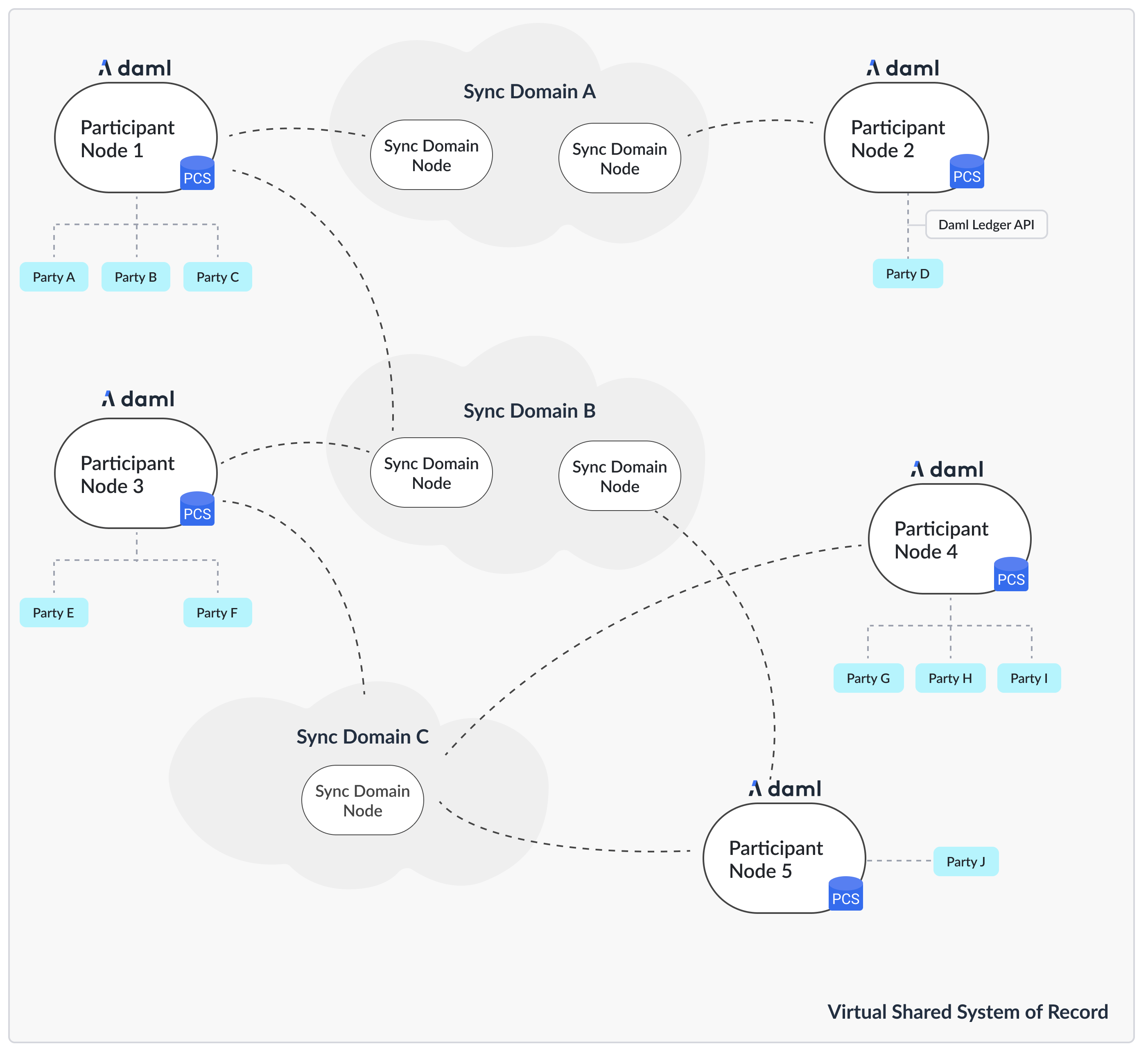
Daml代码运行在参与者节点上,表达各方之间的智能合约。聚会在参与者节点上托管。参与者节点通过同步器相互交换消息来将其状态与其他参与者节点同步。同步器是与底层存储技术(例如数据库或其他分布式账本)集成的节点。由于 Canton 协议的编写方式假设参与者节点彼此不信任,因此您通常会期望每个组织仅运行一个参与者节点,除非出于扩展目的。
如果你想为自己建立一个测试网络,你至少需要一个参与节点和一个同步器。
以下说明假设您正在运行发布包根目录中的所有命令:
cd ./canton-<type>-X.Y.Z配置目录内容
config 目录包含一组参考配置文件,每个节点类型一个:
.
└── config
      ├── shared.conf, sandbox.conf, participant.conf, sequencer.conf, mediator.conf
      ├── jwt
      ├── misc
      ├── monitoring
      ├── remote
      ├── storage
      ├── tls
└── utilsparticipant.conf:参与节点配置sequencer.conf、mediator.conf、manager.conf:用于 Daml Enterprise 同步器部署的排序器、中介器和管理器节点配置。sandbox.conf:连接到单个同步器节点的单个参与者节点的简单设置,使用内存存储进行测试。
此外,您还会发现以下文件和目录:* shared.conf:所有其他配置都包含的共享配置文件。
jwt:包含 Ledger API 的 JWT 配置文件。misc:包含对调试和开发有用的各种配置文件。monitoring:包含启用指标和跟踪的配置文件。remote:包含将 Canton 控制台连接到远程节点的配置文件。storage:包含各种存储选项的存储配置文件的目录。tls:包含各种API的TLS配置文件和生成测试证书的脚本。utils:包含实用脚本,主要用于设置数据库。
选择您的存储层
为了运行任何类型的节点,您需要决定如何以及是否要保留数据。您可以选择不保留数据,而是使用在节点重新启动时删除的内存存储,或者您可以使用 Postgres 数据库来保留数据。
为此,定义了一些存储混合配置(config/storage/)。
这些存储混合可以与任何节点配置一起使用。所有参考示例都包含config/shared.conf,默认情况下又包含postgres.conf。或者,内存中的配置开箱即用,无需进一步配置,但不会保留任何数据。您可以在config/shared.conf内更改包含内容。
mixin 通过定义共享变量来工作,该变量可以被任何节点配置引用
storage = ${_shared.storage}
storage.parameters.databaseName = "canton_participant"如果您看到以下错误:Could not resolve substitution to a value: ${_shared.storage},那么您忘记添加持久性 mixin 配置文件。
Canton 将为您管理数据库架构。您不需要创建任何表或索引。
使用 Postgres 进行持久化
虽然内存中非常适合测试和演示,但对于任何生产用途,您都需要使用数据库作为持久层。社区版和企业版都支持Postgres作为持久层。
确保您有正在运行的 Postgres 服务器。每个节点创建一个数据库。
Canton 在当前支持的 Postgres 版本 上进行了测试。有关用于测试特定 Canton 版本的特定 Postgres 版本,请参阅 Canton 发行说明。
创建数据库和用户在util/postgres中,您可以找到一个脚本db.sh,它可以帮助配置数据库,并可以选择启动基于Docker的Postgres实例。假设你已经安装了Docker,你可以运行:
cd ./config/util/postgres
./db.sh start [durable]
./db.sh setup
如果环境变量尚未设置连接设置,则 db.sh 将从 config/util/postgres/db.env 读取连接设置。该脚本将启动一个非持久的 Postgres 实例(如果您想在重新启动之间保留数据,请使用start durable),并创建config/util/postgres/databases中定义的数据库。
其他有用的命令有:
create-user:创建db.env中定义的用户。resume:恢复之前停止的基于 Docker 的 Postgres 实例。drop:删除已创建的数据库。
数据库字符编码
为了使 Canton 应用程序正常工作,您必须在 Postgres 中使用 UTF8 数据库服务器编码。这可以避免任何字符转换问题,例如无法在数据库中存储某些 UTF8 字符。如果服务器字符编码未设置为 UTF8,Canton 将在启动时报告错误日志消息。您可以通过 SQL 控制台(例如 psql)连接到数据库并发出 SHOW SERVER_ENCODING; 服务器编码在数据库初始化期间设置为从操作系统环境推导的默认值来检查 Postgres 数据库服务器编码,但这可以是覆盖。请参阅有关此主题的 Postgres 文档 了解更多信息。
配置连接
您可以通过编辑文件 config/storage/postgres.conf 或设置相应的环境变量来提供连接设置(请参阅需要设置的文件):
export POSTGRES_HOST="localhost"
export POSTGRES_USER="test-user"
export POSTGRES_PASSWORD="test-password"
export POSTGRES_DB=postgres
export POSTGRES_PORT=5432
调整数据库
请注意,Canton 需要适当大小且正确配置的数据库。请参阅 Postgres 性能指南以获取更多信息。
生成 TLS 证书
参考示例配置使用 TLS 来保护 API。您可以在config/tls找到配置文件。配置文件由不同的API分割。配置文件是:
tls-ledger-api.conf:Ledger API 的 TLS 配置,由参与者节点公开。mtls-admin-api.conf:管理 API 的 TLS 配置,由所有节点类型公开。tls-public-api.conf:公共 API 的 TLS 配置,由排序器和同步器节点公开。
公共 API 上的客户端身份验证是内置的,无法禁用。它使用与节点身份关联的特定签名密钥。 Ledger API 支持基于 JWT 的身份验证。在管理 API 上,您可以启用 mTLS。请参阅 TLS 文档部分以获取更多信息。如果您想从简单的设置开始,可以使用提供的脚本 config/tls/gen-test-certs.sh 生成一组自签名证书(其中必须包含节点将绑定到的地址的正确 SAN 条目)。
或者,您也可以通过注释掉相应配置文件中的 TLS 来跳过此步骤。
设置参与者
使用参考示例config/participant.conf启动您的参与者:
./bin/canton [daemon] -c config/participant.conf参数daemon是可选的。如果省略,节点将以交互式控制台启动。有各种可用的命令行选项,例如用于进一步调整日志记录配置。
这是启动您的参与者节点所需的一切。但是,为了保护参与者并使其可用,您需要执行一些步骤。
保护 API
- 默认情况下,Canton 中的所有 API 只能从本地主机访问。如果你想从其他机器连接到你的节点,你需要绑定到
0.0.0.0而不是 localhost。您可以通过在相应的 API 配置部分中设置address = 0.0.0.0或所需的网络名称来完成此操作。 - 所有节点均通过管理API进行管理。每当您使用控制台时,几乎所有请求都将通过管理 API。建议您按照 TLS 文档部分中的说明设置相互 TLS 身份验证。
- 应用程序和用户使用 gRPC Ledger API 与参与者节点交互。我们建议您使用 TLS 来保护您的 API。您还应该使用 JWT 令牌授权您的客户。参考配置包含
config/jwt中的一组配置文件,您可以将其用作起点。
配置应用程序、用户和连接
Canton 将静态配置与动态配置区分开来。
- 静态配置是不应更改的项目,因此会在配置文件中捕获。一个示例是绑定到哪个端口。
- 动态配置是诸如 Daml 档案 (DAR)、同步器连接或各方等项目。所有此类更改都是通过控制台命令(或管理 API)实现的。
如果您不知道如何连接到同步器、船上各方或提供 Daml 代码,请阅读入门指南。
设置同步器
您的参与者节点现在已准备好连接到其他参与者以形成分布式账本。连接由同步器促进,同步器由三个独立的进程形成:
- 一个排序器,负责对加密消息进行排序
- 调解员,负责汇总各个参与者的验证响应
- 同步器管理器,负责在拓扑更改(分布式配置更改)分发到同步器之前验证其有效性
这些节点不存储任何账本数据,只是促进参与者之间的通信。要设置同步器,您需要决定要为Sequencer使用哪种驱动程序。为不同的基础设施类型提供了驱动程序。这些司机在信任和绩效方面具有不同程度的保真度。您当前的选项如下:
1.基于Postgres的同步器 2. 原生 Canton BFT 驱动(用于 Canton Network)。
本节介绍如何设置基于 Postgres 的同步同步器。
使用微服务
如果您使用 Daml Enterprise,则可以将同步器进程作为单独的微服务启动:
./bin/canton daemon -c config/[mediator|sequencer|manager].conf在节点协同工作之前,需要对它们进行初始化和连接。请参阅有关如何引导同步器的详细指南。
通常,您可以使用嵌入式控制台(如果它们在同一进程中运行)或通过远程控制台连接节点:
./bin/canton -c config/remote/mediator.conf,config/remote/manager.conf,config/remote/sequencer.conf随后,只需运行 boostrap 命令:
bootstrap.synchronizer(
  synchronizerName = "da",
  sequencers = sequencers.all,
  mediators = mediators.all,
  synchronizerOwners = Seq(sequencer1),
  synchronizerThreshold = PositiveInt.one,
  staticSynchronizerParameters = StaticSynchronizerParameters.defaultsWithoutKMS(ProtocolVersion.latest),
)
连接参与者
最后一步是将参与者连接到同步器。有关详细说明,请参阅连接指南。在最简单的情况下,您只需在参与者的控制台中运行以下命令:
participant.synchronizers.connect("da", "https://localhost:10018", certificatesPath = "config/tls/root-ca.crt")该证书是明确提供的,因为默认情况下不信任自签名测试证书。
保护 API
- 与参与者节点一样,所有 API 默认绑定到 localhost。如果你想从其他机器连接到你的节点,你需要绑定到正确的接口或
0.0.0.0。 - 应使用客户端证书来保护管理 API,如 TLS 文档部分中所述。
- 公共 API 需要使用 TLS 进行适当的保护。请按照相应的说明进行操作。
多节点设置
如果需要,您可以在同一进程中运行多个节点。这便于测试和演示目的。您可以通过在同一配置文件中列出多个节点配置或通过使用多个单独的配置文件(合并在一起)调用 Canton 进程来实现此目的。
./bin/canton -c config/participant.conf -c config/sequencer.conf,config/mediator.conf -c config/manager.conf本文由 CC Privacy Club 根据 Canton Network 官方文档(CC-BY-4.0)整理翻译,仅供学习;实现细节以官方最新版本为准。