
使用 JSON Ledger API
在 Canton Network Quickstart 环境中使用 JSON Ledger API。
使用 JSON Ledger API
概览
你将扩展 CN Quickstart 以直接操作 LocalNet:以 OAuth2 编程创建 party、上传 DAR、创建合约并集成 Canton Coin(Amulet),掌握构建 CN 应用的关键 API 模式。
前置条件
本指南需要 Digital Asset Package Manager,安装见 DPM。
请完成 Quickstart 安装与演示教程;建议阅读开发者旅程以理解 Quickstart 如何为 CN 应用提供工具链。
LocalNet:演示 UI vs 开发者 API
演示中你通过 Web UI 使用 LocalNet;现在将通过 API 直接控制,为 ScratchNet、TestNet 等打下基础。
项目目录结构
CN Quickstart 目录结构:
   cn-quickstart/
   ├── daml/                  # daml contracts and project files
   │   ├── User.daml          # user management
   │   ├── Provider.daml      # license provider
   │   └── License.daml       # license management
   ├── backend/               # API integration points
   ├── frontend/              # UI
   └── config/                # LocalNet settings, including OAuth2 and port settings
主要在 daml/ 扩展许可合约(示例提及 LicenseHistory.daml 跟踪所有权转移)。
LocalNet 环境与认证
环境验证
Quickstart 应已构建并运行;用 make status 确认服务正常。

端口映射
安全说明
LocalNet 映射暴露 AdminAPI 与 Postgres 端口,公网有风险,本地开发有用;非本地部署勿暴露,可在 Docker 文件中移除 ports。
JSON API 端口
(2975、3975、4975):Daml 运维与合约部署
Validator API 端口
(2903、3903、4903):状态监控
OAuth2 与令牌管理
概览
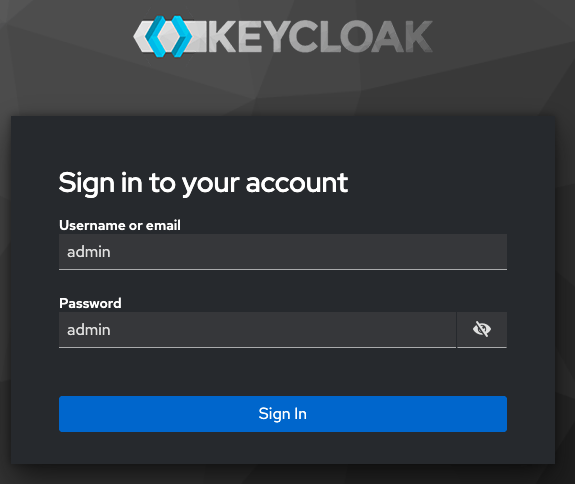
LocalNet 在 http://keycloak.localhost:8082 用 Keycloak OAuth2,realm 为 AppUser 与 AppProvider;可用 admin/admin 登录。详见 ref:keycloak-in-cnqs。
JSON API 教程
本教程用 API 模拟 Web 应用步骤:获取 JWT 作为 Bearer 调用 API;在 quickstart/ 启动应用与工具。
开始采集日志
make capture-logs
让 capture-logs 在单独终端运行;新终端 make start 后可作为工作终端;再开终端 lnav logs/*.clog 分析日志。若无 clog 可 make stop && make clean-all 后重启,或直接做账本交易以生成 clog。保持 lnav 运行。
lnav 指引
lnav 导航与自定义格式详见 Debugging and troubleshooting with lnav。
获取令牌
用 AppUser 验证者客户端获取令牌。
   export USER_ADMIN_TOKEN=$(curl -fsS "http://keycloak.localhost:8082/realms/AppUser/protocol/openid-connect/token" \
     -H "Content-Type: application/x-www-form-urlencoded" \
     -d "client_id=app-user-validator" \
     -d "client_secret=6m12QyyGl81d9nABWQXMycZdXho6ejEX" \
     -d "grant_type=client_credentials" \
     -d "scope=openid" | jq -r .access_token)
(client_secret 在 oauth2.env 与 AppUser-realm.json)
空返回表示成功。
验证令牌
echo $USER_ADMIN_TOKEN
使用令牌
列出已有 party,请求携带令牌
   curl -H "Authorization: Bearer $USER_ADMIN_TOKEN" \
     http://localhost:2975/v2/parties
在 lnav 中查看 Party 与 DSO
在 lnav 用 :filter-in 加 app provider 或 app user ID 查看 Party 活动。
:filter-in APP_PROVIDER_ID
亦可用 DSO ID 在 lnav 查看 DSO 活动。
:filter-in DSO_ID
将 app-provider、app-user 的 party 保存为 APP_PROVIDER_PARTY、APP_USER_PARTY。
   APP_PROVIDER_PARTY=$(curl -s -H "Authorization: Bearer $USER_ADMIN_TOKEN" http://localhost:2975/v2/parties | \
     jq -r '.partyDetails[] | select(.party | startswith("app_provider_quickstart-")) | .party')

   APP_USER_PARTY=$(curl -s -H "Authorization: Bearer $USER_ADMIN_TOKEN" http://localhost:2975/v2/parties | \
     jq -r '.partyDetails[] | select(.party | startswith("app_user_quickstart-")) | .party')

   echo "APP_PROVIDER_PARTY: $APP_PROVIDER_PARTY"
   echo "APP_USER_PARTY: $APP_USER_PARTY"
保存 DSO Party
   DSO_PARTY=$(curl -s "http://localhost:2975/v2/parties" \
     -H "Authorization: Bearer $USER_ADMIN_TOKEN" | \
     jq -r '.partyDetails[] | select(.party | startswith("DSO::")) | .party')
   echo "DSO Party: $DSO_PARTY"
现在可向 LocalNet 发起认证 JSON API 调用。
令牌管理排障
令牌会过期;若返回 Cannot iterate over null 或 401,请重新获取;生产模式见 splice-onboarding 工具脚本。
创建 party
在 AppUser 验证者创建新 party。
   curl -X POST http://localhost:2975/v2/parties \
     -H "Authorization: Bearer $USER_ADMIN_TOKEN" \
     -H "Content-Type: application/json" \
     -d '{
       "partyIdHint": "Alice"
     }'
partyIdHint 可任意命名;Canton 可能追加字符保证唯一。
成功响应:
   {
     "partyDetails": {
       "party": "Alice::122091f5d8d174bc0d624616d4f366904f8d4c56d56e33508878db3156c3dd9b8ae9",
       "isLocal": true,
       "localMetadata": { "resourceVersion": "0", "annotations": {} },
       "identityProviderId": ""
     }
   }
在 lnav 中查看 Alice
:filter-in: Alice
or
:filter-in: ALICE_ID
创建 party 常见问题
A security-sensitive error has been received or 401 Unauthorized: Token expired - regenerate with the OAuth2 command
INVALID_ARGUMENT, Party already exists, or 400 Bad Request: Party might already exist - check with:
   curl -X GET http://localhost:2975/v2/parties \
     -H "Authorization: Bearer $USER_ADMIN_TOKEN"
上传 DAR
向验证者上传预构建许可 DAR。
   curl -X POST http://localhost:2975/v2/packages \
     -H "Content-Type: application/octet-stream" \
     -H "Authorization: Bearer $USER_ADMIN_TOKEN" \
     --data-binary @./daml/licensing/.daml/dist/quickstart-licensing-0.0.1.dar
成功形如:
{}
DAR 上传问题
404:检查 DAR 路径;413:DAR 过大;409:包已上传;curl (52):网络问题可重试;详见 lnav 上传日志。
在 LocalNet 创建合约
检查 DAR 获取包哈希;保存 64 位十六进制 package ID。
dpm damlc inspect-dar daml/licensing/.daml/dist/quickstart-licensing-0.0.1.dar
建议复制粘贴该命令;若手输可能需完整路径。
所需值可能因 SDK 版本而异;在包列表中以项目名识别主包。
The format follows:
<project-name>-<version>-<package-id>At the time of publication, the repeating string of b59ffbf847ac36fee1a4a743864274c5d8ab6f02ea8899f49fb5347e9978543f is the project ID that we seek.
本教程查询 quickstart-licensing DAR 时可用 grep 快速保存 project ID:
   PACKAGE_ID=$(dpm damlc inspect-dar daml/licensing/.daml/dist/quickstart-licensing-0.0.1.dar | grep "quickstart-licensing-0.0.1-" | grep -v "dalf" | tail -1 | awk '{print $2}' | tr -d '"')

   echo $PACKAGE_ID
查询其他 DAR 请改文件路径。
在 lnav 按包 ID 过滤 DAR 活动
:filter-in PACKAGE_ID
创建合约
刷新令牌以查询 participant:
   USER_ADMIN_TOKEN=$(curl -fsS "http://keycloak.localhost:8082/realms/AppUser/protocol/openid-connect/token" \
     -H 'Content-Type: application/x-www-form-urlencoded' \
     -d 'client_id=app-user-validator' \
     -d 'client_secret=6m12QyyGl81d9nABWQXMycZdXho6ejEX' \
     -d 'grant_type=client_credentials' \
     -d 'scope=openid' | jq -r .access_token)
获取 PROVIDER_ADMIN_TOKEN
   PROVIDER_ADMIN_TOKEN=$(curl -f -s -S "http://keycloak.localhost:8082/realms/AppProvider/protocol/openid-connect/token" \
     -H 'Content-Type: application/x-www-form-urlencoded' \
     -d 'client_id=app-provider-validator' \
     -d 'client_secret=AL8648b9SfdTFImq7FV56Vd0KHifHBuC' \
     -d 'grant_type=client_credentials' \
     -d 'scope=openid' | jq -r .access_token)
获取用户令牌:
   USER_TOKEN=$(curl -f -s -S "http://keycloak.localhost:8082/realms/AppUser/protocol/openid-connect/token" \
     -H 'Content-Type: application/x-www-form-urlencoded' \
     -d 'client_id=app-user-unsafe' \
     -d 'username=app-user' \
     -d 'password=abc123' \
     -d 'grant_type=password' \
     -d 'scope=openid' | jq -r .access_token)
创建 AppInstallRequest:
   curl -X POST "http://localhost:2975/v2/commands/submit-and-wait" \
     -H "Authorization: Bearer $USER_TOKEN" \
     -H "Content-Type: application/json" \
     -d '{
       "commands": [{
         "CreateCommand": {
           "templateId": "'"$PACKAGE_ID"':Licensing.AppInstall:AppInstallRequest",
           "createArguments": {
             "provider": "'"$APP_PROVIDER_PARTY"'",
             "user": "'"$APP_USER_PARTY"'",
             "meta": {"values": {}}
           }
         }
       }],
       "workflowId": "install-request",
       "applicationId": "'"$APP_USER_ID"'",
       "commandId": "req-'"$(date +%s%N)"'",
       "deduplicationPeriod": {"Empty": {}},
       "actAs": ["'"$APP_USER_PARTY"'"],
       "readAs": [],
       "submissionId": "install-request",
       "disclosedContracts": [],
       "domainId": "",
       "packageIdSelectionPreference": []
     }'
返回表示你已通过 JSON API 在 LocalNet 创建首个合约!
返回类似:
   {
     "updateId": "122059bdefac3665d7a0e933017e8b4f68b5668945ca3ecca219bee89741f10b28b1",
     "completionOffset": 1666
   }
updateId:账本更新/交易唯一 ID,可用于日志追踪。completionOffset:交易在账本中的位置,例如 1666 表示该 participant 第 1666 笔交易。
在 lnav 过滤 AppInstallRequest 或 updateId 查看创建。
:filter-in AppInstallRequest
结果含 trace ID,可跟踪完整业务操作。

截图中 deb9fe66... 与 61af0b81... 为 trace ID 示例。
在 daml shell 访问合约
新终端在 quickstart/ 运行 make shell 打开 daml shell 查询合约。
查询 AppInstallRequest:
active quickstart-licensing:Licensing.AppInstall:AppInstallRequest

用显示的合约 ID 片段查看详情。
在 daml shell 运行 contract <ID>,可用 Tab 补全。
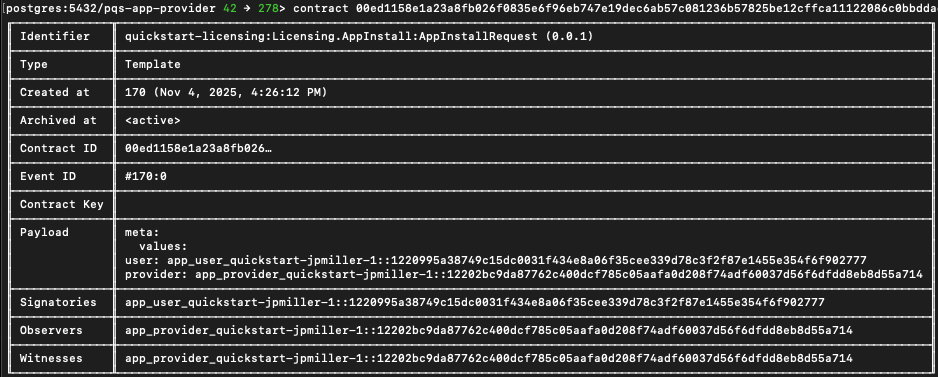
将合约 ID 保存为 INSTALL_REQ_CID。
INSTALL_REQ_CID="###"
查找 AppInstallRequest 合约
用 password grant 获取提供方用户令牌。
   PROVIDER_TOKEN=$(curl -f -s -S "http://keycloak.localhost:8082/realms/AppProvider/protocol/openid-connect/token" \
     -H 'Content-Type: application/x-www-form-urlencoded' \
     -d 'client_id=app-provider-unsafe' \
     -d 'username=app-provider' \
     -d 'password=abc123' \
     -d 'grant_type=password' \
     -d 'scope=openid' | jq -r .access_token)
对首个合约行使 Accept choice:
   JSON_PAYLOAD=$(cat <<EOF
   {
     "commands": [{
       "ExerciseCommand": {
         "templateId": "$PACKAGE_ID:Licensing.AppInstall:AppInstallRequest",
         "contractId": "$INSTALL_REQ_CID",
         "choice": "AppInstallRequest_Accept",
         "choiceArgument": {
           "installMeta": {"values": {}},
           "meta": {"values": {}}
         }
       }
     }],
     "workflowId": "accept-install",
     "applicationId": "app-provider-app",
     "commandId": "accept-$(date +%s%N)",
     "actAs": ["$APP_PROVIDER_PARTY"],
     "readAs": [],
     "submissionId": "accept-install",
     "disclosedContracts": [],
     "domainId": "",
     "packageIdSelectionPreference": []
   }
   EOF
   )

   curl -X POST "http://localhost:3975/v2/commands/submit-and-wait" \
     -H "Authorization: Bearer $PROVIDER_TOKEN" \
     -H "Content-Type: application/json" \
     -d "$JSON_PAYLOAD"
成功类似 {"updateId":"...","completionOffset":109}
See the contract in lnav
:filter-in appinstallrequest
Accept choice 只能行使一次,之后合约已接受会报错。
Generate a token for the app provider
   PROVIDER_ADMIN_TOKEN=$(curl -fsS "http://keycloak.localhost:8082/realms/AppProvider/protocol/openid-connect/token" \
     -H 'Content-Type: application/x-www-form-urlencoded' \
     -d 'client_id=app-provider-validator' \
     -d 'client_secret=AL8648b9SfdTFImq7FV56Vd0KHifHBuC' \
     -d 'grant_type=client_credentials' \
     -d 'scope=openid' | jq -r .access_token)
检查 app-provider 用户是否存在
   curl -s "http://localhost:3975/v2/users" \
     -H "Authorization: Bearer $PROVIDER_ADMIN_TOKEN" | jq '.users[] | select(.metadata.annotations.username == "app-provider")'
若存在则获取 party 并验证(失败请回顾前面步骤):
   APP_PROVIDER_USER_ID=$(curl -s "http://localhost:3975/v2/users" \
     -H "Authorization: Bearer $PROVIDER_ADMIN_TOKEN" | \
     jq -r '.users[] | select(.metadata.annotations.username == "app-provider") | .id')

   echo "APP_PROVIDER_USER_ID: $APP_PROVIDER_USER_ID"
APP_PROVIDER_USER_ID 应等于 “id” 值。
在 daml shell 查询 AppInstall 合约 ID
active quickstart-licensing:Licensing.AppInstall:AppInstall
Use the contract command as before to isolate and copy the complete contract id.
回到 shell 终端
APP_INSTALL_CID="..."
可验证变量已设置:
   echo "User Party: $APP_USER_PARTY"
   echo "Provider Party: $APP_PROVIDER_PARTY"
   echo "App Provider User ID: $APP_PROVIDER_USER_ID"
   echo "Provider Token: ${PROVIDER_TOKEN:0:50}..."
   echo "Package ID: $PACKAGE_ID"
   echo "DSO Party: $DSO_PARTY"
   echo "Contract ID: $APP_INSTALL_CID"
检查令牌有效
   curl -s "http://localhost:3975/v2/users/$APP_PROVIDER_USER_ID" \
     -H "Authorization: Bearer $PROVIDER_TOKEN" | jq .
有效令牌显示提供方元数据。
无效令牌可能显示 security-sensitive error
   curl -s "http://localhost:3975/v2/users/$APP_PROVIDER_USER_ID" \
     -H "Authorization: Bearer $PROVIDER_TOKEN" | jq
必要时重新生成会话并再次验证。
   PROVIDER_TOKEN=$(curl -f -s -S "http://keycloak.localhost:8082/realms/AppProvider/protocol/openid-connect/token" \
     -H 'Content-Type: application/x-www-form-urlencoded' \
     -d 'client_id=app-provider-unsafe' \
     -d 'username=app-provider' \
     -d 'password=abc123' \
     -d 'grant_type=password' \
     -d 'scope=openid' | jq -r .access_token)
行使 CreateLicense
   JSON_PAYLOAD=$(cat <<EOF
   {
     "commands": [{
       "ExerciseCommand": {
         "templateId": "$PACKAGE_ID:Licensing.AppInstall:AppInstall",
         "contractId": "$APP_INSTALL_CID",
         "choice": "AppInstall_CreateLicense",
         "choiceArgument": {
           "params": {
             "meta": {"values": {}}
           }
         }
       }
     }],
     "workflowId": "create-license",
     "applicationId": "app-provider-app",
     "commandId": "license-$(date +%s%N)",
     "actAs": ["$APP_PROVIDER_PARTY"],
     "readAs": [],
     "submissionId": "create-license",
     "disclosedContracts": [],
     "domainId": "",
     "packageIdSelectionPreference": []
   }
   EOF
   )

   curl -X POST "http://localhost:3975/v2/commands/submit-and-wait" \
     -H "Authorization: Bearer $PROVIDER_TOKEN" \
     -H "Content-Type: application/json" \
     -d "$JSON_PAYLOAD"
若报 Contract could not be found,说明 contractId 变量不正确。
{"code":"CONTRACT_NOT_FOUND","cause":"Contract could not be found with id 0093e43a6fe746a56fb38e02f897194764150545917f127c6eb2c96b69976d83f6ca111220e6f80978587f7b7cd8ebbd8e176b2bb976fc3a6d3c6762d6fb8aad8e3c210b9f","correlationId":"create-license","traceId":"1e8a0ba16a95ef0881b1edb46b6f177a","context":{"participant":"'app-provider'","category":"11","tid":"1e8a0ba16a95ef0881b1edb46b6f177a","definite_answer":"false","commands":"{readAs: [], deduplicationPeriod: {duration: 'PT30S'}, submittedAt: '2025-10-28T16:20:38.735022Z', submissionId: 'create-license', actAs: ['app_provider_quickstart-jpmiller-1::1220349240f3f941ea497e05c40ae2497f1f2684706c0212e8cba854510332676ed6'], commandId: 'license-1761668438670963000', userId: '553c6754-8879-41c9-ae80-b302f5af92c9', workflowId: 'create-license'}"},"resources":[["ErrorResource(CID)","0093e43a6fe746a56fb38e02f897194764150545917f127c6eb2c96b69976d83f6ca111220e6f80978587f7b7cd8ebbd8e176b2bb976fc3a6d3c6762d6fb8aad8e3c210b9f"]],"errorCategory":11,"grpcCodeValue":5,"retryInfo":null,"definiteAnswer":null}%
成功返回新 updateId 与 completionOffset。
{"updateId":"12209864eb06a5407b006e1ded12dbfa495bfedef74463a314000bbbd9e2e412d27e","completionOffset":2559}%
在 lnav 查看 AppInstall
:filter-in appinstall
在 daml shell 获取 License 合约 ID
回到 daml shell 获取 License 合约 ID。
active quickstart-licensing:Licensing.License:License
复制完整合约 ID 回到工作终端。
contract ###...
保存许可合约 ID
LICENSE_CID="..."
生成唯一续期请求
   REQUEST_ID=$(uuidgen)
   REQUESTED_AT=$(date -u +"%Y-%m-%dT%H:%M:%SZ")
   PREPARE_UNTIL=$(date -u -v+60M +"%Y-%m-%dT%H:%M:%SZ")
   SETTLE_BEFORE=$(date -u -v+90M +"%Y-%m-%dT%H:%M:%SZ")
设置许可延期
   LICENSE_EXTENSION_DAYS=30
   LICENSE_EXTENSION_MICROSECONDS=$((LICENSE_EXTENSION_DAYS * 24 * 60 * 60 * 1000000))
创建许可续期请求
若遇 security-sensitive error 请按前述刷新令牌。
可先刷新令牌以防过期。
   PROVIDER_TOKEN=$(curl -f -s -S "http://keycloak.localhost:8082/realms/AppProvider/protocol/openid-connect/token" \
     -H 'Content-Type: application/x-www-form-urlencoded' \
     -d 'client_id=app-provider-unsafe' \
     -d 'username=app-provider' \
     -d 'password=abc123' \
     -d 'grant_type=password' \
     -d 'scope=openid' | jq -r .access_token)
Set the COMMAND_ID variable
COMMAND_ID="complete-$(date +%s%N)"
须在 15 分钟内分配代币,30 分钟内完成续期请求。
   JSON_PAYLOAD=$(cat <<EOF
   {
     "commands": [{
       "ExerciseCommand": {
         "templateId": "$PACKAGE_ID:Licensing.License:License",
         "contractId": "$LICENSE_CID",
         "choice": "License_Renew",
         "choiceArgument": {
           "requestId": "$REQUEST_ID",
           "licenseFeeInstrumentId": {
             "admin": "$DSO_PARTY",
             "id": "Amulet"
           },
           "licenseFeeAmount": "100.0",
           "licenseExtensionDuration": {
             "microseconds": $LICENSE_EXTENSION_MICROSECONDS
           },
           "requestedAt": "$REQUESTED_AT",
           "prepareUntil": "$PREPARE_UNTIL",
           "settleBefore": "$SETTLE_BEFORE",
           "description": "License renewal payment"
         }
       }
     }],
     "workflowId": "renew-license",
     "applicationId": "app-provider-app",
     "commandId": "$COMMAND_ID",
     "actAs": ["$APP_PROVIDER_PARTY"],
     "readAs": [],
     "submissionId": "renew-license",
     "disclosedContracts": [],
     "domainId": "",
     "packageIdSelectionPreference": []
   }
   EOF
   )

   curl -X POST "http://localhost:3975/v2/commands/submit-and-wait" \
     -H "Authorization: Bearer $PROVIDER_TOKEN" \
     -H "Content-Type: application/json" \
     -d "$JSON_PAYLOAD"
成功形如: {"updateId":"122067883fdbb23d7395fabab7fc44703b3d588e44924fe1d33b45eebc116ecd94a5","completionOffset":220}%
LicenseRenewalRequest
Return to daml shell to get the LicenseRenewalRequest contract ID
active quickstart-licensing:Licensing.License:LicenseRenewalRequest
Execute the contract command to see the LicenseRenewalRequest contract details.
contract ###...
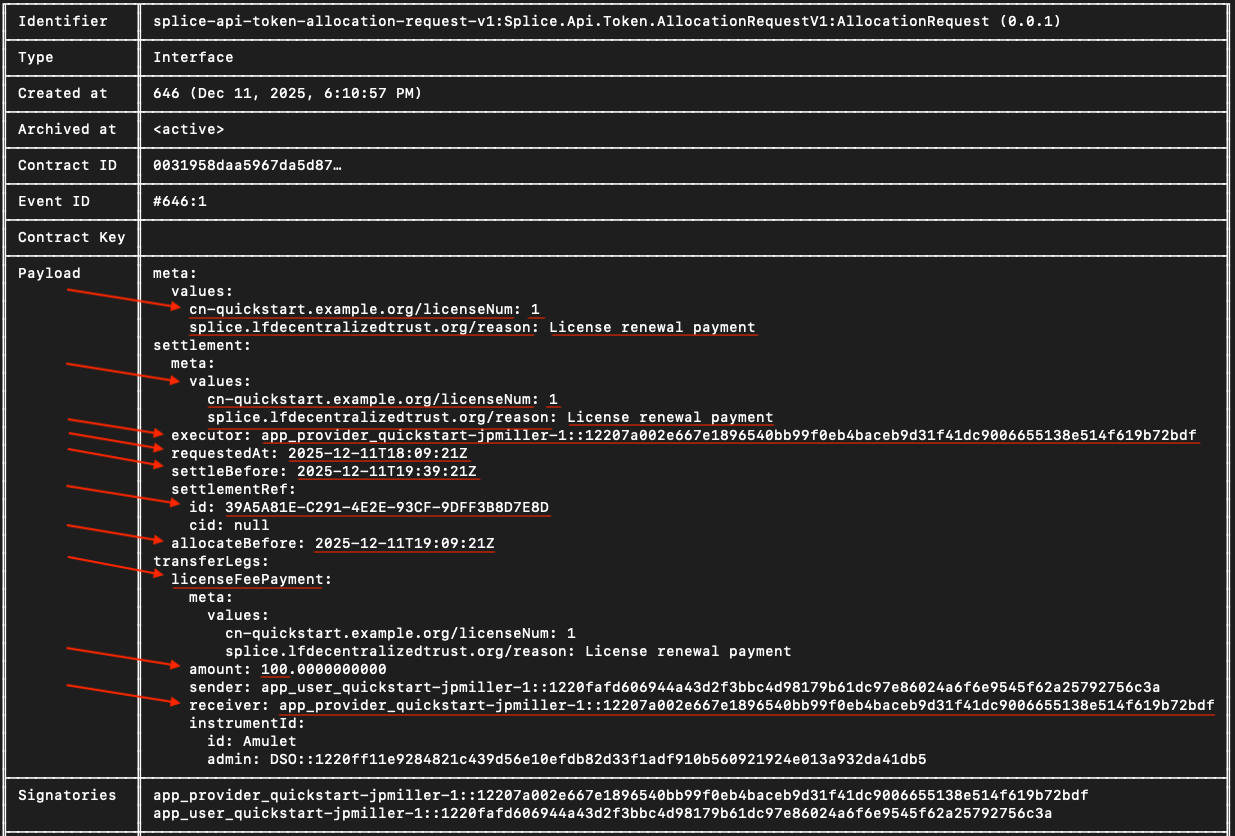
Take note of the Payload field. You’ll use the metadata values to send the payment allocation in a future step.
Go back to the terminal and create a new RENEWAL_REQ_CID variable
RENEWAL_REQ_CID="###"
回到 daml shell
LicenseRenewalRequest implements the AllocationRequest interface.
用户须分配 100 CC 完成付款。
active splice-api-token-holding-v1:Splice.Api.Token.HoldingV1:Holding
If the return shows “<empty>”, wait a couple minutes and try again. (It can take up to 15 minutes). This is normal Canton Network behavior due to how the Participant Query Store (PQS) works. Before the holding, or any other on-ledger activity shows in the daml shell, the transaction must be processed on the ledger, PQS polls the participant for new events and updates its database, and after the sync completes the queries return the new data.
此步骤 amount 须大于 100。
LocalNet 中 Canton 钱包每轮自动补充代币;不足 100 时通常稍等即可。
可选:用 Holding 合约 ID 查看更多详情。
以 app-user / abc123 登录
演示中 Web 应用后端代为完成分配;现需手动填写分配请求。
即使 UI 已有请求,仍须为 daml shell 中的 allocation 合约手动创建分配。
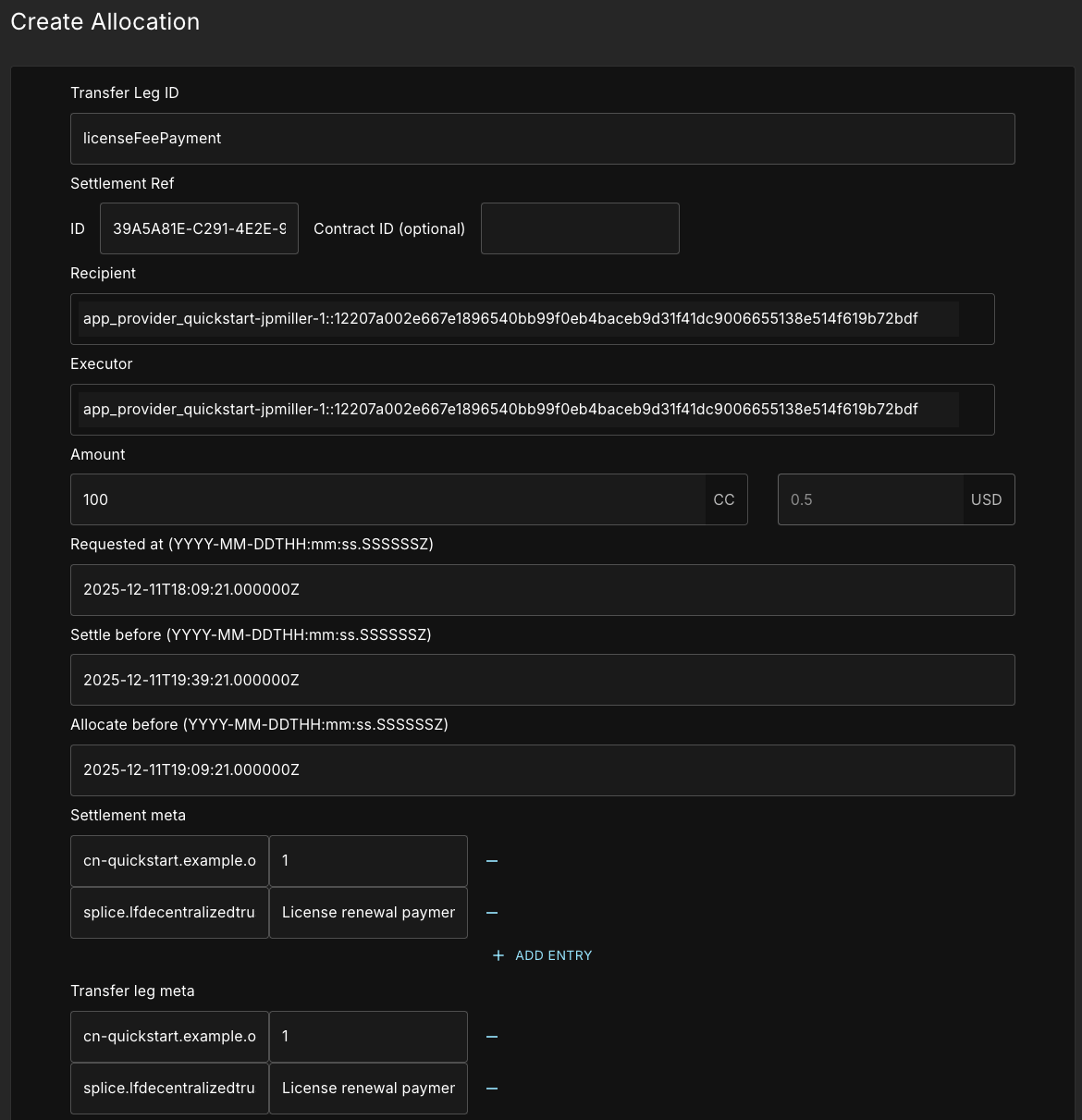
用上文 Payload 元数据填写标红字段。
- Transfer Leg ID:
licenseFeePayment - Settlement Ref ID:
settlementRef.id - Recipient:
receiver - Executor:
executor - Amount:
100 - Requested At:
requestedAt - Settle before:
settleBefore - Allocate before:
allocateBefore
Add two custom entries for the Settlement meta and Transfer leg meta, each.
- Key:
cn-quickstart.example.org/licenseNum - Value:
1 - Key:
splice.lfdecentralizedtrust.org/reason - Value:
License renewal payment
值勿加引号;Canton 钱包会转义引号。
两对键值须分别填入两个 meta。
所需信息见 daml shell 中 LicenseRenewalRequest 的 payload。
时间字段须在 Z 前加 . 及六个 0,例如 2025-10-29T20:38:16.000000Z。
For example, requestedAt: 2025-10-29T20:38:16Z becomes 2025-10-29T20:38:16.000000Z
信息填完后发送请求。
遇安全敏感错误时刷新提供方令牌
令牌会过期,属安全措施。
   PROVIDER_TOKEN=$(curl -f -s -S "http://keycloak.localhost:8082/realms/AppProvider/protocol/openid-connect/token" \
     -H 'Content-Type: application/x-www-form-urlencoded' \
     -d 'client_id=app-provider-unsafe' \
     -d 'username=app-provider' \
     -d 'password=abc123' \
     -d 'grant_type=password' \
     -d 'scope=openid' | jq -r .access_token)
回到终端获取用户令牌
   USER_TOKEN=$(curl -f -s -S "http://keycloak.localhost:8082/realms/AppUser/protocol/openid-connect/token" \
     -H 'Content-Type: application/x-www-form-urlencoded' \
     -d 'client_id=app-user-unsafe' \
     -d 'username=app-user' \
     -d 'password=abc123' \
     -d 'grant_type=password' \
     -d 'scope=openid' | jq -r .access_token)
查找 Allocation 合约 ID
Query for the allocation in daml shell
active splice-api-token-allocation-v1:Splice.Api.Token.AllocationV1:Allocation
Save the allocation contract ID as ALLOCATION_CID=”###”
确认续期请求、allocation、许可合约 ID 互不相同;可与 daml shell 对照。
   echo "Renewal Request: $RENEWAL_REQ_CID"
   echo "Allocation: $ALLOCATION_CID"
   echo "License: $LICENSE_CID"
   echo "User Party: $APP_USER_PARTY"
   echo "Provider Party: $APP_PROVIDER_PARTY"
   echo "App Provider User ID: $APP_PROVIDER_USER_ID"
   echo "Provider Token: ${PROVIDER_TOKEN:0:50}..."
   echo "Package ID: $PACKAGE_ID"
   echo "DSO Party: $DSO_PARTY"
   echo "Contract ID: $APP_INSTALL_CID"
刷新令牌
   PROVIDER_TOKEN=$(curl -fsS "http://keycloak.localhost:8082/realms/AppProvider/protocol/openid-connect/token" \
     -H 'Content-Type: application/x-www-form-urlencoded' \
     -d 'client_id=app-provider-unsafe' \
     -d 'username=app-provider' \
     -d 'password=abc123' \
     -d 'grant_type=password' \
     -d 'scope=openid' | jq -r .access_token)
生成唯一 command ID
COMMAND_ID="complete-renewal-$(date +%s%N)"
设置 complete-renewal 后端端点
此步骤需后端:DSO 与用户交换的 lockedAmulet 信息对提供方不可见,daml shell 无法获取。
ENDPOINT="http://localhost:8080/licenses/${LICENSE_CID}:complete-renewal"
创建请求体变量
   REQUEST_BODY=$(cat <<EOF
   {
     "renewalRequestContractId": "$RENEWAL_REQ_CID",
     "allocationContractId": "$ALLOCATION_CID"
   }
   EOF
   )
请求完成许可续期
   RESPONSE=$(curl -s -v -X POST "$ENDPOINT?commandId=$COMMAND_ID" \
     -H "Authorization: Bearer $PROVIDER_TOKEN" \
     -H "Content-Type: application/json" \
     -d "$REQUEST_BODY")


   echo "$RESPONSE" | jq .
成功返回 licenseId
   {
     "licenseId": "###"
   }
成功后回到 daml shell 用返回的 licenseId 运行 contract 命令。
contract ###...
Payload 中 expiresAt 约为 30 天后。
恭喜!你已通过 JSON API 在 Quickstart 完成完整业务操作(complete-renewal 需后端补充 PQS 不可用信息)。
附录
用户令牌与 ID 手册
   #!/bin/bash
   # Complete LocalNet Setup Script


   # 1. Get Admin Tokens (for querying users)
   USER_ADMIN_TOKEN=$(curl -fsS "http://keycloak.localhost:8082/realms/AppUser/protocol/openid-connect/token" \
     -H 'Content-Type: application/x-www-form-urlencoded' \
     -d 'client_id=app-user-validator' \
     -d 'client_secret=6m12QyyGl81d9nABWQXMycZdXho6ejEX' \
     -d 'grant_type=client_credentials' \
     -d 'scope=openid' | jq -r .access_token)


   PROVIDER_ADMIN_TOKEN=$(curl -fsS "http://keycloak.localhost:8082/realms/AppProvider/protocol/openid-connect/token" \
     -H 'Content-Type: application/x-www-form-urlencoded' \
     -d 'client_id=app-provider-validator' \
     -d 'client_secret=AL8648b9SfdTFImq7FV56Vd0KHifHBuC' \
     -d 'grant_type=client_credentials' \
     -d 'scope=openid' | jq -r .access_token)


   # 2. Discover User IDs and Party IDs
   APP_USER_USER_ID=$(curl -s "http://localhost:2975/v2/users" \
     -H "Authorization: Bearer $USER_ADMIN_TOKEN" | \
     jq -r '.users[] | select(.metadata.annotations.username == "app-user") | .id')


   APP_USER_PARTY=$(curl -s "http://localhost:2975/v2/users/$APP_USER_USER_ID" \
     -H "Authorization: Bearer $USER_ADMIN_TOKEN" | jq -r '.user.primaryParty')


   APP_PROVIDER_USER_ID=$(curl -s "http://localhost:3975/v2/users" \
     -H "Authorization: Bearer $PROVIDER_ADMIN_TOKEN" | \
     jq -r '.users[] | select(.metadata.annotations.username == "app-provider") | .id')


   APP_PROVIDER_PARTY=$(curl -s "http://localhost:3975/v2/users/$APP_PROVIDER_USER_ID" \
     -H "Authorization: Bearer $PROVIDER_ADMIN_TOKEN" | jq -r '.user.primaryParty')


   # 3. Get User Tokens (for party operations)
   USER_TOKEN=$(curl -f -s -S "http://keycloak.localhost:8082/realms/AppUser/protocol/openid-connect/token" \
     -H 'Content-Type: application/x-www-form-urlencoded' \
     -d 'client_id=app-user-unsafe' \
     -d 'username=app-user' \
     -d 'password=abc123' \
     -d 'grant_type=password' \
     -d 'scope=openid' | jq -r .access_token)


   PROVIDER_TOKEN=$(curl -f -s -S "http://keycloak.localhost:8082/realms/AppProvider/protocol/openid-connect/token" \
     -H 'Content-Type: application/x-www-form-urlencoded' \
     -d 'client_id=app-provider-unsafe' \
     -d 'username=app-provider' \
     -d 'password=abc123' \
     -d 'grant_type=password' \
     -d 'scope=openid' | jq -r .access_token)


   # 4. Get Package ID
   PACKAGE_ID=$(dpm damlc inspect-dar daml/licensing/.daml/dist/quickstart-licensing-0.0.1.dar | \
     grep "quickstart-licensing-0.0.1-" | grep -v "dalf" | tail -1 | awk '{print $2}' | tr -d '"')


   # 5. Display all variables
   echo "=== Setup Complete ==="
   echo "APP_USER_USER_ID: $APP_USER_USER_ID"
   echo "APP_USER_PARTY: $APP_USER_PARTY"
   echo "APP_PROVIDER_USER_ID: $APP_PROVIDER_USER_ID"
   echo "APP_PROVIDER_PARTY: $APP_PROVIDER_PARTY"
   echo "PACKAGE_ID: $PACKAGE_ID"
   echo ""
   echo "Tokens set (first 50 chars):"
   echo "USER_TOKEN: ${USER_TOKEN:0:50}..."
   echo "PROVIDER_TOKEN: ${PROVIDER_TOKEN:0:50}..."


   # Check if the user exists on the participant
   curl "http://localhost:2975/v2/users/92a520cb-2f09-4e55-b465-d178c6cfe5e4" \
     -H "Authorization: Bearer $USER_ADMIN_TOKEN"
默认暴露的额外端口
Ledger API ports (2901、3901、4901):Canton Ledger API
Admin API ports (2902、3902、4902):系统管理
健康检查
健康检查端点见 quickstart/docker/modules/localnet/docker/splice/health-check.sh。
空响应表示健康。
curl -f http://localhost:2903/api/validator/readyz  # App User
curl -f http://localhost:3903/api/validator/readyz  # App Provider
curl -f http://localhost:4903/api/validator/readyz  # Super Validator
访问 admin 端口
Admin ports are defined in quickstart/docker/modules/localnet/compose.yaml
   curl -v http://localhost:2902/admin    # Would access App User admin if exposed
   curl -v http://localhost:3902/admin    # Would access App Provider admin if exposed
查看令牌中的 Ledger API claims
echo $USER_TOKEN | cut -d. -f2 | base64 -d 2>/dev/null | jq '."https://daml.com/ledger-api"'
如何发现用户与提供方 ID
AppUser and AppProvider validator, wallet admin, and other IDs are located in their respective oauth2.env files.
   # 1. Get admin token for the participant
   USER_ADMIN_TOKEN=$(curl -fsS "http://keycloak.localhost:8082/realms/AppUser/protocol/openid-connect/token" \
     -H 'Content-Type: application/x-www-form-urlencoded' \
     -d 'client_id=app-user-validator' \
     -d 'client_secret=6m12QyyGl81d9nABWQXMycZdXho6ejEX' \
     -d 'grant_type=client_credentials' \
     -d 'scope=openid' | jq -r .access_token)
   # 2. List all users to discover the wallet admin user
   curl -s "http://localhost:2975/v2/users" \
     -H "Authorization: Bearer $USER_ADMIN_TOKEN" | jq '.users[] | select(.metadata.annotations.username == "app-user")'
   # 3. Extract the user ID from the result
   APP_USER_ID=$(curl -s "http://localhost:2975/v2/users" \
     -H "Authorization: Bearer $USER_ADMIN_TOKEN" | jq -r '.users[] | select(.metadata.annotations.username == "app-user") | .id')
   # 4. Get the party ID for that user
   APP_USER_PARTY=$(curl -s "http://localhost:2975/v2/users/$APP_USER_ID" \
     -H "Authorization: Bearer $USER_ADMIN_TOKEN" | jq -r '.user.primaryParty')
本文由 CC Privacy Club 根据 Canton Network 官方文档(CC-BY-4.0)整理翻译,仅供学习;实现细节以官方最新版本为准。