
Canton Configuration Guide
Documentation Index
Fetch the complete documentation index at: https://docs.canton.network/llms.txt Use this file to discover all available pages before exploring further.
Canton Configuration Guide
Configure Canton nodes using HOCON files, command-line options, and declarative configuration
Explain the difference between static and dynamic configuration. Move out specific configuration parts from here to their howto sections, such as multi-synchronizer below.
Set Configuration Options
Canton differentiates between static and dynamic configuration. Static configuration is immutable and therefore has to be known from the beginning of the process. For a static configuration, examples would be the connectivity parameters to the local persistence store or the port the admin-apis should bind to. On the other hand, connecting to a synchronizer or adding parties are not matters of static configuration and therefore are not set via the config file but through console commands (or the administration APIs).
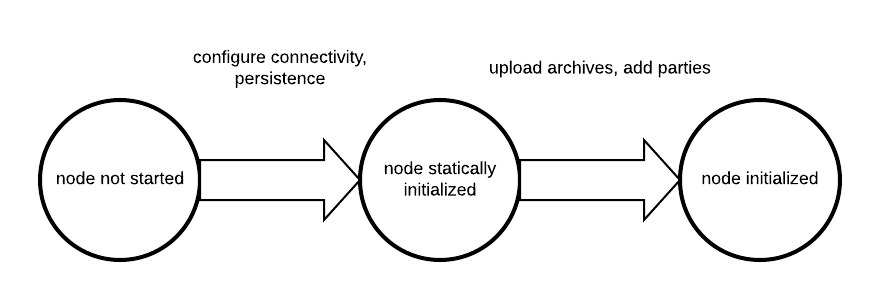
The configuration files themselves are written in HOCON format with some extensions:
- Durations are specified scala durations using a
<length><unit>format. Valid units are defined by scala directly, but behave as expected usingms,s,m,h,dto refer to milliseconds, seconds, minutes, hours and days. Durations have to be non-negative in our context.
Canton does not run one node, but any number of nodes, be it synchronizers or participant nodes in the same process. Therefore, the root configuration allows to define several instances of synchronizers and participant nodes together with a set of general process parameters.
A sample configuration file for two participant nodes and a single synchronizer can be seen below.
  canton {
    // user-manual-entry-begin: SimpleSequencerNodeConfig
    sequencers {
      sequencer1 {
        storage.type = memory
        public-api.port = 5001
        admin-api.port = 5002
        sequencer.type = BFT
      }
    }
    // user-manual-entry-end: SimpleSequencerNodeConfig

    // user-manual-entry-begin: SimpleMediatorNodeConfig
    mediators {
      mediator1 {
        storage.type = memory
        admin-api.port = 5202
      }
    }
    // user-manual-entry-end: SimpleMediatorNodeConfig

    participants {
      // user-manual-entry-begin: port configuration
      participant1 {
        storage.type = memory
        admin-api.port = 5012
        ledger-api.port = 5011
        http-ledger-api.port = 5013
      }
      // user-manual-entry-end: port configuration
      participant2 {
        storage.type = memory
        admin-api.port = 5022
        ledger-api.port = 5021
        http-ledger-api.port = 5023
      }
    }
  }
Configuration reference
The Canton configuration file for static properties is based on PureConfig. PureConfig maps Scala case classes and their class structure into analogue configuration options (see e.g. the PureConfig quick start for an example). Therefore, the ultimate source of truth for all available configuration options and the configuration file syntax is given by the CantonConfig Scala reference and the related types in com.digitalasset.canton.config.
When understanding the mapping from scaladocs to configuration, please keep in mind that:
- CamelCase Scala names are mapped to lowercase-with-dashes names in configuration files, e.g.
synchronizerParametersin the scaladocs becomessynchronizer-parametersin a configuration file (dash, not underscore). Option[<scala-class>]means that the configuration can be specified but doesn’t need to be, e.g. you can specify a JWT token viatoken=tokenin RemoteParticipantConfig, but not specifyingtokenis also valid.
Configuration Compatibility
The enterprise edition configuration files extend the community configuration. As such, any community configuration can run with an enterprise binary, whereas not every enterprise configuration file will also work with community versions.
Advanced Configurations
Configuration files can be nested and combined together. First, using the include required directive (with relative paths), a configuration file can include other configuration files.
canton {
    synchronizers {
        include required(file("synchronizer1.conf"))
    }
}
The required keyword will trigger an error, if the included file does not exist; without the required keyword, any missing files will be silently ignored. The file keyword instructs the configuration parser to interpret its argument as a file name; without this keyword, the parser may interpret the given name as a URL or classpath resource. By using the file keyword, you will also get the most intuitive semantics and most stable semantics of include. The precise rules for resolving relative paths can be found here.
Second, by providing several configuration files, we can override configuration settings using explicit configuration option paths:
canton.participants.myparticipant.admin-api.port = 11234If the same key is included in multiple configurations, then the last definition has highest precedence.
Furthermore, HOCON supports substituting environment variables for config values using the syntax key = ${ENV_VAR_NAME} or optional substitution key = ${?ENV_VAR_NAME}, where the key will only be set if the environment variable exists.
Configuration Mixin
Even more than multiple configuration files, we can leverage PureConfig to create shared configuration items that refer to environment variables. A handy example is the following, which allows for sharing database configuration settings in a setup involving several synchronizers or participant nodes:
# Postgres persistence configuration mixin
#
# This file defines a shared configuration resources. You can mix it into your configuration by
# refer to the shared storage resource and add the database name.
#
# Example:
#   participant1 {
#     storage = ${_shared.storage}
#     storage.config.properties.databaseName = "participant1"
#   }
#
# The user and password is not set. You want to either change this configuration file or pass
# the settings in via environment variables POSTGRES_USER and POSTGRES_PASSWORD.
#
_shared {
    storage {
        type = postgres
        config {
            dataSourceClass = "org.postgresql.ds.PGSimpleDataSource"
            properties = {
                serverName = "localhost"
                # the next line will override above "serverName" in case the environment variable POSTGRES_HOST exists
                # which makes it optional
                serverName = ${?POSTGRES_HOST}
                portNumber = "5432"
                portNumber = ${?POSTGRES_PORT}
                # user and password are required
                user = ${POSTGRES_USER}
                password = ${POSTGRES_PASSWORD}
            }
        }
        parameters {
            # If defined, will configure the number of database connections per node.
            # Please note that the number of connections can be fine tuned for participant nodes (see participant.conf)
            max-connections = ${?POSTGRES_NUM_CONNECTIONS}
            # If true, then database migrations will be applied on startup automatically
            # Otherwise, you will have to run the migration manually using participant.db.migrate()
            migrate-and-start = false
            # If true (default), then the node will fail to start if it can not connect to the database.
            # The setting is useful during initial deployment to get immediate feedback when the
            # database is not available.
            # In a production setup, you might want to set this to false to allow uncoordinated startups between
            # the database and the node.
            fail-fast-on-startup = true
        }
    }
}
Such a definition can subsequently be referenced in the actual node definition:
canton {
    synchronizers {
        mysynchronizer {
            storage = ${_shared.storage}
            storage.config.properties.databaseName = ${CANTON_DB_NAME_SYNCHRONIZER}
        }
    }
}
Multiple Synchronizers
A Canton configuration allows you to define multiple synchronizers. Also, a Canton participant can connect to multiple synchronizers. This is however only supported as a preview feature and not yet suitable for production use.
In particular, contract key uniqueness cannot be enforced over multiple synchronizers. In this situation, you must turn off contract key uniqueness in the Canton configuration. Please note that the setting is final and cannot be changed subsequently. We will provide a migration path once multi-synchronizer functionality is fully implemented.
Fail Fast Mode
By default, Canton will fail to start if it cannot access some external dependency such as the database. This is preferable during initial deployment and development, as it provides instantaneous feedback, but can cause problems in production. As an example, if Canton is started with a database in parallel, the Canton process would fail if the database is not ready before the Canton process attempts to access it. To avoid this problem, you can configure a node to wait indefinitely for an external dependency such as a database to start. The config option below will disable the “fail fast” behavior for participant1.
canton.participants.participant1.storage.parameters.fail-fast-on-startup = "no"
This option should be used with care as, by design, it can cause infinite, noisy waits.
Init Configuration
Some configuration values are only used during the first initialization of a node and cannot be changed afterwards. These values are located under the init section of the relevant configuration of the node. Below is an example with some init values for a participant config
participant1 {
  init {
    // example settings
    ledger-api.max-deduplication-duration = 1 minute
    identity.node-identifier.type = random
  }
}
The option ledger-api.max-deduplication-duration sets the maximum deduplication duration that the participant uses for command deduplication.
{/* COPIED_START source=“docs-website:docs/replicated/canton/3.4/participant/howtos/configure/general/command_line.rst” hash=“5d37a7f5” */}
Use the Canton Command Line
Canton supports a variety of command line arguments. Please run bin/canton --help to see all of them. Here, we explain the most relevant ones.
Selecting a Configuration
Canton requires a configuration file to run. There is no default topology configuration built in and therefore, the user needs to at least define what kind of node (synchronizer or participant) and how many they want to run in the given process. Sample configuration files can be found in our release package, under the examples directory.
When starting Canton, configuration files can be provided using
bin/canton --config conf_filename -c conf_filename2which will start Canton by merging the content of conf_filename2 into conf_filename. Both options -c and --config are equivalent. If several configuration files assign values to the same key, the last value is taken. The section on static configuration explains how to write a configuration file.
You can also specify config parameters on the command line, alone or along with configuration files, to specify missing parameters or to overwrite others. This can be useful for providing simple short config info. Config parameters can be provided using -C:
bin/canton --config conf_filename -C canton.participants.participant1.storage.type=memoryRun Modes
You can run Canton in various modes, depending on the desired environment and task.
Interactive Console
The default method to run Canton is in the interactive mode. The process will start a command line interface (REPL) which allows to conveniently operate, modify and inspect the Canton application.
In this mode, all errors will be reported as CommandExecutionException to the console, but Canton will remain running.
The interactive console can be started together with a script, using the --bootstrap=... option. The script uses the same syntax as the console.
The interactive mode is useful for development, education and expert use.
Daemon
If the console is undesired such as in server operation, Canton can be started in daemon mode
bin/canton daemon --config ...All configured entities will be automatically started and will resume operation.
A failure to connect to the database storage will lead the process to exit with a non-zero exit code. This can be turned off using:
canton.participants.participant1.storage.parameters.fail-fast-on-startup = "no"
Any failures encountered while running the bootstrap script will immediately shutdown the Canton process with a non-zero exit code.
Nodes started in daemon mode can be administrated by setting up a remote console that provides the interactive user experience, while the nodes run in a separate process.
Sandbox
During development, it can be useful to run a lightweight ledger with a given DAR. For this purpose, you can run Canton in sandbox mode, which runs the Daml Sandbox.
bin/canton sandbox --dar Main.dar ...Headless Script Mode
For testing and scripting purposes, Canton can also start in headless script mode:
bin/canton run <script-path> --config ...In this case, commands are specified in a script rather than executed interactively. Any errors with the script or during command execution should cause the Canton process to exit with a non-zero exit code. When the script completes all components are stopped.
Interactive Server Process using Screen
In some situations, we find it convenient to run even a server process interactively. For server use on Linux / OSX, this can be accomplished by using the screen command:
screen -S canton -d -m ./bin/canton -c ...will start the Canton process in a screen session named canton which does not terminate on user-logout and therefore allows to inspect the Canton process whenever necessary.
A previously started process can be joined using
screen -r cantonand an active screen session can be detached using CTRL-A + D (in sequence). Be careful and avoid typing CTRL-D, as it will terminate the session. The screen session will continue to run even if you log out of the machine.
Java Virtual Machine Arguments
The bin/canton application is a convenient wrapper to start a Java virtual machine running the Canton process. The wrapper supports providing additional JVM options using the JAVA_OPTS environment variable or using the -D command line option.
For example, you can configure the heap size as follows:
JAVA_OPTS="-Xmx2G" ./bin/canton --config ...There are several log related options that can be specified. Refer to Logging for more details.
{/* COPIED_START source=“docs-website:docs/replicated/canton/3.4/participant/howtos/configure/general/declarative_conf.rst” hash=“29ee858d” */}
Declarative Configuration
By default, Canton at runtime is administered using API requests for scalability purposes. For smaller-sized deployments, Canton also supports configuration settings for dynamic changes. This configuration can add or remove DARs, parties, synchronizers, users, and identity providers, and can be used as follows:
// enable dynamic configuration explicitly (alpha feature, turned off by default)
canton.parameters.enable-alpha-state-via-config = yes
canton.parameters.state-refresh-interval = 5s

// this is an example configuration file
// note that the configuration format will possibly change in the future based
// on the feedback we get from the community
canton.participants.myparticipant.alpha-dynamic {
  fetched-dar-directory = "fetched-dars"
  // upload dars
  dars = [
    { location = "dars/CantonExamples.dar", expected-main-package = "abcd" }
    { location = "https://path.to/repo/token.dar", request-headers = { AuthenticationToken : "mytoken" }}
  ],
  // define parties
  parties = [
    { party = "Alice", synchronizers = ["mysync"] }
    { party = "Bob" }
  ],
  // if true, then parties found which are not in the configuration file will be deleted
  remove-parties = false
  // define identity providers
  idps = [
    { identity-provider-id = "idp1", issuer = "issuer", jwks-url = "https://path.to/jwks", audience = "optional", is-deactivated = false }
  ]
  // if true, then idps found which are not in the configuration file will be deleted
  remove-idps = false
  // define users
  users = [
    { user = "User1", primary-party = "Alice", is-deactivated = false, annotations = {"key" : "value"},
      identity-provider-id = "idp1", rights = {
        act-as = ["Alice"],
        read-as = ["Bob"],
        read-as-any-party = true
        participant-admin = true
        identity-provider-admin = true
      }
    }
  ]
  // if true, then users found which are not in the configuration file will be deleted
  remove-users = false
  // define synchronizers
  connections = [{
    synchronizer-alias = "mysync"
    manual-connect = false
    priority = 0
    trust-threshold = 1
    connections = {
      "first" : {
        endpoints = [{ host = "localhost", port = 1234 }]
        transport-security = true
        custom-trust-certificate = "cert.pem"
      }
    }
  }]
}
Please note that all configuration files will be checked regularly for file modifications, triggering a reload and applying the changes to the node.
The metrics daml.declarative_api.items and daml.declarative_api.errors provide insights into the amount of items managed through the state configuration file. Negative error codes mean that something fundamental with the sync did not succeed (-1 if the config file cannot be parsed, -2 if something failed during the preparation of the sync, and -3 if the sync itself failed fundamentally), while positive error codes point to a number of items that failed. Anything other than 0 errors means something is wrong.
Some settings can only be applied if certain preconditions are met. Assigning a party to a user is only possible if a synchronizer is already registered. Therefore, some of the changes will only appear once these preconditions are met. However, it is safe to define a target state with parties before the participant is connected to a synchronizer.
It is also possible to mix declarative and imperative configurations. Excess items defined through the API will not be deleted unless explicitly configured to do so.
{/* COPIED_START source=“docs-website:docs/replicated/canton/3.4/participant/howtos/configure/storage/storage.rst” hash=“02111269” */}
Configure storage
Canton needs to persist data to operate. Participant Nodes, Mediator Nodes, and Synchronizer Nodes all require storage configuration.
Configure production storage
For production deployments, the only supported storage is PostgreSQL. Please see Configure Canton with Postgres for details on how to configure it.
Other storage configurations
Configure in-memory storage
By default, in-memory storage is used if no other storage configuration is provided. With in-memory storage, in place of a relational database, in-memory data structures store the data. A consequence of this is that all data is lost when the node is stopped.
This example shows explicit in-memory configuration for a Sequencer, Mediator, and Participant Node:
# Configures sequencer1, mediator1, and participant1 to use in-memory storage.
canton {
  sequencers.sequencer1.storage.type = memory
  mediators.mediator1.storage.type = memory
  participants.participant1.storage.type = memory
}
Configure H2 storage
This example shows H2 storage configuration for a Sequencer, Mediator, and Participant Node:
# Configures sequencer1, mediator1, and participant1 to use file based H2 storage.
canton {
  sequencers.sequencer1.storage {
    type = h2
    config.url = "jdbc:h2:file:./data/sequencer1;MODE=PostgreSQL;LOCK_TIMEOUT=10000;DB_CLOSE_DELAY=-1"
  }
  mediators.mediator1.storage {
    type = h2
    config.url = "jdbc:h2:file:./data/mediator1;MODE=PostgreSQL;LOCK_TIMEOUT=10000;DB_CLOSE_DELAY=-1"
  }
  participants.participant1.storage {
    type = h2
    config.url = "jdbc:h2:file:./data/participant1;MODE=PostgreSQL;LOCK_TIMEOUT=10000;DB_CLOSE_DELAY=-1"
  }
}
The jdbc: prefixed url can be configured in many ways. The example above configures:
Embedded file based storage
On canton startup embedded H2 databases will be created in the ./data directory relative to the Canton node’s working directory and will have the file suffix .mv.db. When using H2 embedded connection mode only a single process can access the database at a time, so to inspect the database, it will be necessary to stop Canton first. Once no other process is accessing the database, it can be inspected using the H2 tools, such as the H2 Console.
MODE=PostgreSQL This is essential as the SQL dialect used by Canton is PostgreSQL. This setting enables PostgreSQL compatibility mode.
LOCK_TIMEOUT=10000 This gives a thread 10 seconds to acquire a database lock before timing out.
DB_CLOSE_DELAY=-1 This setting keeps the database open until the Canton process terminates.
{/* COPIED_START source=“docs-website:docs/replicated/canton/3.4/participant/howtos/configure/storage/postgres.rst” hash=“e08b03d4” */}
Configure Canton with PostgreSQL
Example configuration
This example shows a PostgreSQL storage configuration for a Sequencer, Mediator, and Participant Node all running on a local PostgreSQL database instance on port 5432.
# Configures sequencer1, mediator1, and participant1 with locally running PostgreSQL storage.
canton {
  sequencers.sequencer1.storage {
    type = postgres
    config {
      dataSourceClassName = "org.postgresql.ds.PGSimpleDataSource"
      properties = {
        serverName = "localhost"
        databaseName = "sequencer1_db"
        portNumber = "5432"
        user = "sequencer1"
        password = "pgpass"
      }
    }
  }
  mediators.mediator1.storage {
    type = postgres
    config {
      dataSourceClassName = "org.postgresql.ds.PGSimpleDataSource"
      properties = {
        serverName = "localhost"
        databaseName = "mediator1_db"
        portNumber = "5432"
        user = "mediator1"
        password = "pgpass"
      }
    }
  }
  participants.participant1.storage {
    type = postgres
    config {
      dataSourceClassName = "org.postgresql.ds.PGSimpleDataSource"
      properties = {
        serverName = "localhost"
        databaseName = "participant1_db"
        portNumber = "5432"
        user = "participant1"
        password = "pgpass"
      }
    }
  }
}
Configure the connection pool
Canton uses HikariCP for connection pooling. This is configured in storage.config. We recommend this article on how to choose the size of the pool.
The set of pool properties that may be set is given below, the descriptions of the properties can be found in the associated get/set method descriptions for HikariConfig.
| allowPoolSuspension | catalog | connectionInitSql |
| connectionTestQuery | connectionTimeout | dataSourceClassName |
| idleTimeout | initializationFailTimeout | isolateInternalQueries |
| leakDetectionThreshold | maxLifetime | maximumPoolSize |
| minimumIdle | poolName | properties |
| readOnly | registerMbeans | schema |
| validationTimeout |
Configure the PostgreSQL data source
To create a connection HikariCP uses the data-source dataSourceClassName configured using the properties in properties. We recommend using the org.postgresql.ds.PGSimpleDataSource data-source configured with the following properties:
- serverName
- databaseName
- portNumber
- user
- password
You can find the details of additional supported properties by reviewing the associated get/set method descriptions for PGSimpleDataSource.
Use environment variables in configuration
You can use environment variables to configure the PostgreSQL data-source properties. This is useful for sensitive information like passwords or when you want to avoid hardcoding values in your configuration files.
In this example all the database properties are set using environment variables. The environment variables are prefixed with SEQUENCER1_ to avoid conflicts with other configurations.
config {
  dataSourceClassName = "org.postgresql.ds.PGSimpleDataSource"
  properties = {
    serverName = ${SEQUENCER1_SERVER}
    databaseName = ${SEQUENCER1_DB}
    portNumber = ${SEQUENCER1_PORT}
    user = ${SEQUENCER1_USER}
    password = ${SEQUENCER1_PASSWORD}
  }
Share database configuration across nodes
This example shows how PureConfig can be used to share common database configuration across multiple nodes in a Canton setup.
# Postgres persistence configuration mixin
#
# This file defines a shared configuration resources. You can mix it into your configuration by
# refer to the shared storage resource and add the database name.
#
# Example:
#   participant1 {
#     storage = ${_shared.storage}
#     storage.config.properties.databaseName = "participant1"
#   }
#
# The user and password is not set. You want to either change this configuration file or pass
# the settings in via environment variables POSTGRES_USER and POSTGRES_PASSWORD.
#
_shared {
    storage {
        type = postgres
        config {
            dataSourceClass = "org.postgresql.ds.PGSimpleDataSource"
            properties = {
                serverName = "localhost"
                # the next line will override above "serverName" in case the environment variable POSTGRES_HOST exists
                # which makes it optional
                serverName = ${?POSTGRES_HOST}
                portNumber = "5432"
                portNumber = ${?POSTGRES_PORT}
                # user and password are required
                user = ${POSTGRES_USER}
                password = ${POSTGRES_PASSWORD}
            }
        }
        parameters {
            # If defined, will configure the number of database connections per node.
            # Please note that the number of connections can be fine tuned for participant nodes (see participant.conf)
            max-connections = ${?POSTGRES_NUM_CONNECTIONS}
            # If true, then database migrations will be applied on startup automatically
            # Otherwise, you will have to run the migration manually using participant.db.migrate()
            migrate-and-start = false
            # If true (default), then the node will fail to start if it can not connect to the database.
            # The setting is useful during initial deployment to get immediate feedback when the
            # database is not available.
            # In a production setup, you might want to set this to false to allow uncoordinated startups between
            # the database and the node.
            fail-fast-on-startup = true
        }
    }
}
Use SSL
Configure SSL using the following PGSimpleDataSource properties.
ssl = true Verify both the SSL certificate and verify the hostname
sslmode= “verify-ca” Check the certificate chain up to the root certificate stored on the client.
sslrootcert = “path/to/root.cert” Optionally set this to set with path to root certificate.
For more details on how to configure SSL in PostgreSQL, see the PostgreSQL SSL documentation.
Use mTLS
To configure mutual TLS (mTLS) you can use the following additional properties:
- sslcert = “path/to/client-cert.pem”
- sslkey = “path/to/client-key.p12”
Set up the PostgreSQL database
A separate database is required for each Canton node. Create the database before starting Canton.
Create the database
Databases must be created with UTF8 encoding to ensure proper handling of Unicode characters. The following SQL command creates a database named participant1_db with UTF8 encoding:
create database participant1_db encoding = 'UTF8';Create a database user
The database user configured in the data-source properties must have the necessary permissions to create and modify the database schema, in addition to reading and writing data.
The following SQL commands create a user named participant1_user with a password and grant all privileges on the database:
create user participant1_user with password 'change-me';
grant all privileges on database participant1_db to participant1_user;
Operations
Optimize storage
See Storage Optimization.
Backup
See Backup and Restore.
Setup HA
See High Availability Usage.
Use a cloud hosted database
You can use a cloud-hosted PostgreSQL database, such as Amazon RDS, Google Cloud SQL, or Azure Database for PostgreSQL.
Please refer to the documentation of the respective cloud provider for details on how to set up and configure and secure a PostgreSQL database.
{/* COPIED_START source=“docs-website:docs/replicated/canton/3.4/participant/howtos/configure/parameters/parameters.rst” hash=“978f5ecd” */}
Configure Canton parameters
Participant Node protocol version
On Participant Node connection to a Sequencer Node there is a handshake between the nodes to ensure that the Synchronizer protocol version is compatible. By default a Participant Node can connect to a Synchronizer running any stable protocol version.
Ensure a minimum protocol version
Setting a minimum protocol version ensures that the Participant Node can only connect to a Synchronizer running a protocol version at least as high as the configured minimum. Use this to ensure a Participant Node cannot connect to a Synchronizer running an protocol version known to have an security exploit or that doesn’t support a required feature.
For example to ensure that the Synchronizer protocol version is at least version 33 set the minimum-protocol-version Participant Node parameter:
canton.participants.participant1.parameters.minimum-protocol-version=33Enable early access protocol features
Enable alpha protocol versions
To allow a Participant Node to connect to a Synchronizer running an alpha protocol version, set the alpha-version-support parameter to true. As this is an experimental feature, it’s necessary to also set the non-standard-config parameter to true:
canton.parameters {
  # turn on non-standard configuration support
  non-standard-config = yes

  # turn on support of alpha version support for synchronizer nodes
  alpha-version-support = yes
}

canton.participants.participant1.parameters = {
  # enable alpha version support on the participant (this will allow the participant to connect to a synchronizer running protocol version dev or any other alpha protocol)
  # and it will turn on support for unsafe daml lf dev versions
  # not to be used in production and requires you to define non-standard-config = yes
  alpha-version-support = yes
}
Enable beta protocol versions
To allow a Participant Node to connect to a Synchronizer running an beta protocol version, set the beta-version-support parameter to true. As this is an experimental feature, it’s necessary to also set the non-standard-config parameter to true:
canton.parameters {
  # turn on support of beta version support for synchronizer nodes
  beta-version-support = yes
}

canton.participants.participant1.parameters = {
  # enable beta version on the participant (this will allow the participant to connect to a synchronizer with beta protocol version)
  beta-version-support = yes
}
Detect when Canton has started
When running Canton inside a test environment, it can be useful to detect when Canton has started.
To instruct Canton to write a file containing details of the running ports when initialized, configure a ports-file:
canton.parameters.ports-file=ports.json
On startup, Canton writes to the ports-file the values of the ports its services are running on:
{
  "participant1" : {
    "ledgerApi" : 5021,
    "adminApi" : 5022,
    "jsonApi" : null
  }
}
Enable preview commands
Canton console preview commands are commands that are not considered stable and are not listed in command group help requests.
To enable preview commands, set the enable-preview-commands parameter to yes in the configuration file. Preview commands are now listed in command group help requests and may be used.
canton.features.enable-preview-commands=yes
Mirrored from Canton Network official documentation (CC-BY-4.0) by CC Privacy Club for learning purposes.